

Apex Terminal
彦霈 李 Utilities iPhoneiPadiPod touch
Apex Terminal is a free Utilities app for iPhone and iPad by 彦霈 李. Requires iOS 17.0. Updated September 13, 2026.
- Price
- Free
- on the App Store
- Size
- 28 MB
- Age 12+
- Updated
- Sep 13
- 2026 · v1.0
Screenshots



About Apex Terminal
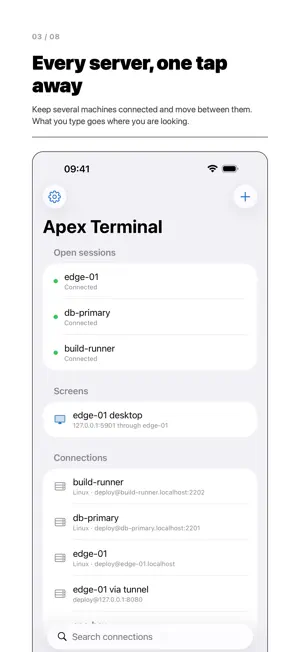
Apex Terminal is an SSH client for iPhone and iPad. It opens a real interactive session on a server you already own, allocates a real PTY, and draws what comes back with its own terminal emulator. Commands run on your own remote machines. There is no account to create, no back end operated by us, and nothing to buy. ONE CONNECTION, NOT FOUR Open a shell, a file browser, a remote desktop and a port forward on the same server and you pay for one TCP connection, one key exchange, one authentication and one biometric prompt. They are channels on a single pooled SSH transport — not four separate logins. A TERMINAL, NOT AN APPROXIMATION • 24-bit true colour and 256 colours, both SGR spellings • The alternate screen, so quitting vim or less leaves your shell exactly as it was • Sixel graphics — gnuplot and img2sixel put real pictures on the screen • Mouse reporting in all three modes, with modifiers, wheel and drag • Correct cell widths for CJK, emoji and combining marks, from the Unicode tables • Reflow on width change, scrollback with block selection, and search across all of it • OSC 7, OSC 52 and OSC 133 — working directory, clipboard and shell integration • Any monospaced font on your device, with your own size and line height FILES, WITHOUT A SECOND APP Browse your server over SFTP on the same SSH connection. Upload, download, rename, make folders, set permissions. Open several remote folders at once — the same server twice, or two servers side by side on an iPad. Publish a connection to the Files app and reach it from anywhere in iOS. TUNNELS YOU CAN SEE Local, remote and dynamic (SOCKS5) forwarding. Rules are saved with a connection and start with it, and each one shows bytes out, bytes in, connections open now and connections carried in total. A forward that cannot start says why, and names the port. TMUX, SPOKEN PROPERLY Apex Terminal speaks tmux's own control protocol, so tmux is something it drives rather than text it scrapes. Turn on "Attach to tmux" and opening a connection puts you inside a named session. Detach, put the iPad down, attach again — the windows, the panes and their output are still there. THE DESKTOP, TOO A remote screen over VNC, in the same app, reached through the same SSH connection — so nothing needs to be exposed to the internet. Touch to click, a key row for the keys a touch keyboard lacks, and your clipboard sent across. KEYS THAT STAY WHERE YOU PUT THEM Generate an Ed25519 or ECDSA P-256 key on the device. Or generate one inside the Secure Enclave: the private half is created in dedicated hardware, never exists outside it, and cannot be exported, backed up or moved — and it still logs in to an ordinary OpenSSH server. Keys you already have import, passphrase and all. The first time you reach a server, its fingerprint is put in front of you. If a known key later changes, that is a hard stop, not a shrug. If your organisation signs host keys, trust the authority once instead. Also: OpenSSH user and host certificates, ProxyJump through a bastion, agent forwarding with the device as the agent, servers with PAM or a one-time-code prompt, and post-quantum hybrid key exchange where a server offers it. BUILT FOR IPAD Split a pane and watch a log while you work; each pane is a full session with its own controls. Open a session in a second window. A hardware keyboard reaches new connection, the command palette, next and previous session, session by number, close, and font size — and Command is never forwarded to the remote host. QUIET BY DEFAULT No analytics, no telemetry, no crash reporter, no advertising identifier, no third-party SDK of that kind. Command history is off until you turn it on. Copied text expires from the clipboard. A program on the server can write your clipboard only if you allow it, and can never read it. The app itself can be locked with a passcode of its own. Requires iOS or iPadOS 17.0 or later. You supply the servers; the app connects to them.
App privacy
The developer, 彦霈 李, reported these privacy practices to Apple.
Data Not Collected
The developer does not collect any data from this app.
Alternatives to Apex Terminal
Looking for apps like Apex Terminal? Here are 6 similar apps on the App Store. The highest rated is LED Banner - Marquee Scroller (5.0/5), and all 6 are free to download.
-
 Chameleon GO
-
 LED Banner - Marquee Scroller
5.0
-
 懂你PRO
-
 Network APIs
5.0
-
 Hotspot Connect
-
 iTerm2 Buddy
2.8
| App | Rating | Price | Last updated | Compare |
|---|---|---|---|---|
| Apex Terminal | – | Free | September 13, 2026 | |
| Chameleon GO | – | Free | Oct 23, 2026 | Compare |
| LED Banner - Marquee Scroller | 5.0 / 5 (2) | Free | Aug 11, 2026 | Compare |
| 懂你PRO | – | Free | Aug 20, 2026 | Compare |
| Network APIs | 5.0 / 5 (1) | Free | Sep 22, 2026 | Compare |
| Hotspot Connect | – | Free | Jun 16, 2025 | Compare |
| iTerm2 Buddy | 2.8 / 5 (6) | Free | Oct 16, 2026 | Compare |
Compare Apex Terminal with the top alternatives: ratings, updates, ASO score and keyword gaps →