

Calcanto - Talking Calculator
Beijing CloudWest Technology Co., Ltd. Utilities iPhoneiPadiPod touchMac
Calcanto - Talking Calculator is a free Utilities app for iPhone and iPad by Beijing CloudWest Technology Co., Ltd. Requires iOS 17.0.
- Price
- Free
- on the App Store
- Size
- 18 MB
- Age 4+
- Updated
- Oct 20
- 2026 · v1.0.2
Screenshots


About Calcanto - Talking Calculator
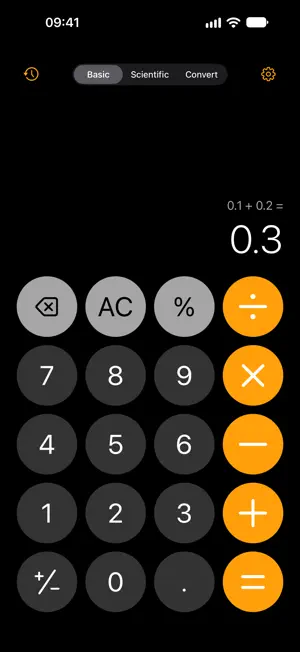
Calcanto is a calculator that says its results out loud, changes its look, and gets the arithmetic right. 0.1 + 0.2 = 0.3 The basic engine works in Decimal rather than binary floating point, so that sum comes out as 0.3 and not 0.30000000000000004. Results carry 15 significant digits, rounded half-up. IT SPEAKS, IN TWO LANGUAGES A female and a male voice. Each language reads a number the way that language does: 120 is "one hundred twenty" in English and 一百二十 in Chinese, never a digit-by-digit spell-out. Keys are announced as you press them and the whole result is read at the end. Every clip ships inside the app and is stitched together on the device, so the readout works in Airplane mode with nothing sent anywhere. Press = and a string is plucked. Each theme has its own pluck, and it is a separate switch from the spoken readout — turn narration off and the pluck is still there. FIVE THEMES, SWITCHED WHILE YOU WATCH Onyx, Seaglass, Bubblegum, Titanium and Neon Noir. All five are in the app. None is behind a purchase and there is no theme store to visit. Changing the theme changes the sound of = with it. THREE MODES Basic — four operations, percent, sign, decimal point, backspace, clear. Multiplication binds before addition, and pressing = again repeats the last operation. Scientific — sin, cos, tan and their inverses, the hyperbolic set and theirs, ln, log₁₀, x^y and the y-th root, x², x³, √, ³√, x!, 1/x, e^x, 10^x, EE, Rand, π, e, parentheses, mc / m+ / m− / mr, 2nd, and a Rad / Deg switch. Convert — five categories. Currency covers nine: USD, CNY, EUR, JPY, GBP, HKD, KRW, AUD and CAD, on live rates labelled with when they were fetched. Length, weight, temperature and area never need a network at all. HISTORY YOU CAN PUT BACK Expression, result, time and mode are all kept. Tap an entry and it drops straight back into the input. Delete one, or clear the lot. ACCESSIBILITY, NOT AN ACCESSIBILITY MODE Every key carries a VoiceOver label written to be heard rather than read: "+" is announced as "plus", and a toggled key says which way it is currently set. Dynamic Type scales the display and the keypad as far as a fixed grid can take them, while Settings, History and the sheets keep the full range. When a key fills with its theme's accent colour, the label colour is re-picked at runtime so it stays readable. ENGLISH AND CHINESE, SWITCHED INSIDE THE APP Settings → Language applies at once, with no restart. It is independent of the system language, and independent of which language the readout speaks — an English interface reading its results in Chinese is a legitimate combination. WHAT IT DOES NOT DO No account, no sign-in, no ads, no subscription, no analytics or advertising SDK — there is no third-party SDK in it at all. History, theme and voice settings stay on your device and sync nowhere. The app makes exactly one kind of network request, for exchange rates; never open Convert and it never goes online. Free, with no in-app purchase. iOS and iPadOS 17 or later, macOS 14 or later — one download covers all three.
What’s new
Version 1.0.2 · Updated October 20, 2026
Calcanto 1.0.2 is about VoiceOver. • Press equals and hear the answer. VoiceOver now announces the result, so you no longer have to move focus to the display to find out what it was. • One voice at a time. While VoiceOver is running, the app's own spoken readout stays out of the way entirely — no more hearing every key twice. • Keys sound like keys. Focusing one says "seven" rather than "seven, button", and double-tapping it no longer repeats the name on the way through. • Turning VoiceOver on or off takes effect straight away, without relaunching. • On iOS 17, large results show their thousands separators again — 1,000,000,000,000 rather than 1000000000000. The two earcons still play, so a key that was refused still sounds different from one that didn't register.
App privacy
The developer, Beijing CloudWest Technology Co., Ltd., reported these privacy practices to Apple.
Data Not Collected
The developer does not collect any data from this app.
Alternatives to Calcanto - Talking Calculator
Looking for apps like Calcanto - Talking Calculator? Here are 6 similar apps on the App Store. The highest rated is Smile Tally - 随口算·生活计算器、商品比价对比 (5.0/5), and 5 of the 6 are free to download.
-
 Control System Calc
-
 ChanceKit - Random Picker
-
 Smile Tally - 随口算·生活计算器、商品比价对比
5.0
Smile Tally - 随口算·生活计算器、商品比价对比
5.0
-
 Voice Calculator - Just Speak
-
 Calculator + Formula & History
-
 SmartScrollCapture
5.0
SmartScrollCapture
5.0
| App | Rating | Price | Last updated | Compare |
|---|---|---|---|---|
| Calcanto - Talking Calculator | – | Free | October 20, 2026 | |
| Control System Calc | – | Free | Oct 25, 2026 | Compare |
| ChanceKit - Random Picker | – | Free | Oct 15, 2026 | Compare |
| Smile Tally - 随口算·生活计算器、商品比价对比 | 5.0 / 5 (3) | Free | Oct 5, 2026 | Compare |
| Voice Calculator - Just Speak | – | Free | Aug 8, 2026 | Compare |
| Calculator + Formula & History | – | Free | Sep 25, 2026 | Compare |
| SmartScrollCapture | 5.0 / 5 (1) | 1.99 USD | Aug 22, 2026 | Compare |