

Screen Time Next: App Limits
XIACHEN GUO Utilities iPhoneiPadiPod touch
Screen Time Next: App Limits is a free Utilities app for iPhone and iPad by XIACHEN GUO. Rated 5.0/5 from 1 ratings. Requires iOS 18.0.
- Rating
- 5.0
- 1 ratings
- Price
- Free
- on the App Store
- Size
- 7 MB
- Age 4+
- Updated
- Sep 16
- 2026 · v1.1
Screenshots

About Screen Time Next: App Limits
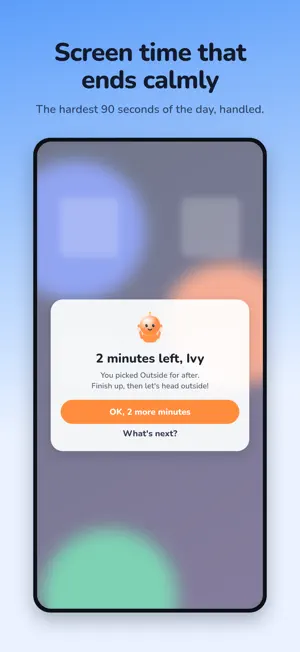
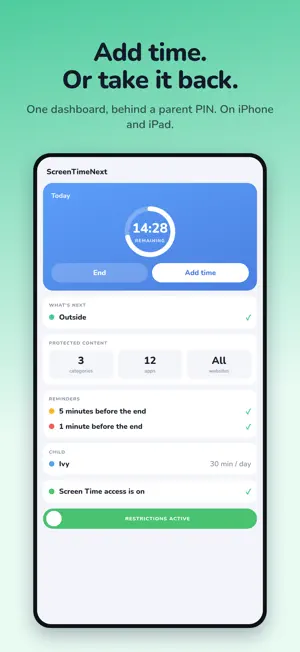
Screen time doesn't have to end in a fight. ScreenTimeNext gives that moment a countdown your child can see, a warning before the end, and a screen that asks one question: what are we doing next? Choosing is what closes the screen — so the ending has a destination, not just a stop. HOW IT WORKS 1. You pick what to limit. Apps, categories, or all web browsing — chosen with Apple's own Screen Time picker, so your child's app list never leaves their device. 2. You set the time. Start a session from the dashboard and a countdown begins, with a live timer on the Lock Screen and in the Dynamic Island. 3. A warning arrives before the end. Not a wall — a full-screen message inside the app they are using, telling them how long is left. 4. Your child chooses what's next. Family time, outside, free time, clean up, or a meal. Choosing is what closes the screen, so the ending has somewhere to go. FOR THE PARENT - One dashboard: how much time is left, what your child chose, and a tap to add or take back minutes - Add time when it's earned. Taking minutes back also shortens today's budget, so a longer session doesn't quietly become a longer day - Decide what's next yourself when the day calls for it, instead of asking - Add your own activities — piano, the dog walk, Nana's house - Slide to remove every restriction for the rest of the day — one deliberate gesture, never a stray tap - A parent PIN, with Face ID if you want it PRIVACY ScreenTimeNext uses Apple's Screen Time framework. Your child's app selections are handled by iOS as opaque tokens: the app cannot read which apps they are, and never stores, logs, or transmits them. There are no accounts, no servers, and no analytics. Nothing leaves the device. WHAT YOU NEED - Screen Time permission, granted once by a parent - ScreenTimeNext limits the device it is installed on ScreenTimeNext is not a monitoring tool. It doesn't report where your child goes or what they type. It does one thing: it makes the end of screen time predictable, and gives it somewhere to go.
What’s new
Version 1.1 · Updated September 16, 2026
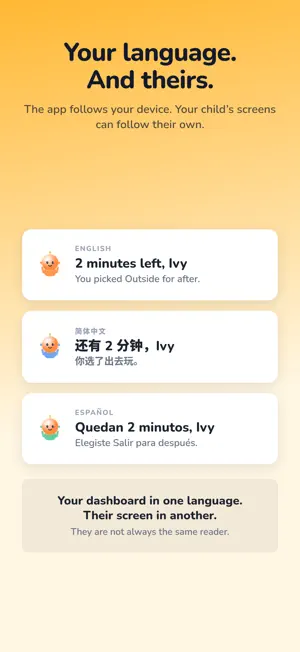
iPad, three languages, and a calmer last minute. - iPad — the whole app, laid out properly for a 13" screen, Split View included. - English, 中文 and Español, following your device. - Your child's timer and transition screen can be set to their own language, separately from yours. - Time spent reading the transition screen is given back, and the Dynamic Island now pauses with it instead of counting down behind the screen. - Choosing what's covered is one screen now: Apple's picker and web blocking in the same place. - "Block all web browsing" shows your child the transition screen instead of Safari's restricted page. - Start over hands the device back straight away, until the next timer begins.
App privacy
The developer, XIACHEN GUO, reported these privacy practices to Apple.
Data Not Collected
The developer does not collect any data from this app.
Alternatives to Screen Time Next: App Limits
Looking for apps like Screen Time Next: App Limits? Here are 6 similar apps on the App Store. The highest rated is GT Alarm - Weekday Alarm Clock (5.0/5), and 5 of the 6 are free to download.
-
 GT Alarm - Weekday Alarm Clock
5.0
GT Alarm - Weekday Alarm Clock
5.0
-
 Airwheel.PT
-
 BlackBox Life Voice Recorder
3.9
BlackBox Life Voice Recorder
3.9
-
 DigitalCounter - Multi-Project
4.5
DigitalCounter - Multi-Project
4.5
-
 iRime输入法-小鹤双拼五笔郑码输入法
4.0
iRime输入法-小鹤双拼五笔郑码输入法
4.0
-
 Unee - Your first AI bestie
3.9
Unee - Your first AI bestie
3.9
| App | Rating | Price | Last updated | Compare |
|---|---|---|---|---|
| Screen Time Next: App Limits | 5.0 / 5 (1 rating) | Free | September 16, 2026 | |
| GT Alarm - Weekday Alarm Clock | 5.0 / 5 (1) | Free | Jan 8, 2026 | Compare |
| Airwheel.PT | – | Free | Feb 9, 2026 | Compare |
| BlackBox Life Voice Recorder | 3.9 / 5 (12) | Free | Oct 17, 2026 | Compare |
| DigitalCounter - Multi-Project | 4.6 / 5 (20) | Free | Aug 10, 2026 | Compare |
| iRime输入法-小鹤双拼五笔郑码输入法 | 4.0 / 5 (153) | 0.99 USD | Oct 30, 2023 | Compare |
| Unee - Your first AI bestie | 3.9 / 5 (14) | Free | Aug 31, 2026 | Compare |