

360Design: AI Interior Planner
Martin Lorer Lifestyle iPhoneiPadiPod touch
360Design: AI Interior Planner is a free Lifestyle app for iPhone and iPad by Martin Lorer. Requires iOS 17.0. Updated October 27, 2026.
- Price
- Free
- on the App Store
- Size
- 35 MB
- Age 4+
- Updated
- Oct 27
- 2026 · v1.1
Screenshots


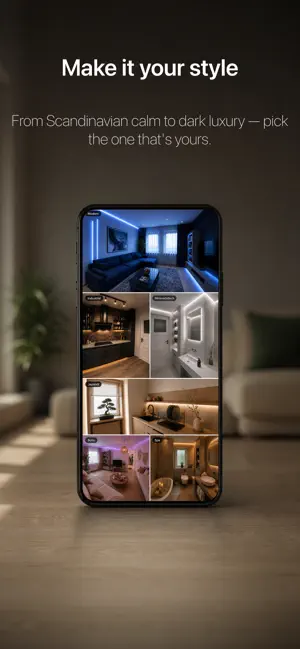
About 360Design: AI Interior Planner
A photo shows one wall. Your room has four. Most room designers work from a flat picture: one angle, one corner, and a guess about everything outside the frame. The wall behind you never existed. The floor stops where the photo stopped. 360Design sees the whole room. You turn once with your phone, and the app takes in all of it at the same time - every wall, the floor, the ceiling, the corner you were standing in. Then it designs that entire space as one coherent room, not one flattering rectangle. And you get it back the same way. The finished design is not an image. It is a room you stand in the middle of and look around: behind you, up, into the corner where the radiator sits. THREE MODES The other reason a flat photo falls short: it only ever answers one question. A whole room lets you ask three. UPGRADE - Swap and add furniture. The room stays what it is. The pieces in it get better ones — a new sofa, proper lighting, the shelf that was missing. Walls and floor untouched. RENOVATE - Walls, floor and textiles. Your furniture stays exactly where it is. Everything around it changes: new flooring, repainted walls, a different splashback, other curtains. The room you know, in better condition. FULL REDESIGN - Everything out, everything new. The room is emptied and furnished from scratch. Same walls, same windows, same light — nothing else survives. Three genuinely different questions, and you pick the one you are actually asking. Not a slider between "a bit different" and "unrecognisable". IT SEES EVERYTHING IN THE ROOM Because it takes in the whole space, the app finds everything in it - not just what happened to face the camera. Your L-shaped sofa, the open pine shelving behind you, the radiator under the window, the tiles behind the sink. For every single piece it works out what could replace it, what could simply be refinished, what is missing, and what the room would be better off without. Ten pieces, three concrete alternatives each, materials and colours named. PLAN AT YOUR OWN PACE Nothing happens until you say so. Tick the new sofa, leave the floor alone, add the lighting, throw out the clutter - then change your mind and untick it. Every suggestion is its own decision, nothing is bundled. When you are ready, the design renders while you do something else. Close the app, come back later, it is waiting. PRIVACY Your room photos belong to you. They are stored under your own account and are never shown to other users - there is no feed, no gallery, no sharing between people. You can delete your account and everything in it from inside the app at any time. DEVICE 360Design needs an iPhone with an ultra-wide lens - the sweep is built from it. That means iPhone 11 and later, with four exceptions: iPhone SE, iPhone Air, iPhone 16e and iPhone 17e have a single rear camera. On those, the app says so on the first screen rather than let you pay for something your phone cannot do. Subscription required for full access. Pricing shown in the app. Privacy Policy: https://checkered-provelone-ca3.notion.site/Privacy-Policy-360Design-3d47311cc41380d3bcf5f142c66171b3 Terms of use: https://checkered-provelone-ca3.notion.site/TERMS-OF-USE-360Design-3d47311cc413807eb908e202c95b9234 EULA: https://www.apple.com/legal/internet-services/itunes/dev/stdeula/
What’s new
Version 1.1 · Updated October 27, 2026
bugfixes and improvements
App privacy
The developer, Martin Lorer, reported these privacy practices to Apple.
Data Used to Track You
The following data may be used to track you across apps and websites owned by other companies:
- Purchases: Purchase History
- Identifiers: Device ID
Data Linked to You
The following data, which may be collected and linked to your identity, may be used for the following purposes:
- Purchases: Purchase History
- Identifiers: Device ID, User ID
- Usage Data: Product Interaction, Other Usage Data
- Contact Info: Name
- User Content: Photos or Videos
Used for: Third-Party Advertising, Analytics, App Functionality
Alternatives to 360Design: AI Interior Planner
Looking for apps like 360Design: AI Interior Planner? Here are 6 similar apps on the App Store. The highest rated is Jar of Words (5.0/5), and all 6 are free to download.
-
 Oshi Clock: Flip Photo Widget
-
 Jar of Words
5.0
-
 Baby Monitor TEDDY-baby camera
4.4
-
 Hairu: AI Hairstyle Try On
4.4
-
 Bello: Nightlife & Friends
4.6
-
 Amber: Student Housing & Apt
4.7
| App | Rating | Price | Last updated | Compare |
|---|---|---|---|---|
| 360Design: AI Interior Planner | – | Free | October 27, 2026 | |
| Oshi Clock: Flip Photo Widget | – | Free | Oct 18, 2026 | Compare |
| Jar of Words | 5.0 / 5 (1) | Free | Oct 16, 2026 | Compare |
| Baby Monitor TEDDY-baby camera | 4.4 / 5 (761) | Free | Jul 15, 2025 | Compare |
| Hairu: AI Hairstyle Try On | 4.4 / 5 (300) | Free | Oct 7, 2026 | Compare |
| Bello: Nightlife & Friends | 4.6 / 5 (86) | Free | Sep 30, 2026 | Compare |
| Amber: Student Housing & Apt | 4.7 / 5 (62) | Free | Oct 23, 2026 | Compare |