

GPS Camera: Photo Location&Map
Vu Nhung Utilities iPhoneiPadiPod touch
GPS Camera: Photo Location&Map is a free Utilities app for iPhone and iPad by Vu Nhung. Requires iOS 15.6. Updated October 9, 2026.
- Price
- Free
- on the App Store
- Size
- 96 MB
- Age 4+
- Updated
- Oct 9
- 2026 · v2.0
Screenshots
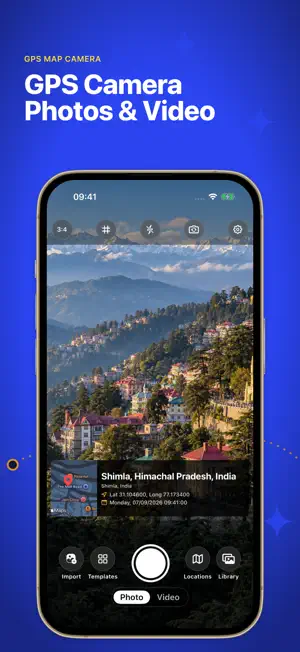
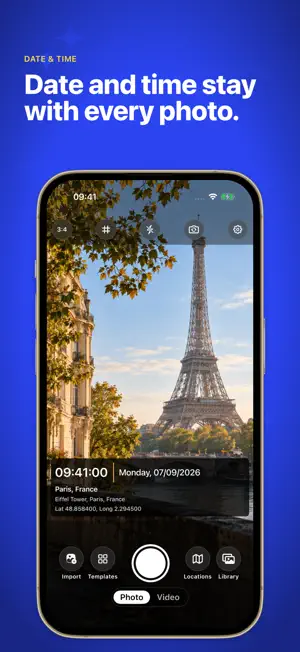

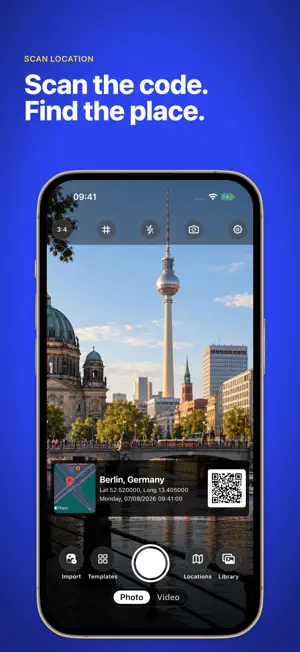
About GPS Camera: Photo Location&Map
Give every photo a place, a time, and a story. GPS Camera turns photos and videos into easy-to-share visual records. Add a visible location stamp with a map, address, GPS coordinates, date, and time—so the details stay in view when you save or share. From construction progress and property visits to deliveries and travel memories, capture the scene and the context together. CAPTURE PHOTOS AND VIDEOS WITH CONTEXT • Add location and timestamp details directly to your photos and videos. • Include a map, address, latitude, and longitude. • Show altitude, compass direction, or GPS accuracy when available. • Check the camera’s location status before you capture. MAKE THE STAMP YOURS Choose a built-in layout and decide which details to show. Add a title, note, or your own logo to give each image useful context. Use your current location or select a custom location for the stamp. KEEP WORK AND MEMORIES ORGANIZED Create named albums for jobs, properties, trips, or site visits. Choose an album for new photos, move existing photos between albums, and share selected album photos together. Save stamped media to Photos or share through your favorite apps. ADD STAMPS TO EXISTING MEDIA Import photos and videos from your library to add a visible stamp. With Premium batch photo stamping, process multiple photos in one workflow. Batch import reads each photo’s original capture date and GPS location when available, and lets you review missing details before saving. BUILT FOR EVERYDAY FIELDWORK • Construction teams documenting progress • Real estate professionals recording property visits • Inspectors and technicians keeping visual records • Delivery teams documenting drop-offs • Travelers remembering places worth revisiting GO FURTHER WITH PREMIUM • Batch photo stamping • Save your own named stamp templates • Custom fonts and stamp colors • Remove the app watermark while keeping your GPS stamp • An ad-free experience Start with the free tools, then upgrade when you need more customization or batch stamping. Location details depend on device permissions and GPS availability. Custom locations and edited stamps are user-selected details, not independently verified proof of where or when media was captured. Terms of Use: https://docs.google.com/document/d/1yXN7IF2kSndEHeLd5RX19p207Vz910vIi15sj4WPq7Y Privacy Policy: https://docs.google.com/document/d/1Dyr29aFZiivgihOsZ3gXJl376HKeNrzx7vNzVhLG9bw Apple Standard EULA: https://www.apple.com/legal/internet-services/itunes/dev/stdeula/
What’s new
Version 2.0 · Updated October 9, 2026
- Update metadata - Bug fixes
App privacy
The developer, Vu Nhung, reported these privacy practices to Apple.
Data Not Linked to You
The following data, which may be collected but is not linked to your identity, may be used for the following purposes:
- Location: Coarse Location
- Identifiers: Device ID
- Usage Data: Advertising Data
- Diagnostics: Crash Data
Used for: Third-Party Advertising, App Functionality
Alternatives to GPS Camera: Photo Location&Map
Looking for apps like GPS Camera: Photo Location&Map? Here are 6 similar apps on the App Store. The highest rated is Water Eject: Clean Pro (4.5/5), and all 6 are free to download.
-
 Fish Identifier - FinFind
-
 Geomap
-
 Indurama Living
-
 Speed Chess Timer
1.0
Speed Chess Timer
1.0
-
 Fish Identifier - Fish ID
3.6
Fish Identifier - Fish ID
3.6
-
 Water Eject: Clean Pro
4.5
Water Eject: Clean Pro
4.5
| App | Rating | Price | Last updated | Compare |
|---|---|---|---|---|
| GPS Camera: Photo Location&Map | – | Free | October 9, 2026 | |
| Fish Identifier - FinFind | – | Free | Aug 30, 2025 | Compare |
| Geomap | – | Free | Aug 8, 2024 | Compare |
| Indurama Living | – | Free | Aug 31, 2026 | Compare |
| Speed Chess Timer | 1.0 / 5 (1) | Free | Oct 14, 2024 | Compare |
| Fish Identifier - Fish ID | 3.6 / 5 (44) | Free | Aug 6, 2024 | Compare |
| Water Eject: Clean Pro | 4.5 / 5 (92) | Free | Jul 9, 2026 | Compare |