

Keyu: Live Lecture Captions
JIACHENG GUO Education iPhoneiPadiPod touch
Keyu: Live Lecture Captions is a free Education app for iPhone and iPad by JIACHENG GUO. Rated 5.0/5 from 2 ratings. Requires iOS 26.0.
- Rating
- 5.0
- 2 ratings
- Price
- Free
- on the App Store
- Size
- 10 MB
- Age 4+
- Updated
- Sep 27
- 2026 · v1.1
Screenshots



About Keyu: Live Lecture Captions
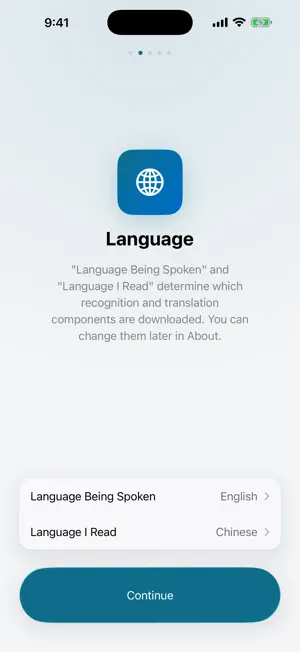
Keyu turns a lecture into live captions: what the teacher says appears on screen within seconds, each line followed by a translation. Recognition and translation run on the device through Apple's system frameworks, with no network round trip. Audience - Students in foreign-language lectures who need captions and translation - Attendees of international talks, seminars, and open courses - Anyone who wants bilingual notes of a class Workflow On first launch, a guided setup lets you choose languages, grant Microphone and Speech Recognition permissions, and download Apple's system recognition and translation components — the only step that requires a connection. After that, the app works offline. Tap the microphone button at the top right when class begins, and tap Stop when it ends. The session is saved automatically. Languages Recognition: English, Chinese (Mandarin and Cantonese), Japanese, Korean, Spanish, French, German, Italian, Portuguese. Translation: about 20 languages, following the device language by default. When both languages are the same, only the original captions are shown. Available languages depend on iOS. The interface is available in 14 languages. iPad Native support for full screen, Split View, Slide Over, and Stage Manager, with text size and layout adapted for the larger display. External keyboard shortcuts: ⌘R to start, ⌘P to pause or resume, ⌘. to stop. Display and after class Three text sizes; captions can show original and translation, original only, or translation only. Recording continues when you switch apps or lock the screen; the Lock Screen and Dynamic Island show elapsed time and the latest line, and you can pause and resume. Each class is saved automatically as a session you can search and review in bilingual full text. Long-press a line to copy or share it, or copy the full text. Export as TXT, SRT with timestamps, Markdown, or PDF. The audio recording stays on the device; it can be played in the app or exported as m4a. Privacy Recognition, translation, and recording all run on the device; core features rely on no server, and class content is not uploaded. The only network component is an optional, user-initiated diagnostic log upload, disclosed in the privacy policy. Caption text is included only in your encrypted iCloud system backup, if enabled. Limitations - Noise, distance, or strong accents may cause recognition errors; an orange status dot means sound is detected but temporarily not recognized - Requires iOS 26 or iPadOS 26 or later Support: [email protected]
What’s new
Version 1.1 · Updated September 27, 2026
- iPad: native full screen, Split View, Slide Over, and Stage Manager support; text size and layout adapted for larger displays; external keyboard shortcuts — ⌘R start, ⌘P pause or resume, ⌘. stop - Languages: the interface is now available in 14 languages; languages can be chosen during first-launch setup; the default translation language follows the device language - Display: three text sizes; switch between original and translation, original only, or translation only - Copy and share: long-press a line to copy or share it, or copy the full text; PDF export added, alongside TXT, SRT, and Markdown; recordings export as m4a - More: translation color is clearer and easier to read; captions return to the latest line after changing text size or display mode; exported files are named after the class; unsupported older devices get a clear notice; stability fixes
App privacy
The developer, JIACHENG GUO, reported these privacy practices to Apple.
Data Not Collected
The developer does not collect any data from this app.
Alternatives to Keyu: Live Lecture Captions
Looking for apps like Keyu: Live Lecture Captions? Here are 6 similar apps on the App Store. The highest rated is BufferMind - AI Translator (5.0/5), and all 6 are free to download.
-
 Verit AI
-
 Tatar-English Dictionary
-
 英语启蒙-儿童英语单词卡
4.0
-
 BufferMind - AI Translator
5.0
-
 OAB Mack
-
 KREA eLibrary
| App | Rating | Price | Last updated | Compare |
|---|---|---|---|---|
| Keyu: Live Lecture Captions | 5.0 / 5 (2 ratings) | Free | September 27, 2026 | |
| Verit AI | – | Free | Oct 19, 2026 | Compare |
| Tatar-English Dictionary | – | Free | Nov 29, 2023 | Compare |
| 英语启蒙-儿童英语单词卡 | 4.0 / 5 (1) | Free | Sep 15, 2025 | Compare |
| BufferMind - AI Translator | 5.0 / 5 (8) | Free | Oct 10, 2026 | Compare |
| OAB Mack | – | Free | Mar 17, 2024 | Compare |
| KREA eLibrary | – | Free | Aug 19, 2025 | Compare |