

QRiFile - QR File Transfer
Long Nguyen Duy Utilities iPhoneiPadiPod touch
QRiFile - QR File Transfer is a free Utilities app for iPhone and iPad by Long Nguyen Duy. Requires iOS 15.5. Updated October 20, 2026.
- Price
- Free
- on the App Store
- Size
- 52 MB
- Age 4+
- Updated
- Oct 20
- 2026 · v1.2.3
Screenshots


About QRiFile - QR File Transfer
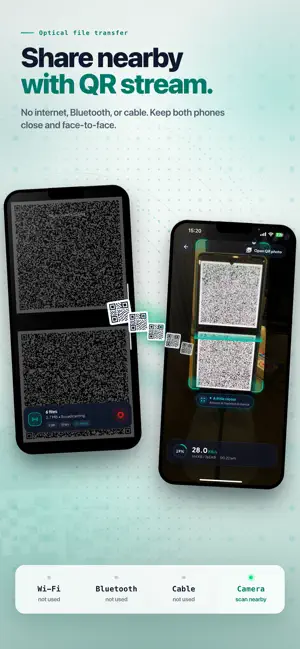
QRiFile is a simple way to send files between devices using QR codes. When two devices are close together, QRiFile can transfer data through an Optical File Transfer mode. The sending device turns the file into a fast QR stream on screen, and the receiving device reads it with the camera. No internet connection, Bluetooth pairing, or cable is required. When the file is larger, or when the receiver is not nearby, QRiFile can use server transfer. The file is uploaded temporarily, and the app creates a QR code that the receiver can scan to download it. What you can send: - Photos - Videos - Text notes - Clipboard content - PDF files - Documents - ZIP files - Other common file types Nearby Optical File Transfer (Offline Stream): - Works without internet - Does not require Bluetooth - Does not need a cable - Uses the screen and camera only - Best when both devices are close and facing each other - Useful for quick offline sharing Server Transfer: - Better for larger files - Works when devices are not near each other - Creates a QR code for the receiver - Supports faster upload and download for large transfers - Lets you choose how long the file stays available - Can delete the file automatically after download Privacy and control: - Optional password protection for server transfers - Temporary file availability - Optional auto-delete after the receiver downloads - No public file directory or searchable shared files - Files are accessed only through the generated QR code QRiFile is designed for everyday file sharing across iPhone, iPad, and Android devices. It gives you two practical ways to send data: optical QR streaming when people are nearby, and temporary server transfer when distance or file size matters.
What’s new
Version 1.2.3 · Updated October 20, 2026
Improvements and bug fixes.
App privacy
The developer, Long Nguyen Duy, reported these privacy practices to Apple.
Data Used to Track You
The following data may be used to track you across apps and websites owned by other companies:
- Identifiers: Device ID
Data Linked to You
The following data, which may be collected and linked to your identity, may be used for the following purposes:
- Identifiers: Device ID
Used for: Third-Party Advertising, Analytics
Data Not Linked to You
The following data, which may be collected but is not linked to your identity, may be used for the following purposes:
- Usage Data: Advertising Data, Product Interaction
- Diagnostics: Crash Data
- User Content: Photos or Videos, Other User Content
Used for: Third-Party Advertising, Analytics, App Functionality
Alternatives to QRiFile - QR File Transfer
Looking for apps like QRiFile - QR File Transfer? Here are 6 similar apps on the App Store. The highest rated is Keyboard Extension - SnipKey (4.9/5), and all 6 are free to download.
-
 Duet — Offline File Transfer
-
 QR Offline - Lite
-
 Video-QR Studio
-
 NFC Tool: Tag Reader & Writer
-
 Keyboard Extension - SnipKey
4.9
-
 Card Centering Tool - CCT
3.7
| App | Rating | Price | Last updated | Compare |
|---|---|---|---|---|
| QRiFile - QR File Transfer | – | Free | October 20, 2026 | |
| Duet — Offline File Transfer | – | Free | Jun 18, 2026 | Compare |
| QR Offline - Lite | – | Free | Aug 3, 2026 | Compare |
| Video-QR Studio | – | Free | Mar 30, 2026 | Compare |
| NFC Tool: Tag Reader & Writer | – | Free | Sep 9, 2026 | Compare |
| Keyboard Extension - SnipKey | 4.9 / 5 (31) | Free | Oct 20, 2026 | Compare |
| Card Centering Tool - CCT | 3.7 / 5 (3) | Free | Dec 20, 2025 | Compare |