

minulo: Block Reels & Shorts
ayumu kitabayashi Productivity iPhoneiPadiPod touch
minulo: Block Reels & Shorts is a free Productivity app for iPhone and iPad by ayumu kitabayashi. Requires iOS 16.4. Updated October 14, 2026.
- Price
- Free
- on the App Store
- Size
- 57 MB
- Age 4+
- Updated
- Oct 14
- 2026 · v1.0.11
Screenshots


About minulo: Block Reels & Shorts
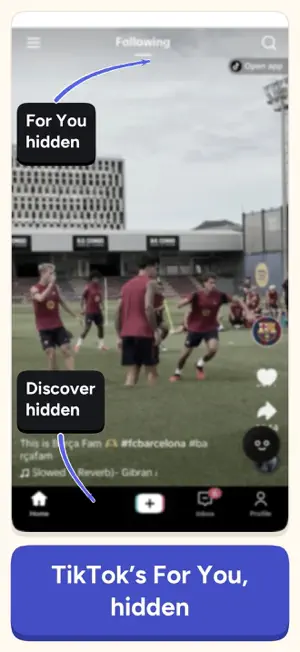
minulo is an iPhone app that hides Instagram Reels, YouTube Shorts and suggested posts while your DMs and friends' posts keep working. It covers 10 social networks, and hiding is free. Keep social media. Leave the endless scroll behind. The core features that hide suggested posts, Reels, and Shorts are completely free. Your DMs, your friends’ posts, and your own posts remain available. You cannot simply quit social media when you need it for work, communication, and sharing. minulo keeps social media available while hiding only the content pushed at you. 【WHAT YOU CAN HIDE】 ・ Reels ・ Shorts ・ Recommended videos ・ Algorithmically suggested posts ・ Explore tabs 【WHAT YOU CAN KEEP】 ・ DMs ・ Friends’ posts ・ Your own posts ・ Replies ・ Profiles you choose to visit ・ In-app notification tabs ※ Search may also be hidden on some services. 【VIDEOS SENT TO YOU STOP BEFORE THE ENDLESS SCROLL】 When you try to open a Reel or Short sent through a DM, minulo pauses before you enter the vertical video stream. When you really want to watch it, select “Open for 5 minutes.” After five minutes, blocking turns back on automatically. This prevents one quick video from turning into 30 minutes of scrolling. 【HOW IT WORKS】 Just open the social media service you want to use inside minulo. You can use it with Reels, Shorts, and suggested posts already hidden. After checking a DM, you are less likely to be pulled straight into an endless video stream. 【SUPPORTED SERVICES】 ・ Instagram ・ YouTube ・ TikTok ・ X ・ Threads ・ Facebook ・ Reddit ・ Snapchat ・ Pinterest ・ LinkedIn 【SWITCH BETWEEN ACCOUNTS】 Add your Instagram, X, TikTok and other accounts inside minulo and switch between them. Sign-ins stay only on this iPhone, and minulo never stores your password. 【YOU CAN BLOCK THE OFFICIAL APPS TOO】 Grant Screen Time access, and minulo will block the official social media apps you select when you try to open them from your iPhone Home Screen. It will then guide you to open the service through minulo instead. This prevents you from hiding the feed in minulo, only to open the official app out of habit. 【LOCKED MODE PREVENTS IMPULSIVE CHANGES】 When Locked Mode is enabled, you cannot immediately change the following settings: ・ Turn off blocking ・ Switch hiding rules ・ Change your schedules To unlock the settings, you must complete four steps: ・ Choose why you want to unlock ・ Solve mental math problems ・ Tap the color of a word, not the word itself ・ Wait for 60 seconds The goal is not to make unlocking unnecessarily difficult. It is designed to create a moment to think between the impulse and the action. 【WHAT YOU CAN DO FOR FREE】 ・ Hide Reels ・ Hide Shorts ・ Hide suggested posts ・ Choose individual items to hide ・ Add the social media services you use ・ View DMs and regular posts ・ Block official social media apps (up to 2 hours at a time, as often as you like) ・ Track the times you chose not to open an app ・ Track your social media usage time 【WHAT PRO ADDS】 ・ Switch automatically by day of the week ・ Switch automatically by time of day ・ Schedule templates such as Night (11 PM–7 AM) ・ Use Locked Mode ・ Blocks longer than 2 hours ・ Block social media completely (it won’t open inside minulo either) ・ Create and save multiple block lists 【PRIVACY FIRST】 You sign in through the official login page provided by each social media service. minulo does not collect or store your social media IDs or passwords. Blocking official social media apps uses Apple’s Screen Time framework. Information about the apps you select is protected by Apple’s system. As a result, minulo’s developers cannot see which apps you have selected. Spend your time on what you choose. Terms of Use (EULA): https://www.apple.com/legal/internet-services/itunes/dev/stdeula/ Privacy Policy: https://minulo.app/privacy.html
What’s new
Version 1.0.11 · Updated October 14, 2026
Fixed an issue where an official app could stay blocked after the block time ended. Added "Remove all blocks" under Block in Settings, so you can remove every block at once if something goes wrong.
App privacy
The developer, ayumu kitabayashi, reported these privacy practices to Apple.
Data Not Linked to You
The following data, which may be collected but is not linked to your identity, may be used for the following purposes:
- Purchases: Purchase History
- Identifiers: Device ID
- Usage Data: Product Interaction, Advertising Data
- Diagnostics: Crash Data, Other Diagnostic Data
- Other Data: Other Data Types
Used for: Analytics
Alternatives to minulo: Block Reels & Shorts
Looking for apps like minulo: Block Reels & Shorts? Here are 6 similar apps on the App Store. The highest rated is Intent: Block Reels & Shorts (5.0/5), and all 6 are free to download.
-
 Slowth: Short Video Blocker
3.7
Slowth: Short Video Blocker
3.7
-
 Stillfeed: Block Reels&Shorts
-
 Intent: Block Reels & Shorts
5.0
Intent: Block Reels & Shorts
5.0
-
 Block Reels & Shorts: Curfew
-
 Block Reels & Shorts: Reelmute
-
 Slowcial: Bloque Reels, Shorts
| App | Rating | Price | Last updated | Compare |
|---|---|---|---|---|
| minulo: Block Reels & Shorts | – | Free | October 14, 2026 | |
| Slowth: Short Video Blocker | 3.7 / 5 (3) | Free | Oct 8, 2026 | Compare |
| Stillfeed: Block Reels&Shorts | – | Free | Oct 12, 2026 | Compare |
| Intent: Block Reels & Shorts | 5.0 / 5 (1) | Free | Sep 8, 2026 | Compare |
| Block Reels & Shorts: Curfew | – | Free | Oct 7, 2026 | Compare |
| Block Reels & Shorts: Reelmute | – | Free | Oct 19, 2026 | Compare |
| Slowcial: Bloque Reels, Shorts | – | Free | Oct 12, 2026 | Compare |