

Bible Reading Plan: Pace
Jinwan Kim Reference iPhoneiPadiPod touch
Bible Reading Plan: Pace is a free Reference app for iPhone and iPad by Jinwan Kim. Requires iOS 17.0. Updated September 10, 2026.
- Price
- Free
- on the App Store
- Size
- 5 MB
- Age 4+
- Updated
- Sep 10
- 2026 · v1.0
Screenshots
About Bible Reading Plan: Pace
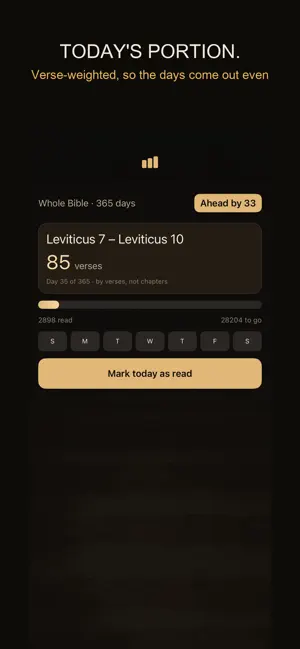
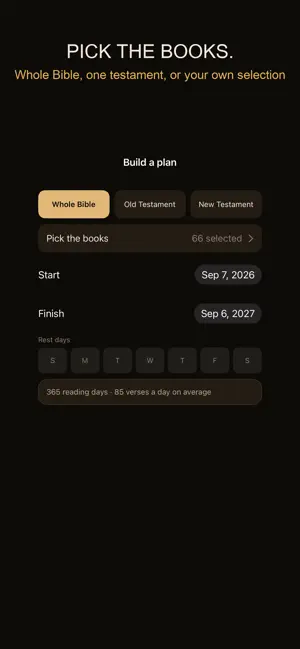
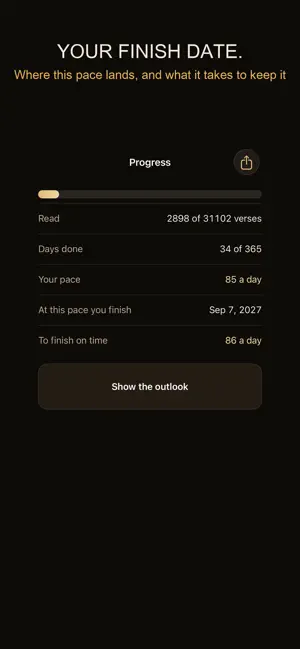
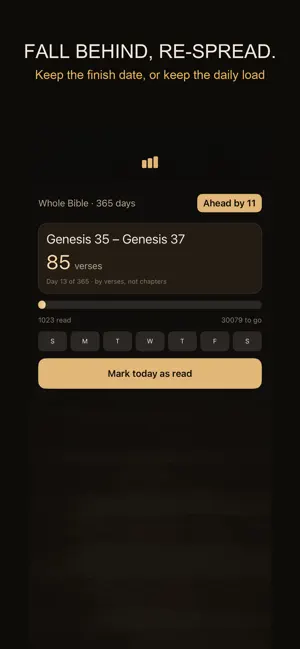
Most reading plans hand you someone else's schedule. This one starts from what you want to read and when you want to be done. Pick the books — the whole Bible, one testament, or a selection you make yourself — set a start and a finish date, mark the days you do not read, and the plan follows. Pick the books. All 66, the Old Testament, the New Testament, or a grid where you tap the ones you want. Sixteen books for a season, or four gospels over Lent. The plan is rebuilt the moment you change the selection. By verses, not chapters. Psalms has 150 chapters and 2,461 verses. Obadiah has one chapter and 21. A plan that counts chapters gives you a twenty minute day and a two minute day and calls them equal. This one is verse-weighted, so the days come out even. Your finish date is a date, not a guess. Rest days come out of the real calendar and leap years get their extra day. The target after any day is cumulative, so rounding never leaves the total short — the last day lands exactly on the last verse. Fall behind, and you choose how to re-spread. Keep the finish date and read a little more each day, or keep the daily load and finish later. Both are shown with the numbers before you pick. Missing days is not treated as a failure and nothing is taken away from you for it. It carries no Bible text, only the structure of 66 books. There is no translation inside this app, no recorded reading, and no devotional writing. It works from the structure alone — 66 books, 1,189 chapters, 31,102 verses — and tells you which chapters and verses today's portion covers. You read them in whatever Bible you already use, on paper or in the app you already have. Share your progress as a card. The plan lives on this phone and nowhere else. There is no server behind it, so there is no sign-up, no password to lose, and no reason for the app to ask you for anything. Airplane mode changes nothing except that the optional ad stops loading. Languages: English, 한국어, 日本語, 繁體中文, Deutsch, Français, Español
App privacy
The developer, Jinwan Kim, reported these privacy practices to Apple.
Data Not Linked to You
The following data, which may be collected but is not linked to your identity, may be used for the following purposes:
- Location: Coarse Location
- Identifiers: Device ID
- Usage Data: Advertising Data
Used for: Third-Party Advertising
Alternatives to Bible Reading Plan: Pace
Looking for apps like Bible Reading Plan: Pace? Here are 6 similar apps on the App Store. The highest rated is VerseKeeper: Scripture Memory (5.0/5), and all 6 are free to download.
-
 Selah: Daily Prayer
-
 VerseKeeper: Scripture Memory
5.0
VerseKeeper: Scripture Memory
5.0
-
 eRetraite
-
 Bible365: Bible in a Year
5.0
Bible365: Bible in a Year
5.0
-
 原文新約
5.0
原文新約
5.0
-
 Ecolemedia Parent
| App | Rating | Price | Last updated | Compare |
|---|---|---|---|---|
| Bible Reading Plan: Pace | – | Free | September 10, 2026 | |
| Selah: Daily Prayer | – | Free | Sep 20, 2026 | Compare |
| VerseKeeper: Scripture Memory | 5.0 / 5 (5) | Free | Aug 29, 2026 | Compare |
| eRetraite | – | Free | Sep 14, 2026 | Compare |
| Bible365: Bible in a Year | 5.0 / 5 (5) | Free | Sep 23, 2026 | Compare |
| 原文新約 | 5.0 / 5 (1) | Free | Mar 27, 2026 | Compare |
| Ecolemedia Parent | – | Free | Oct 1, 2026 | Compare |