

Tracer: AR Tracing
Facundo De Lima Graphics & Design iPhoneiPadiPod touch
Tracer: AR Tracing is a free Graphics & Design app for iPhone and iPad by Facundo De Lima. Requires iOS 16.0. Updated September 12, 2026.
- Price
- Free
- on the App Store
- Size
- 1 MB
- Age 4+
- Updated
- Sep 12
- 2026 · v1.0
Screenshots
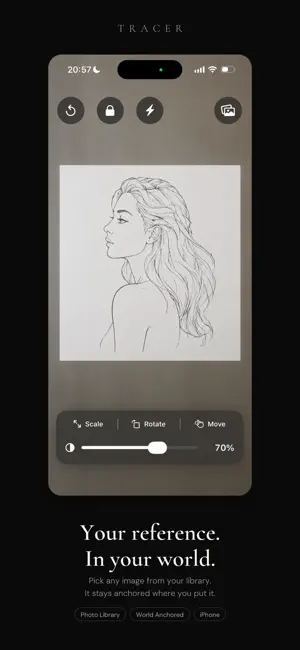
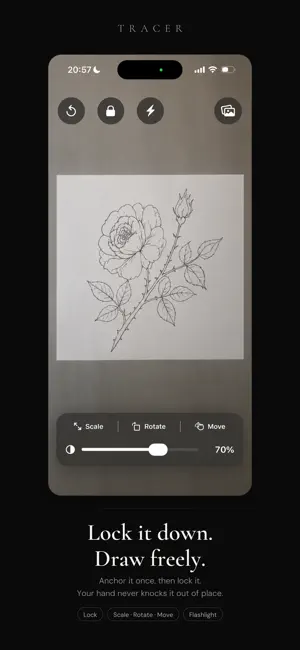
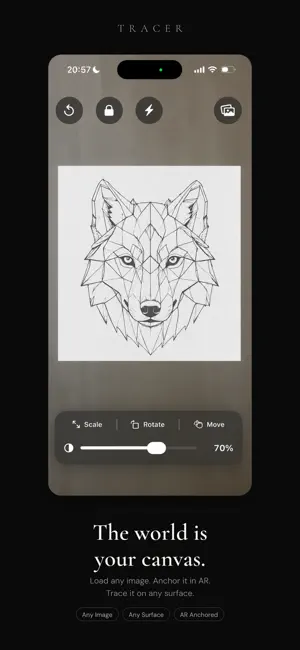
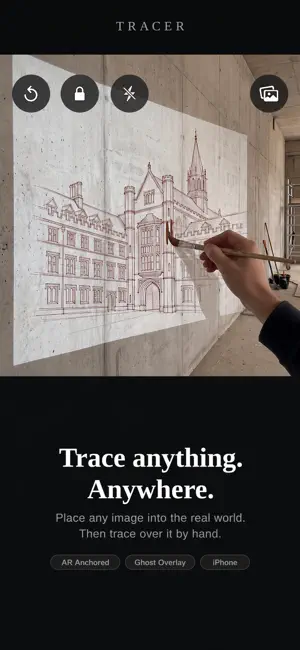
About Tracer: AR Tracing
Tracer turns your iPhone into a tracing tool. Pick any image, anchor it onto a real surface in augmented reality, and trace over it by hand — on paper, on canvas, or on a wall. No projector. No light box. No printing and taping. Your first 5 images are free. After that, Tracer unlocks with a Tracer Yearly subscription — $9.99/year, auto-renewing, cancel anytime in Settings. HOW IT WORKS Point your iPhone at the surface you want to draw on. Pick a reference image from your photos. Tap the surface to anchor it in place. The image stays locked to that exact spot in the real world while you draw. DIAL IN THE OPACITY Slide from barely-there to fully opaque. Keep it faint to check your proportions, or bring it up to follow every line. You see exactly what you're tracing, and exactly what you've already drawn. POSITION IT EXACTLY Pinch to scale, twist to rotate, drag to move. Once it's where you want it, lock it — your hand can rest on the phone without knocking the reference out of alignment. BUILT FOR LONG SESSIONS The screen stays awake while you trace, so it won't sleep mid-drawing. Close the app and come back later: Tracer remembers your reference, its position and your opacity setting, and puts everything back where you left it. Working in low light? There's a built-in flashlight. MADE FOR • Illustrators working from reference • Tattoo artists placing a stencil • Muralists scaling a design up to a wall • Lettering and calligraphy • Anyone learning to draw PRIVACY Tracer has no servers, no analytics, no accounts and no ads. The camera feed is processed on your device and never recorded. Your reference image never leaves your iPhone. Tracer doesn't even ask for photo library permission — it uses Apple's system picker, which hands over only the single image you choose. Requires an ARKit-capable iPhone running iOS 16 or later. Terms of Use: https://www.apple.com/legal/internet-services/itunes/dev/stdeula/ Privacy Policy: https://tracer-privacy.vercel.app
App privacy
The developer, Facundo De Lima, reported these privacy practices to Apple.
Data Not Collected
The developer does not collect any data from this app.
Alternatives to Tracer: AR Tracing
Looking for apps like Tracer: AR Tracing? Here are 6 similar apps on the App Store. The highest rated is Tracer: Trace Drawing Camera (4.6/5), and all 6 are free to download.
-
 Drawing Projector: AR Trace
2.0
Drawing Projector: AR Trace
2.0
-
 Draw AR - Trace & Sketch
4.4
Draw AR - Trace & Sketch
4.4
-
 Lightbox Trace: Draw on Paper
4.1
Lightbox Trace: Draw on Paper
4.1
-
 AR Drawing:Sketch & Trace app
4.5
AR Drawing:Sketch & Trace app
4.5
-
 Tracer: Trace Drawing Camera
4.6
Tracer: Trace Drawing Camera
4.6
-
 Light Tablet
4.5
Light Tablet
4.5
| App | Rating | Price | Last updated | Compare |
|---|---|---|---|---|
| Tracer: AR Tracing | – | Free | September 12, 2026 | |
| Drawing Projector: AR Trace | 2.0 / 5 (1) | Free | Sep 2, 2026 | Compare |
| Draw AR - Trace & Sketch | 4.4 / 5 (8) | Free | Oct 21, 2026 | Compare |
| Lightbox Trace: Draw on Paper | 4.1 / 5 (7) | Free | Sep 30, 2026 | Compare |
| AR Drawing:Sketch & Trace app | 4.5 / 5 (35) | Free | Oct 22, 2026 | Compare |
| Tracer: Trace Drawing Camera | 4.6 / 5 (111) | Free | Oct 26, 2026 | Compare |
| Light Tablet | 4.5 / 5 (2) | Free | Feb 12, 2025 | Compare |
Compare Tracer: AR Tracing with the top alternatives: ratings, updates, ASO score and keyword gaps →