

LockToDo - LockScreen Task
Yuya Matsushita Productivity iPhoneiPadiPod touch
LockToDo - LockScreen Task is a free Productivity app for iPhone and iPad by Yuya Matsushita. Requires iOS 16.4. Updated November 24, 2026.
- Price
- Free
- on the App Store
- Size
- 55 MB
- Age 4+
- Updated
- Nov 24
- 2026 · v1.1.0
Screenshots
Save to Pinterest
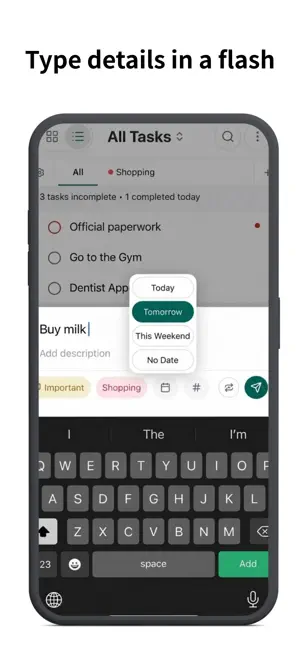

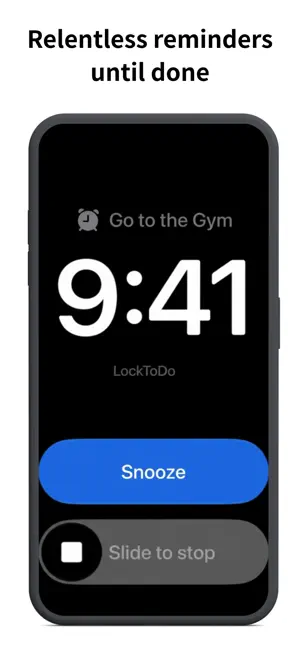
About LockToDo - LockScreen Task
“I’ll do it later”—and just like that, your tasks fade away into the depths of another app. LockToDo was built to put an end to "invisible tasks" by bringing your To-Do list directly to your lock screen. Without even opening the app, a quick glance at your lock screen lets you check today’s tasks and mark them complete on the spot. Never miss a thing, even if you usually overlook standard notifications. Our high-priority "Persistent Reminders" trigger a full-screen alert at the scheduled time, ensuring nothing slips through the cracks. 【Key Features】 ・Keep today’s tasks front and center with Lock Screen widgets, Live Activities, and Dynamic Island. Complete tasks without opening the app. ・"Persistent Reminders" (iOS 26+) deliver full-screen alerts at start times so critical tasks are never missed. ・Quick actions from notifications: Long-press to mark complete, snooze, or reschedule without launching the app. ・One-tap access from Lock Screen and Control Center (iOS 18+) widgets to add tasks, view your priority matrix, or open lists. ・Toggle seamlessly between a 4-quadrant priority matrix (Eisenhower Matrix) and a clean list view. ・Visual analytics including activity heatmaps and completion breakdowns by priority and list. ・Comprehensive task management with support for multiple lists, tags, templates, and recurring tasks (due-date or completion-date based). ・Batch operations to complete, move, or delete multiple tasks at once. ・Advanced search and filtering with customizable multi-condition rules. ・Frictionless UI designed to minimize taps, featuring swipe gestures and smart default settings. ・Full support for Dark Mode and 18 languages. ・Cross-device sync via Apple Account or Google Account (or start immediately without signing in via local mode). LockToDo is free to use, with ads. Pro removes ads and lets you export your tasks (JSON). Choose monthly, yearly, or a one-time purchase. Yearly and monthly plans renew automatically at the same price unless canceled at least 24 hours before the end of the current period. You can cancel in your App Store subscription settings. 【Recommended For】 ・Anyone looking to turn task management into a daily habit. ・Users who want to view and complete tasks right from the lock screen. ・People who tend to see a notification and immediately forget about it. ・Those who want to review their habits and productivity patterns through visual data. Free yourself from the cognitive load of trying to remember everything, and focus on what matters most. Let LockToDo empower your everyday productivity. Terms of Use (EULA): https://www.apple.com/legal/internet-services/itunes/dev/stdeula/ Privacy Policy: https://astonishing-airship-0de.notion.site/Privacy-Policy-3dc4226d62d680d99da4f75b34ea1999
What’s new
Version 1.1.0 · Updated November 24, 2026
• Everything now works offline: adding, completing, editing, deleting and more. Changes that couldn't be sent are marked Not sent and are saved automatically when you're back online. • Deleting a task, changing its repeat, priority or tags, and duplicating it can now be reversed with Undo at the bottom of the screen. • The long-press menu now starts with Select. The multi-select bar shows four actions plus More, and you can change their order with Edit this menu. • The Live Activity can now hide task names and show only how many are left, for a Lock Screen others can see. • New in Persistent reminders: Persistent from the start, so the reminders you add begin as persistent reminders (iOS 26 or later). • When you add a task with no date, the app now tells you it won't show on the Lock Screen and offers Make it today. • Tapping Change date in a notification now opens the task with its date already open. • New in Settings: Follow LockToDo, with our accounts on X, Instagram, TikTok, YouTube and Threads. • The Add Task shortcut no longer shows a confirmation after adding. • On devices that can't ring alarms (before iOS 26, or with alarms not allowed), persistent reminders now arrive as regular notifications. • Fixed: a task completed on the Live Activity could show as not done again, and two Live Activities could appear. • Fixed: opening the add screen from the + on the Lock Screen or the Add Task with Details shortcut could fail to show it right away, or leave the app not responding to touch. • Faster screens, and other stability and privacy improvements.
App privacy
The developer, Yuya Matsushita, reported these privacy practices to Apple.
Data Used to Track You
The following data may be used to track you across apps and websites owned by other companies:
- Location: Coarse Location
- Identifiers: Device ID
- Usage Data: Product Interaction, Advertising Data
- Diagnostics: Performance Data
Data Linked to You
The following data, which may be collected and linked to your identity, may be used for the following purposes:
- Location: Coarse Location
- Identifiers: Device ID, User ID
- Usage Data: Product Interaction, Advertising Data
- Diagnostics: Performance Data
- Purchases: Purchase History
- Contact Info: Email Address, Name
- User Content: Customer Support, Other User Content
Used for: Third-Party Advertising, Analytics, App Functionality
Data Not Linked to You
The following data, which may be collected but is not linked to your identity, may be used for the following purposes:
- Diagnostics: Crash Data
Used for: Analytics, App Functionality
Alternatives to LockToDo - LockScreen Task
Looking for apps like LockToDo - LockScreen Task? Here are 6 similar apps on the App Store. The highest rated is DOYT: Don't Open Your Todo (5.0/5), and all 6 are free to download.
-
 あれやったっけ
-
 LifeOS - Self Observatory
-
 DOYT: Don't Open Your Todo
5.0
-
 チャット風メモ帳
-
 Focused: better everyday
-
 LinkMemo: Social Bookmarks
| App | Rating | Price | Last updated | Compare |
|---|---|---|---|---|
| LockToDo - LockScreen Task | – | Free | November 24, 2026 | |
| あれやったっけ | – | Free | Aug 21, 2026 | Compare |
| LifeOS - Self Observatory | – | Free | Sep 15, 2026 | Compare |
| DOYT: Don't Open Your Todo | 5.0 / 5 (1) | Free | Oct 20, 2026 | Compare |
| チャット風メモ帳 | – | Free | Nov 18, 2026 | Compare |
| Focused: better everyday | – | Free | Nov 13, 2026 | Compare |
| LinkMemo: Social Bookmarks | – | Free | Nov 12, 2026 | Compare |