

Ondelia
Jonathan Jayet Book iPhoneiPadiPod touchApple Watch
Ondelia is a free Book app for iPhone and iPad by Jonathan Jayet. Requires iOS 26.0. Updated October 21, 2026.
- Price
- Free
- on the App Store
- Size
- 27 MB
- Age 4+
- Updated
- Oct 21
- 2026 · v1.9.3
Screenshots
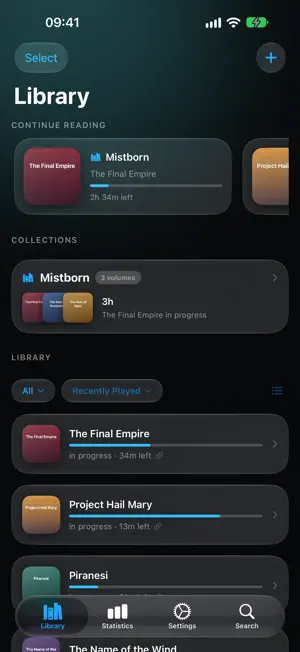

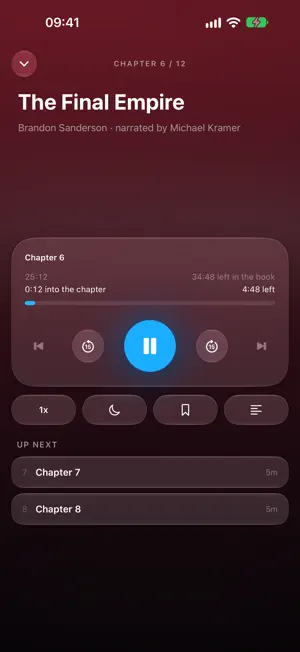

About Ondelia
Ondelia plays the audiobooks you already own. No store, no subscription, no account: import your files and they stay on your devices. YOUR FILES, YOUR LIBRARY Import a file, a whole folder or a ZIP from Files or over AirDrop. Ondelia reads embedded chapters and CUE files, picks up cover art and duration, and rebuilds series. LISTEN ON APPLE WATCH, WITHOUT YOUR IPHONE Send the current chapter and the next ones to the watch: playback is local, with no phone and no signal. The watch keeps its buffer topped up, and your position finds its way back to the iPhone. A SERIOUS PLAYER Per-book speed, custom skip intervals, smart rewind after a pause, one tap back to where you were before a bad scrub, bookmarks, a play queue, and a sleep timer with fade-out or end-of-chapter. TEXT THAT FOLLOWS THE VOICE On-device transcription: the text scrolls with the narration, and tapping a sentence jumps there. EVERYWHERE IN IOS iPhone and Apple Watch widgets, Siri shortcuts, Lock Screen and AirPods controls complete with CarPlay. NOTHING LEAVES YOUR DEVICES No account necessary, no ads, no analytics, no profile. Positions, bookmarks and finished state sync through your own private iCloud, and can be turned off in one tap. Your audio files are never uploaded anywhere. ENHANCED WITH HARDCOVER Use Hardcover to get metadata, track your progress and the book you've read, automatically create book series.
What’s new
Version 1.9.3 · Updated October 21, 2026
AudiobookShelf - Your server's listening stats now include the time you spend in Ondelia, streamed or downloaded, past listening included. - Hide Finished Books, on by default: books your server has as finished leave the shelves, Search and Collections. Turn it off in Settings › AudiobookShelf. - An older position from iPhone or Apple Watch no longer overwrites a newer one on your server. Transcription - Search highlights every match, says how many there are, and steps through them with the up and down arrows. CarPlay - Speed opens the list of speeds, with the current one marked. - Bookmarks lists the book's bookmarks, with Add Bookmark on top. Improvements - Continue Reading shows the time left in the book you are listening to. With Play back to back on, it counts the whole series. - Settings › Storage › Transcripts: see how many there are and delete them. - A folder or ZIP holding a single audio file keeps that file's chapters, title and author. - CUE sheets saved in Windows encoding now import with their chapters. Fixes - The End of chapter sleep timer stops at the end of a book instead of starting the next one. - Playing a finished book starts it over, and Mark as Unread takes it back to the start. - Jumping into the last seconds of a book no longer marks it finished. - A finished series reaches 100 %. - Hardcover asks you to sign in again when your sign-in has expired. - Chapters held up on their way to Apple Watch are sent again, and Clear Watch works after a restart. - In Search, deleting a book asks first.
App privacy
The developer, Jonathan Jayet, reported these privacy practices to Apple.
Data Not Collected
The developer does not collect any data from this app.
Alternatives to Ondelia
Looking for apps like Ondelia? Here are 6 similar apps on the App Store. The highest rated is Bookopedia: Note-Taking Books (5.0/5), and all 6 are free to download.
-
 Chapter - Audiobook Player
-
 ShelfDrop Audiobook Player
-
 AudioBookIt: Audiobook Player
4.2
-
 Bookopedia: Note-Taking Books
5.0
-
 BookSnap: Book Value Scanner
4.5
-
 Hardcover.app
4.2
| App | Rating | Price | Last updated | Compare |
|---|---|---|---|---|
| Ondelia | – | Free | October 21, 2026 | |
| Chapter - Audiobook Player | – | Free | Oct 12, 2026 | Compare |
| ShelfDrop Audiobook Player | – | Free | Oct 14, 2026 | Compare |
| AudioBookIt: Audiobook Player | 4.2 / 5 (5) | Free | Oct 13, 2026 | Compare |
| Bookopedia: Note-Taking Books | 5.0 / 5 (22) | Free | Aug 8, 2026 | Compare |
| BookSnap: Book Value Scanner | 4.5 / 5 (126) | Free | Oct 12, 2026 | Compare |
| Hardcover.app | 4.2 / 5 (66) | Free | Jun 19, 2026 | Compare |
Compare Ondelia with the top alternatives: ratings, updates, ASO score and keyword gaps →