

Goshuin Ledger: Shrine Stamps
Hinata Tomoda Lifestyle iPhoneiPadiPod touch
Goshuin Ledger: Shrine Stamps is a free Lifestyle app for iPhone and iPad by Hinata Tomoda. Requires iOS 16.4. Updated October 13, 2026.
- Price
- Free
- on the App Store
- Size
- 62 MB
- Age 4+
- Updated
- Oct 13
- 2026 · v1.13.0
Screenshots

About Goshuin Ledger: Shrine Stamps
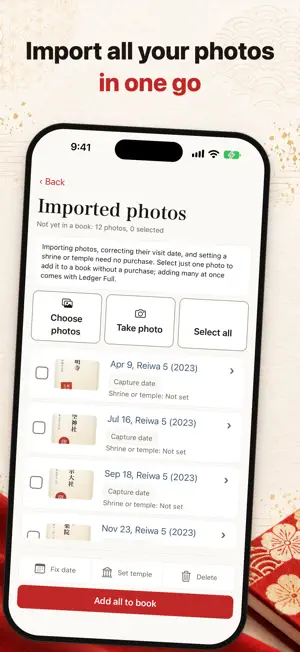
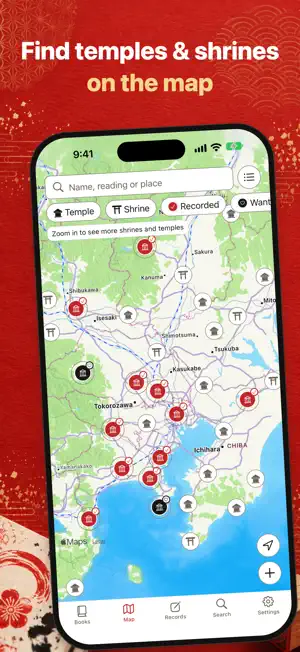
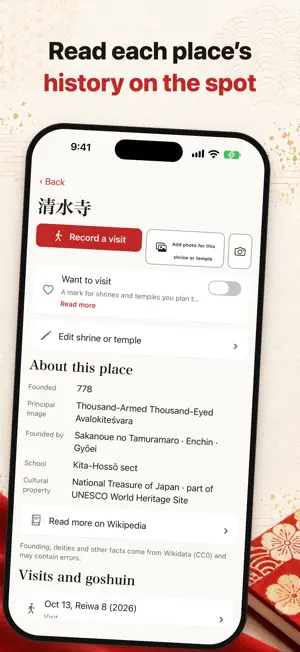
Which book, which page, when, and which shrine or temple. This iOS app builds all of that at once from photos you took by opening the book and shooting the pages. You do not have to re-enter one goshuin at a time, and you can start from the ones that piled up. ■ When this helps ・Your goshuin book is on its second or third volume and you cannot recall what is where ・The photos exist, but entering them one by one stalled ・The book is written in Japanese eras, so you want the record kept the same way ・You have lost records in a phone change before, or you are afraid you will ■ From photos to a ledger 1. Pick several photos from your library. The app only uses the iOS photo picker and never asks for access to the whole library. 2. They arrive in Imported photos, in date order, with each capture date filled in. A photo with no capture date gets the date you imported it. 3. There you correct visit dates — per photo, or one date for all selected photos — in Japanese eras (Reiwa, Heisei, Showa, Taisho, Meiji). One shrine or temple can hold several goshuin, each with its own visit date. 4. You add them to a book and its pages, in visit-date order. Page numbers are assigned for you, and you can move a row up or down. The day you photographed the book is not the day you visited, so the app assumes you will correct the visit date afterwards. ■ What you can use without a purchase (no limit on entries) ・One goshuin book — record as many goshuin in it as you like ・Importing photos — into a book one at a time, with visit date, shrine or temple, and note ・Visit dates in Japanese eras — enter and sort by Reiwa, Heisei, Showa, Taisho and Meiji ・Several goshuin from one shrine or temple — each photo keeps its own visit date ・Search — by the name of the shrine or temple, its reading, or your note ・The standard iOS backup — included in iCloud Backup and Quick Start ・Encrypted backup export and import — move records and photos to a new phone in one file Viewing imported photos and correcting their visit dates need no purchase either. You can fill one book before deciding whether to carry on. ■ What Ledger Full unlocks (in-app purchase, one payment on iOS) ・A second book and beyond, with no limit on the number of books ・Add all to book for imported photos — place two or more at once into a book and its pages ・PDF and CSV export — print your records or open them in a spreadsheet There is no subscription. A purchase can be brought back at any time with Restore purchase, and it applies inside this app only. ■ Your records stay on the device ・No sign-in, no account. ・No advertising. ・Records and photos stay on the device and are not sent anywhere. ・Telling the developer how the app is used, and sending a report when it stops, can each be switched on or off in Settings at any time. Even when sent, they carry no goshuin record, photo, note or shrine name. ・The only other things the app talks to are the map, when it is shown, and the App Store, when you buy. “Read more on Wikipedia” and “Directions in Google Maps” open the browser or Google Maps only when tapped. ・Photos are scaled to about 2,048px on the long edge. ■ So a phone change does not take it away ・Records and photos are written where the standard iOS backup reaches them (iCloud Backup and Quick Start). ・Export a passphrase-encrypted backup file, pass it to the new phone via Files or AirDrop, and import it. Records and photos move in this file, no iCloud; the purchase returns via Restore purchase. ・Settings always shows when you last exported. ■ A map of shrines and temples The Map tab shows a bundled list of shrines and temples (Wikidata). Search by name or place, mark “Want to visit”, or record a visit with a date and note. Location is used only when you tap Current location, never kept or sent. ■ Also included Japanese eras, several goshuin per shrine or temple, more books (Ledger Full), a one-time purchase, iOS backup, encrypted backup, CSV. iPhone (iOS). On iPad, the iPhone layout.
What’s new
Version 1.13.0 · Updated October 13, 2026
・Fixed screen headings in Russian being shown with a gap between every letter.
App privacy
The developer, Hinata Tomoda, reported these privacy practices to Apple.
Data Not Linked to You
The following data, which may be collected but is not linked to your identity, may be used for the following purposes:
- Usage Data: Product Interaction
- Diagnostics: Crash Data
Used for: Analytics, App Functionality
Alternatives to Goshuin Ledger: Shrine Stamps
Looking for apps like Goshuin Ledger: Shrine Stamps? Here are 6 similar apps on the App Store.


| App | Rating | Price | Last updated | Compare |
|---|---|---|---|---|
| Goshuin Ledger: Shrine Stamps | – | Free | October 13, 2026 | |
| マイ御朱印帳 | – | Free | Oct 7, 2026 | Compare |
| スマート御朱印帳 | – | Free | Apr 20, 2026 | Compare |
| 御朱印ウォーク | – | Free | Sep 18, 2026 | Compare |
| ご縁帳 - 願いとお賽銭のつながりが見える | – | Free | Sep 12, 2026 | Compare |
| やさしい「御朱印帳」 | – | Free | Jul 26, 2026 | Compare |
| Purrwell: Puppy Care Plan | – | Free | Jun 28, 2026 | Compare |