

Tapaint – Paint by Number
Maksim Kruchinin Entertainment iPhoneiPadiPod touch
Tapaint – Paint by Number is a free Entertainment app for iPhone and iPad by Maksim Kruchinin. Rated 5.0/5 from 1 ratings. Requires iOS 18.0.
- Rating
- 5.0
- 1 ratings
- Price
- Free
- on the App Store
- Size
- 21 MB
- Age 4+
- Updated
- Oct 28
- 2026 · v1.0.2
Screenshots
About Tapaint – Paint by Number
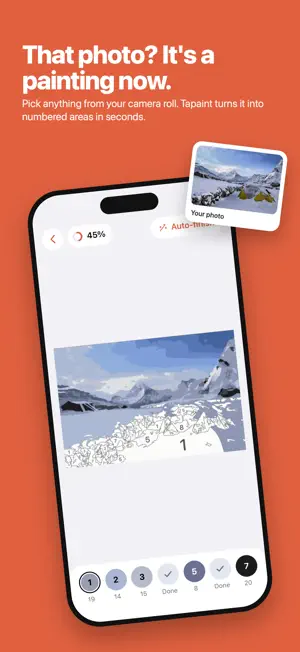
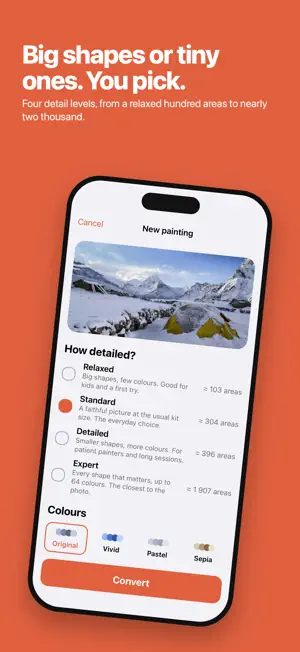
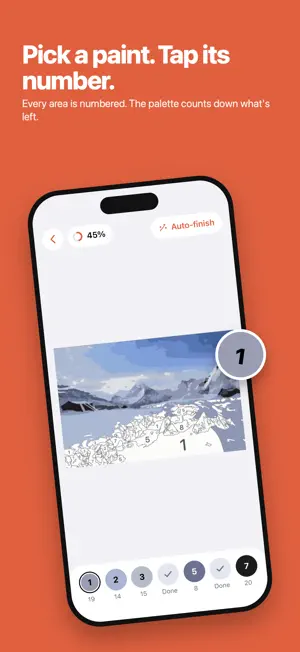
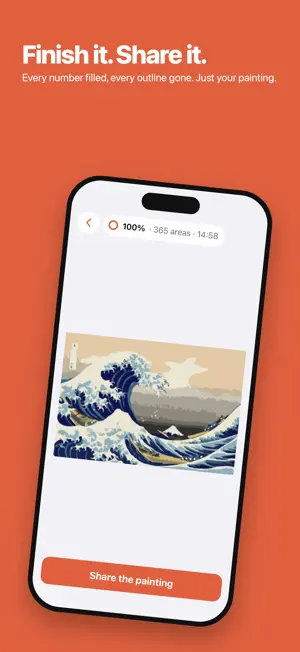
Tap by tap, your photo becomes a painting. Tapaint turns any photo into a paint-by-numbers canvas and lets you paint it by tapping. Your own pictures - a holiday, a pet, a face you love - become something you made with your hands, area by area. HOW IT WORKS • Pick a photo. Tapaint converts it on your phone in about a second. • Choose how detailed: Relaxed for big calm shapes, Standard for a faithful picture, Detailed for a long evening, Expert for every shape that matters. • Tap the areas with the number of the selected paint. Pinch to zoom, tap the paint again to find the next area. • Finish, and the picture reveals itself - then share it, without a watermark. MADE FOR PAINTING, NOT SCROLLING • Numbers that stay readable as you zoom. • A palette that tells you how many areas each paint has left. • Progress and time saved with every tap; pick up where you left off. • Auto-finish when you want to see the result now. A LITTLE EVERY DAY • Today's mystery: a random photo from one of your albums, revealed only when you finish it. • A streak for finishing a painting each day, with rewards along the way. • One gentle evening reminder, if you want it. PAINT ON PAPER TOO • Print the numbered template as a PDF, sized so every number is readable on the sheet. TAPAINT UNLIMITED (one-time purchase, no subscription) • As many paintings as you like. • The Expert level. • Palette styles: vivid, pastel, sepia - before painting, or applied to a finished picture. • Sharing and printing without ads. No ads anywhere. PRIVACY No account, no server. Your photos are converted on your phone and never leave it. The app works in Airplane Mode.
What’s new
Version 1.0.2 · Updated October 28, 2026
Tapaint Unlimited is here: unlimited paintings, the Expert level, palette styles and no ads, for a one-time price. On iPad in landscape, the palette moves to the side so your painting gets the whole screen. Finished paints now leave the palette.
App privacy
The developer, Maksim Kruchinin, reported these privacy practices to Apple.
Data Not Linked to You
The following data, which may be collected but is not linked to your identity, may be used for the following purposes:
- Location: Coarse Location
- Identifiers: Device ID
- Usage Data: Product Interaction
- Purchases: Purchase History
- Diagnostics: Crash Data, Performance Data
Used for: Third-Party Advertising, Analytics, App Functionality
Alternatives to Tapaint – Paint by Number
Looking for apps like Tapaint – Paint by Number? Here are 6 similar apps on the App Store. The highest rated is Kolorize - Paint By Numbers (5.0/5), and all 6 are free to download.
-
 Show Time: Series & Movies
-
 Holst: Paint by Number
-
 AI Coloring Book: Create Share
-
 Kolorize - Paint By Numbers
5.0
Kolorize - Paint By Numbers
5.0
-
 PaintMe - Color by Number
3.7
PaintMe - Color by Number
3.7
-
 Nachoz: Movies & TV Tracker
3.0
Nachoz: Movies & TV Tracker
3.0
| App | Rating | Price | Last updated | Compare |
|---|---|---|---|---|
| Tapaint – Paint by Number | 5.0 / 5 (1 rating) | Free | October 28, 2026 | |
| Show Time: Series & Movies | – | Free | Oct 22, 2026 | Compare |
| Holst: Paint by Number | – | Free | Oct 5, 2026 | Compare |
| AI Coloring Book: Create Share | – | Free | Oct 16, 2025 | Compare |
| Kolorize - Paint By Numbers | 5.0 / 5 (8) | Free | Jul 29, 2025 | Compare |
| PaintMe - Color by Number | 3.7 / 5 (3) | Free | Apr 15, 2026 | Compare |
| Nachoz: Movies & TV Tracker | 3.0 / 5 (2) | Free | Sep 28, 2026 | Compare |