

MorrowLife
万里 杨 Lifestyle iPhoneiPadiPod touch
MorrowLife is a free Lifestyle app for iPhone and iPad by 万里 杨. Requires iOS 17.0. Updated October 22, 2026.
- Price
- Free
- on the App Store
- Size
- 10 MB
- Age 4+
- Updated
- Oct 22
- 2026 · v1.2
Screenshots


About MorrowLife
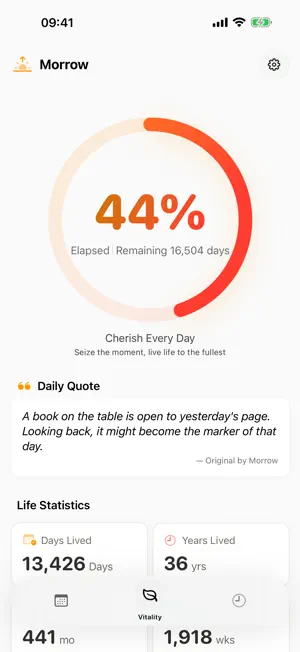
MorrowLife — Make Every Day Meaningful See your life in perspective and keep the moments that matter. • Life progress: explore elapsed and remaining time using your birth date and your own life expectancy setting. This is a personal visualization, not a prediction. • Daily mood: record an emoji and optional note, then revisit your daily entries. • Milestones: keep birthdays, anniversaries, and personal moments in one place. • Reminders and widgets: keep today's progress close at hand. • Themes: choose the visual style that feels like you. • Family Moments: use private iCloud invitations to share daily check-ins with people you invite. Morrow Pro includes personal iCloud sync, creating a family, premium themes, unlimited custom milestones, and an expanded library of original bilingual quote combinations. Invited members can join a family and check in for free. App family groups are separate from Apple Family Sharing. Monthly and annual auto-renewable subscriptions are available. Prices and eligible introductory offers appear on the purchase screen. Subscriptions renew unless cancelled. Manage or cancel them in your Apple Account settings. Privacy first: no ads, third-party analytics SDKs, or cross-app tracking. Personal data stays on your device or, with sync enabled, in your iCloud. Family data is shared with invited members through Apple CloudKit. Delete app data from Settings; deleting data does not cancel a subscription. Requires iOS 17.0 or later. iCloud features require an iCloud account. Privacy Policy: https://fluttering-cream-b70.notion.site/Morrow-Privacy-Policy-3e453dd0d573806086fddc04b17fdbde Terms of Use (Apple Standard EULA): https://www.apple.com/legal/internet-services/itunes/dev/stdeula/
What’s new
Version 1.2 · Updated October 22, 2026
A more comfortable way to keep your days in view. • iPhone Duo and iPad support, with layouts that adapt to folding, rotation and smaller windows. • Ten original mood characters, a compact picker and a note field ready to write in. • A square mood calendar with past-month browsing and easier access to your daily entries. • Theme-aware settings and forms, restored theme animations, and the full branded launch screen. • Clearer local/iCloud sync status and recovery options, with access to existing families retained when Pro expires. • Better large-text readability and keyboard handling, including reliable Cancel and Save actions while editing a family mood. • Subscription plans now recover from loading failures with a clear retry action.
App privacy
The developer, 万里 杨, reported these privacy practices to Apple.
Data Not Collected
The developer does not collect any data from this app.