

Pull to Refresh: Screen Time
Ivan Chernoknizhnikov Productivity iPhoneiPadiPod touch
Pull to Refresh: Screen Time is a free Productivity app for iPhone and iPad by Ivan Chernoknizhnikov. Rated 5.0/5 from 8 ratings. Requires iOS 17.0.
- Rating
- 5.0
- 8 ratings
- Price
- Free
- on the App Store
- Size
- 9 MB
- Age 4+
- Updated
- Oct 12
- 2026 · v1.5.1
Screenshots


About Pull to Refresh: Screen Time
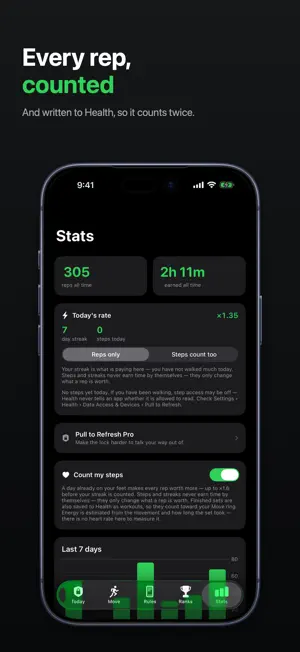
Pull to refresh. Actually pull. Pick the apps that eat your day, give them an allowance, and when it runs out they lock. To get back in, you do reps. The camera counts them on your phone. HOW IT WORKS 1. Choose the apps. Instagram, TikTok, X, games — whatever you actually lose hours to. 2. Set the allowance. So many minutes a day, a few minutes an hour, or nothing at all. 3. Run out, and they shut. 4. Do a set. Push-ups, sit-ups, squats, pull-ups or jumping jacks. 5. Spend what you earned, on whichever app you were reaching for. THE COUNTING IS HONEST Reps are scored from your body's joint positions, not from your phone shaking in a pocket. A rep only counts on a full movement — down to depth and back — so half-reps score nothing, and the app tells you why instead of leaving you guessing. Shaking the phone pays exactly zero. Time is measured in real use of those apps, not on a clock. Put the phone down mid-scroll and the minutes you paid for wait for you — for at least half an hour, and four times as long as the unlock for bigger ones, up to 22 hours. NO VIDEO LEAVES YOUR PHONE Pose detection runs on the device. No video is recorded, stored or uploaded, and there is no account to make. iOS hands the app opaque tokens rather than names, so it can tell that you picked an app — never what you do inside it. What does leave goes through Apple: rep counts and badge progress to Game Center once you say yes, your name and numbers to the iCloud board if you join it, and a copy of your history to your own iCloud. IT COUNTS TWICE Finished sets can be saved to Health as workouts, so reps done here go to your Move ring and show up in Fitness with everything else. RACE SOMEONE Signed in to Game Center, you get its leaderboards — this week and all time — and nine badges to earn, under your Game Center name. Nothing is sent until you say yes. On iOS 26 and later, start a Rep Race with a friend from Game Center: the biggest single set done during the race wins. Not on Game Center? Join the iCloud board under any name you like; leaving deletes your row. PRO Free covers a whole working loop: one group of apps on a daily allowance, every exercise, rep counting, Health and the leaderboards. Forever. Pro makes the lock harder — it never makes it softer: - Strict mode. A rule you cannot switch off the moment you want to. Changing it costs a cooling-off period first, which is exactly when you would have caved. - Minutes per hour. Short check-ins instead of one long sitting. - As many rules as you like, with different limits for different apps. - Your whole history, with streaks. Money never buys screen time here; reps do. Pro is a subscription, renewing until cancelled, or a one-off payment for good. Manage or cancel any time in Settings. WORTH KNOWING Blocking uses Apple's Screen Time. You will be asked to grant it on first launch, and the camera when you do your first set. Deleting the app removes every lock, whatever you have bought — this is a speed bump you chose, not a cage. Terms of Use (EULA): https://pull-to-refresh.pages.dev/terms Privacy Policy: https://pull-to-refresh.pages.dev/privacy
Ratings & reviews
5.0
8 ratings
What’s new
Version 1.5.1 · Updated October 12, 2026
Ready for iPhone Duo. Pull to Refresh uses the whole screen, open or closed, with the tabs down the side where iOS puts them. Turn the phone on its side and the app turns with it — every screen, including the one that counts your reps. On a screen wider than the camera's picture, the preview now shows all of it — head to toe — instead of trimming the top and bottom.
App privacy
The developer, Ivan Chernoknizhnikov, reported these privacy practices to Apple.
Data Not Collected
The developer does not collect any data from this app.
Alternatives to Pull to Refresh: Screen Time
Looking for apps like Pull to Refresh: Screen Time? Here are 6 similar apps on the App Store. The highest rated is Off Book: Run Lines (1.0/5), and all 6 are free to download.
-
 Tandivo: Meeting Notes
-
 SloMo: Screen Time Control
-
 Deep Flow: Screen Time Control
-
 Off Book: Run Lines
1.0
Off Book: Run Lines
1.0
-
 CalcGate | App Lock with Math
-
 Small Wins (2e7d84)
| App | Rating | Price | Last updated | Compare |
|---|---|---|---|---|
| Pull to Refresh: Screen Time | 5.0 / 5 (8 ratings) | Free | October 12, 2026 | |
| Tandivo: Meeting Notes | – | Free | Sep 23, 2026 | Compare |
| SloMo: Screen Time Control | – | Free | Oct 24, 2026 | Compare |
| Deep Flow: Screen Time Control | – | Free | Mar 12, 2026 | Compare |
| Off Book: Run Lines | 1.0 / 5 (1) | Free | Oct 4, 2026 | Compare |
| CalcGate | App Lock with Math | – | Free | Jun 2, 2026 | Compare |
| Small Wins (2e7d84) | – | Free | Sep 8, 2025 | Compare |