

UspendItrack
Boon Keat Gan Finance iPhoneiPadiPod touch
UspendItrack is a free Finance app for iPhone and iPad by Boon Keat Gan. Requires iOS 15.0. Updated September 22, 2026.
- Price
- Free
- on the App Store
- Size
- 7 MB
- Age 4+
- Updated
- Sep 22
- 2026 · v1.0.0
Screenshots
Save to Pinterest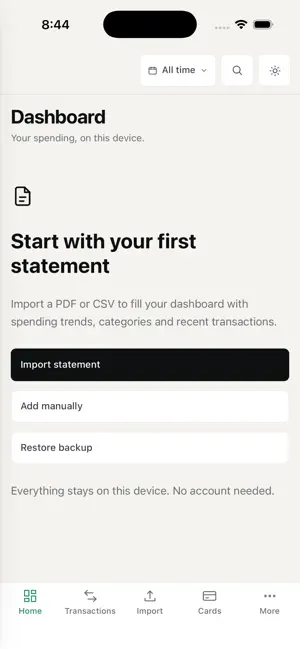


About UspendItrack
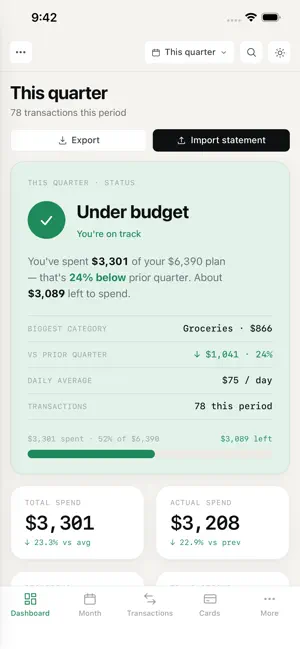
Most people carry three or four cards. Each statement arrives on its own date, in its own format, with no categories — so the only way to see what you actually spent last month is to open all of them and start adding up. UspendItrack does that for you. Import each statement and every card lands on one shared timeline, categorised, so you get a single dashboard across all of them. No account, no bank login, and nothing leaves your phone. ONE VIEW ACROSS EVERY CARD • Import statements from any number of cards and banks • Everything is placed on a common calendar month, so cards with different billing dates finally line up side by side • Categories are applied automatically by rules you control — statements arrive with none • Spend by card, by category, by merchant and by month • Re-importing a statement you already have adds nothing; overlapping periods are handled for you KNOW WHAT EACH CARD IS EARNING • Set your own cashback and miles rates, per card • See what your actual spending earned on each one • Compare cards over the same period, from your own history rather than a marketing table • Find the subscriptions and recurring charges buried across statements PLAN WITH REAL NUMBERS • Budgets per category, compared month to month • Dashboard, month view and cashflow heatmap • Subscriptions and recurring spend, worked out from your own history • Snapshots you can restore, taken automatically as well as on demand NOTHING LEAVES YOUR PHONE • No account, no sign-in, no server, no sync • No analytics, no crash reporting, no advertising identifiers • Your ledger is excluded from iCloud backup, so it does not even reach your own cloud account • Export everything as CSV at any time — never restricted, never behind a purchase IMPORT WHAT YOU ALREADY HAVE • Built-in support for common Singapore statement formats, including DBS, OCBC, UOB, Citibank and PayLah • Any other bank: export CSV from your bank and import that. The app asks which column holds the date, the description and the amount, then remembers it • Every import is checked against the total printed on the statement, so you find out when something did not add up MAKE IT YOURS • Rules that categorise a merchant the same way every time • Bulk edit: select many transactions and recategorise, annotate or mark them recurring in one go • Group recurring expenses that arrive under different names • Notes on any transaction, and manual entry for the cash the statement never saw FREE, WITH ONE PURCHASE Five statement imports are free. If you want more, a single purchase unlocks unlimited importing for good. Everything else is unrestricted either way — viewing, editing, categorising, budgets, reports and CSV export — and anything you imported before the limit stays fully usable forever. A NOTE ON THE TRADE-OFF Because nothing is stored in a cloud, a new phone starts empty. Your data moves across by exporting CSV and importing it on the new device, which takes a minute and requires no account. That is the cost of the promise, and we would rather state it here than have you discover it later.
App privacy
The developer, Boon Keat Gan, reported these privacy practices to Apple.
Data Not Collected
The developer does not collect any data from this app.
Alternatives to UspendItrack
Looking for apps like UspendItrack? Here are 6 similar apps on the App Store. The highest rated is Dobin: Manage Your Money (5.0/5), and all 6 are free to download.
-
 Expense Tracker: MySprout
-
 Stock Analysis: AI Buy Sell
4.0
-
 Money2India (Europe)
-
 Buxfer: Budget & Money Manager
4.2
-
 Dobin: Manage Your Money
5.0
-
 LiquidPay
3.7
| App | Rating | Price | Last updated | Compare |
|---|---|---|---|---|
| UspendItrack | – | Free | September 22, 2026 | |
| Expense Tracker: MySprout | – | Free | Nov 9, 2026 | Compare |
| Stock Analysis: AI Buy Sell | 4.0 / 5 (4) | Free | Oct 29, 2026 | Compare |
| Money2India (Europe) | – | Free | Oct 8, 2026 | Compare |
| Buxfer: Budget & Money Manager | 4.2 / 5 (173) | Free | Sep 16, 2026 | Compare |
| Dobin: Manage Your Money | 5.0 / 5 (3) | Free | Apr 2, 2026 | Compare |
| LiquidPay | 3.7 / 5 (3) | Free | Nov 12, 2026 | Compare |
Compare UspendItrack with the top alternatives: ratings, updates, ASO score and keyword gaps →