

Aesthetic Flip Clock: FlipAura
Huong Le Dieu Productivity iPhoneiPadiPod touch
Aesthetic Flip Clock: FlipAura is a free Productivity app for iPhone and iPad by Huong Le Dieu. Requires iOS 17.0. Updated October 17, 2026.
- Price
- Free
- on the App Store
- Size
- 28 MB
- Age 4+
- Updated
- Oct 17
- 2026 · v1.0.3
Screenshots


About Aesthetic Flip Clock: FlipAura
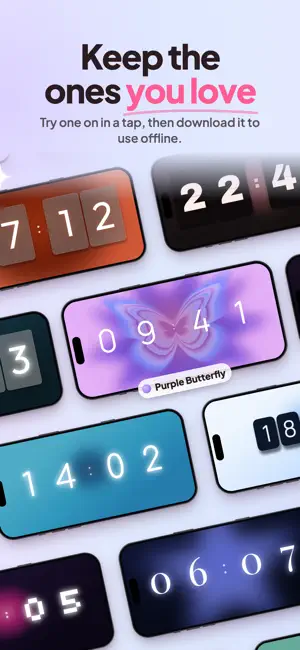
A flip clock you actually want on your desk - and it counts your focus while you watch it. FlipAura turns your iPhone into a big, calm flip clock. Swipe the strip under it to change what it is: a clock, a Pomodoro timer, a countdown, a stopwatch. Start a session, put the phone down, and it keeps counting on your Lock Screen. A CLOCK WORTH LEAVING ON • Big flip cards and a soft aura glow, filling the whole screen • Five faces on one swipe: Clock, Focus, Break, Countdown, Stopwatch • Hide the controls and the status bar goes too - just a clock, sitting on your desk • Stand it up in one row or two big ones; turn it on its side and the digits grow to the full height of the screen • Under the clock, only what you want there: the date, a greeting, your session tally, the task at hand, a quote IT KEEPS GOING WHILE YOU WORK • Live Activity and Dynamic Island count down while you are in another app • Pause, resume or skip a stage straight from the Lock Screen • Home Screen widgets in medium and large, in the theme you already use • A Control Center button that starts a focus session in one tap RAIN, A CAFE, OR NOTHING AT ALL • 25 ambient layers: rain on the window, ocean, mountain stream, cafe murmur, night train, fireplace, brown noise, deep space and more • Blend several at once and save the mix you keep coming back to • A soft chime when a session ends, and a flip sound you choose • Sound keeps playing while you work in another app; turn it off and FlipAura steps aside 300+ LOOKS, OR MAKE YOUR OWN • 100 themes built in, from near-black night to soft pastel • 200+ more in the community library, made by people who use FlipAura: try one on, download it for offline, keep the ones you like • The Studio, ten tabs deep - layout, card, digits, depth, flip, sound, aura, backdrop, overlay, satellites • Fifteen digit fonts, six aura shapes, and your own photo on the card face or behind it • Publish a theme, keep it private, or hand one person a link WHERE THE HOURS ACTUALLY WENT • Total time, sessions, streak and best day, in four numbers • Fourteen days, a full year, and the hour of the day you focus best • Time split by task, so the week stops being a blur • A leaderboard if you want one - real sessions only, and only if you opt in NEWS, WITHOUT THE NOISE • A bell in the corner holds new themes, fresh features, focus tips and offers, in your language • Open it any time - no permission needed • Notifications stay off until you turn them on, and even then it's at most one a week FREE, AND PLUS Free gives you 6 themes (20 when you sign in), 3 digit fonts, 4 ambient layers, 5 tasks, 3 saved designs and a week of stats. FlipAura Plus opens all 100 themes, all 15 fonts, all 25 sound layers, unlimited tasks, up to 50 saved designs, the whole Studio, and your entire history. Monthly, yearly, or one payment that lasts. ONE ACCOUNT, PHONE AND WEB Sign in and your themes, tasks and settings move between this app and flipaura.app. Plus bought on one side works on the other. In 12 languages, and no account needed to start. Open it, pick a look you like, and go. Terms of Use (EULA): https://www.apple.com/legal/internet-services/itunes/dev/stdeula/ Privacy Policy: https://flipaura.app/privacy
What’s new
Version 1.0.3 · Updated October 17, 2026
New in 1.0.3: • An inbox behind the bell in the top corner: new themes, fresh features, focus tips and offers, in your language. No permission needed to read it • Notifications are optional and off by default. Turn them on in Settings > Notifications and you'll get at most one a week • Home Screen widgets redrawn to look just like the theme's tile in the library, with the aura at the right size and no hard edges • The free plan now saves 3 of your own themes instead of 1 • Backdrop photos no longer fail as too heavy: FlipAura saves them at the right size, and if one is still over 2 MB it offers to shrink it for you • The crop frame for a card-face photo is now card-shaped and saves exactly what you framed • Fixed some bugs and improved performance
App privacy
The developer, Huong Le Dieu, reported these privacy practices to Apple.
Data Linked to You
The following data, which may be collected and linked to your identity, may be used for the following purposes:
- Contact Info: Email Address, Name
- User Content: Photos or Videos, Other User Content
- Identifiers: User ID, Device ID
- Usage Data: Product Interaction
Used for: App Functionality
Data Not Linked to You
The following data, which may be collected but is not linked to your identity, may be used for the following purposes:
- Usage Data: Product Interaction
Used for: Analytics
Alternatives to Aesthetic Flip Clock: FlipAura
Looking for apps like Aesthetic Flip Clock: FlipAura? Here are 6 similar apps on the App Store. The highest rated is Clockera: Aesthetic Timer (1.0/5), and all 6 are free to download.
-
 Sundae — Visual Timer
-
 Timer & Stopwatch - CountDo
-
 Focus Flip Clock: Aesthetic
-
 Work Timer: Pomodoro Focus
-
 Clockera: Aesthetic Timer
1.0
Clockera: Aesthetic Timer
1.0
-
 RemiBuddy
| App | Rating | Price | Last updated | Compare |
|---|---|---|---|---|
| Aesthetic Flip Clock: FlipAura | – | Free | October 17, 2026 | |
| Sundae — Visual Timer | – | Free | Sep 21, 2026 | Compare |
| Timer & Stopwatch - CountDo | – | Free | Oct 21, 2026 | Compare |
| Focus Flip Clock: Aesthetic | – | Free | Sep 23, 2026 | Compare |
| Work Timer: Pomodoro Focus | – | Free | Oct 15, 2026 | Compare |
| Clockera: Aesthetic Timer | 1.0 / 5 (1) | Free | Jun 8, 2026 | Compare |
| RemiBuddy | – | Free | Apr 14, 2026 | Compare |