

Zubora: Lazy Expense Tracker
Gaku Tamaki Finance iPhoneiPadiPod touch
Zubora: Lazy Expense Tracker is a free Finance app for iPhone and iPad by Gaku Tamaki. Requires iOS 15.1. Updated October 10, 2026.
- Price
- Free
- on the App Store
- Size
- 34 MB
- Age 4+
- Updated
- Oct 10
- 2026 · v1.0
Screenshots


About Zubora: Lazy Expense Tracker
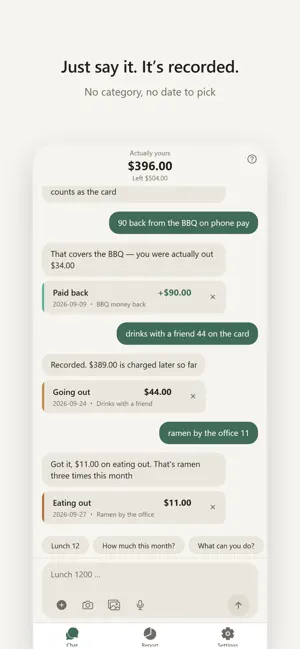
You don't quit budgeting apps because you lack willpower. There's just too much to do. Type the amount. Pick a category. Pick a date. Save. Miss one day and you never open it again. This app removed all of that. ■ No categories. No date picker. "lunch 12" "groceries 68 yesterday" "taxi 25" Write it however you like. The category and the date are our problem. Snap a receipt or say it out loud — either works. There is nothing to choose from, so you never stall. ■ Best used while travelling Say it in the local currency. "ramen 1200 yen" "tuk-tuk 80 baht" It converts at that day's rate and keeps the original amount too, so you can still tell what cost what when you get home. Trips have an end date. There's nothing to keep up with. Use it for five days, and it'll tell you what the trip cost. ■ No bank or card linking There is no account to connect. No credentials to hand over. Which matters most abroad, where linking doesn't work anyway. Cash works exactly the same as card. So does the market stall, the friend who covered you, and the taxi that only took notes. ■ Rough is fine You don't need to match to the cent. You don't need to keep every receipt. Knowing roughly what you spent is enough to make almost every decision you'd want to make. This is not a ledger. It was never trying to be. ■ Know what's still coming The spending feels like today. The bank balance moves next month. That gap is why the statement is always bigger than you thought. Write "on my Visa" and it splits what's already gone from what gets charged later. You're never asked to pick a payment method. It just picks it up when you mention it. ■ It never brings up the gap Stop recording for two weeks and it won't mention it. No "3-day streak". No "great job". No advice about cutting back. Being praised is what makes it hard to open the app after you slip. Lazy is fine. That's the whole idea. ■ At month's end, it writes up your month Not a report of totals. A read on the month you actually had. You also get a card worth showing someone. ■ Your records stay on your device Your expense history is stored on your phone. It does not accumulate on the developer's servers. The in-app privacy policy tells you exactly what goes where, plainly. ■ Subscription Auto-renewing monthly subscription. The price is shown in the app and on the purchase screen. Terms of Use and Privacy Policy are available inside the app. Terms of Use: https://zubora-kakeibo-api.zubora-kakeibo-server.workers.dev/terms?lang=en Privacy Policy: https://zubora-kakeibo-api.zubora-kakeibo-server.workers.dev/privacy?lang=en
App privacy
The developer, Gaku Tamaki, reported these privacy practices to Apple.
Data Not Linked to You
The following data, which may be collected but is not linked to your identity, may be used for the following purposes:
- Identifiers: Device ID
- Usage Data: Product Interaction
Used for: Analytics, App Functionality
Alternatives to Zubora: Lazy Expense Tracker
Looking for apps like Zubora: Lazy Expense Tracker? Here are 6 similar apps on the App Store.
-
 家計簿Aruka - 今日使える金額がわかる
-
 おさいふ手帳 - レシートで家計簿・予算管理
-
 Hiwari – Daily Budget
-
 シンプルすぎる家計簿
-
 5Counter: Binomial Probs
-
 Kirokuto: AI Budget Tracker
| App | Rating | Price | Last updated | Compare |
|---|---|---|---|---|
| Zubora: Lazy Expense Tracker | – | Free | October 10, 2026 | |
| 家計簿Aruka - 今日使える金額がわかる | – | Free | Jun 19, 2026 | Compare |
| おさいふ手帳 - レシートで家計簿・予算管理 | – | Free | Oct 26, 2026 | Compare |
| Hiwari – Daily Budget | – | Free | Oct 18, 2026 | Compare |
| シンプルすぎる家計簿 | – | Free | Aug 7, 2026 | Compare |
| 5Counter: Binomial Probs | – | Free | Mar 5, 2026 | Compare |
| Kirokuto: AI Budget Tracker | – | Free | Aug 8, 2026 | Compare |