

Koma Film Log
GYOU GI Photo & Video iPhoneiPadiPod touchApple Watch
Koma Film Log is a free Photo & Video app for iPhone and iPad by GYOU GI. Requires iOS 17.0. Updated October 4, 2026.
- Price
- Free
- on the App Store
- Size
- 6 MB
- Age 4+
- Updated
- Oct 4
- 2026 · v1.3
Screenshots

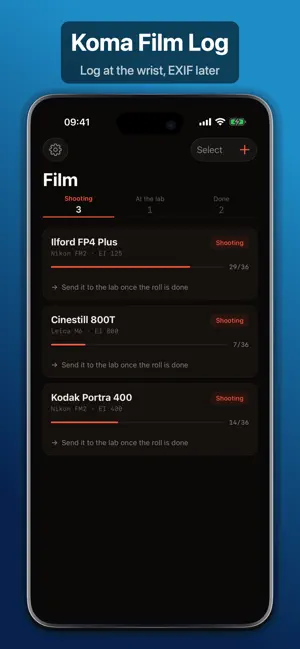
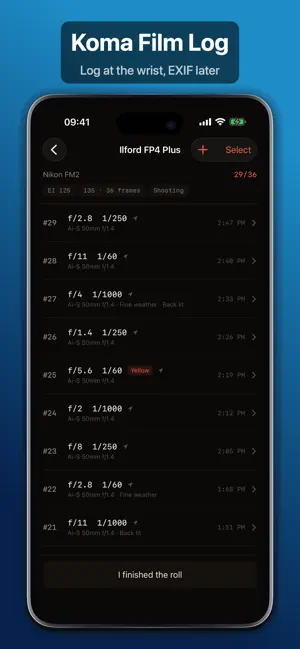

About Koma Film Log
Film does not record anything about itself. No aperture, no shutter, no date, no place. Weeks later the scans arrive as a folder of files that could have been shot anywhere, by anyone, at any time. Koma fills that in. THREE SECONDS AT THE WRIST Turn the Digital Crown on your Apple Watch and press once. Aperture, shutter, exposure compensation and where you stood are logged in about three seconds. The values carry over from the last frame, so most of the time it is one press and you are back to looking through the finder. The scales are your gear, not a generic list. Set the stops your lens actually has and the speeds your body actually has, and the crown reaches any value in two or three notches. THEN NOTHING HAPPENS Developing takes weeks. Koma does not remind you and does not notify you. The records simply wait. Nothing is uploaded to us — if you have bought it, they sync through your own iCloud so your other devices have them too. WHEN THE SCANS COME BACK Import them, line them up, and write the data in. Scans often come back reversed or with the film leader as an extra frame — one tap fixes the order. You confirm the line-up before anything is written; nothing happens automatically. YOUR ORIGINALS ARE NOT TOUCHED New files are written to a folder you choose. The compressed image data is copied through byte for byte, so the picture is never re-encoded and nothing is lost a second time. WRITTEN, THEN READ BACK EXIF is easy to write badly and still be told it worked. Koma reads every file back after writing it — with its own reader, not the one that did the writing — and compares what it finds against what you logged. Anything it cannot confirm is counted and named rather than reported as a success. WHAT YOU GET · Your film sits on the day you shot it, not the day the lab scanned it · It appears on the map where you stood · You can search it the way you search digital files · Standard EXIF, so Lightroom, Capture One and Photos all read it WORTH KNOWING If your scanner already wrote EXIF into a TIFF, those values cannot be replaced — only fields that were missing, such as location and date, get added. JPEG has no such restriction. RAW scans are not supported. PRICE Logging is free and stays free — rolls, frames, gear, importing and lining up. Writing EXIF into your scans, and keeping your rolls on your other devices over iCloud, come with a single purchase. A seven-day trial starts the first time you open the writing screen, not when you install the app. No subscription. Nothing renews.
What’s new
Version 1.3 · Updated October 4, 2026
You can put Koma on your watch face. Tap it and Koma opens. That is all it does for now — it does not show how many frames are left. Fixed: if you started on your iPhone and installed the watch app later, the watch could stay empty until the next time a roll changed. It now fills in as soon as the watch app is there.
App privacy
The developer, GYOU GI, reported these privacy practices to Apple.
Data Not Collected
The developer does not collect any data from this app.
Alternatives to Koma Film Log
Looking for apps like Koma Film Log? Here are 6 similar apps on the App Store. The highest rated is ShotMinder (5.0/5), and 3 of the 6 are free to download.
-
 Canister - Film Log
-
 FilmArchive-Film Photography
-
 Analogger – Film Log
-
 ShotMinder
5.0
ShotMinder
5.0
-
 FRMT - Film Simulation
-
 36 Exposures
5.0
36 Exposures
5.0
| App | Rating | Price | Last updated | Compare |
|---|---|---|---|---|
| Koma Film Log | – | Free | October 4, 2026 | |
| Canister - Film Log | – | Free | Oct 11, 2026 | Compare |
| FilmArchive-Film Photography | – | Free | Sep 24, 2026 | Compare |
| Analogger – Film Log | – | Free | Oct 1, 2026 | Compare |
| ShotMinder | 5.0 / 5 (1) | 4.99 USD | Jun 11, 2025 | Compare |
| FRMT - Film Simulation | – | 14.99 USD | Sep 22, 2026 | Compare |
| 36 Exposures | 5.0 / 5 (2) | 7.99 USD | Dec 14, 2025 | Compare |
Compare Koma Film Log with the top alternatives: ratings, updates, ASO score and keyword gaps →