

Lanes: Kanban & Focus Timer
Youssef Ziat Productivity iPhoneiPadiPod touchMac
Lanes: Kanban & Focus Timer is a free Productivity app for iPhone and iPad by Youssef Ziat. Requires iOS 17.0. Updated October 21, 2026.
- Price
- Free
- on the App Store
- Size
- 17 MB
- Age 4+
- Updated
- Oct 21
- 2026 · v2.0.0
Screenshots

About Lanes: Kanban & Focus Timer
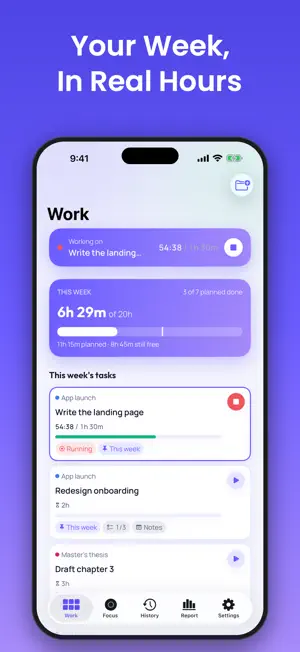
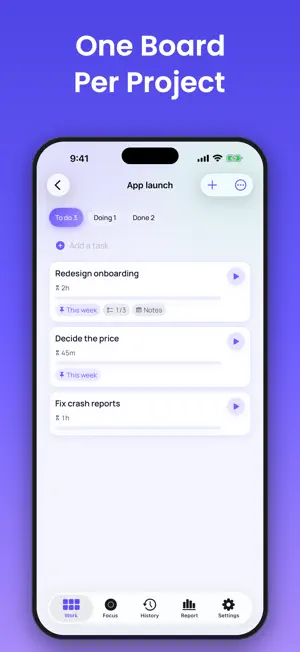
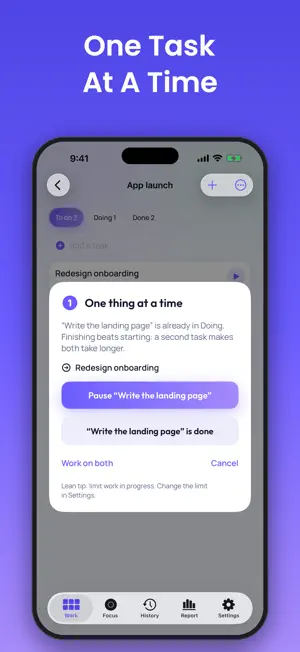
Lanes is a kanban board, a task timer and a focus timer with stakes, in one calm app. Plan your work in projects. Give every task an estimate. Run its timer and see the real time next to your guess. Keep one task in Doing, and finish it before you start the next. YOUR WORK ON A SIMPLE BOARD • A board for each project: To do, Doing, Done. Drag a card, or long-press it for every action. • Duplicate, archive or delete a task, or move it to another project: its tracked time moves with it. • Notes and a checklist on every task. • Pin tasks to this week and see how full the week already is. REAL TIME VS. YOUR ESTIMATE • One tap starts a task's timer. The card shows the real time against the estimate. • A notification when a timed task reaches its estimate, and another if a timer looks forgotten. • Lanes learns how you estimate: after a few finished tasks it tells you whether you under- or overestimate, and by how much. ONE THING AT A TIME Lanes keeps one task in Doing. Start a second one and it asks: pause the first, finish it, or keep both. A task that sits in Doing for three days or more gets flagged. You can raise the limit or turn the coach off in Settings. FOCUS WITH STAKES For the work that needs your whole attention, stake coins on a focus session and put the phone down. Peeking at notifications, leaving the app or picking the phone up costs coins, live and automatically. Locking the phone is free, real phone calls are exempt, and you can end a session at any time. The minutes of a session started from a task count as that task's time. YOUR WEEK IN NUMBERS Time worked, tasks done, time by project, how long tasks take from start to finish, and your focus minutes, by day, week or month. LANES PRO: ONE PURCHASE, NO SUBSCRIPTION Unlimited projects (the free version keeps two), the 7- and 30-day reports, a weekly capacity in hours, and Sign in with Apple to keep your projects in sync across your devices. Today's report is free. Coins for focus stakes are sold separately and never expire. PRIVATE BY DEFAULT No login needed: your projects are saved to a private account from the first task. No ads, no tracking. Delete your account and all its projects and tasks from Settings at any time. Privacy Policy: https://focusstakes-web.web.app/privacy/ Terms of Use: https://focusstakes-web.web.app/terms/
What’s new
Version 2.0.0 · Updated October 21, 2026
Vow is now Lanes. New in 2.0: • Projects with a simple kanban board: To do, Doing, Done. • A timer on every task, with the real time shown next to your estimate. • A coach that keeps one task in Doing, so you finish before you start the next. • Notes, checklists and a plan for the week. • Work reports by day, week and month, including how well you estimate. • Lanes Pro: unlimited projects, full reports, a weekly capacity and sync between your devices, as one purchase. Focus sessions with coin stakes work exactly as before, and a focus session can now count toward a task.
App privacy
The developer, Youssef Ziat, reported these privacy practices to Apple.
Data Not Collected
The developer does not collect any data from this app.
Alternatives to Lanes: Kanban & Focus Timer
Looking for apps like Lanes: Kanban & Focus Timer? Here are 6 similar apps on the App Store. The highest rated is Kofe Flow: Pomodoro Timer (5.0/5), and all 6 are free to download.
-
 POI - タスクをぽいっ!
-
 To Do Everyday - ルーティン管理
-
 Kofe Flow: Pomodoro Timer
5.0
Kofe Flow: Pomodoro Timer
5.0
-
 Gantts
-
 TidyCards - Kanban Boards
-
 Focusy: Complete to Unlock
5.0
Focusy: Complete to Unlock
5.0
| App | Rating | Price | Last updated | Compare |
|---|---|---|---|---|
| Lanes: Kanban & Focus Timer | – | Free | October 21, 2026 | |
| POI - タスクをぽいっ! | – | Free | May 4, 2026 | Compare |
| To Do Everyday - ルーティン管理 | – | Free | Feb 16, 2026 | Compare |
| Kofe Flow: Pomodoro Timer | 5.0 / 5 (1) | Free | Oct 29, 2026 | Compare |
| Gantts | – | Free | Feb 26, 2026 | Compare |
| TidyCards - Kanban Boards | – | Free | Oct 7, 2026 | Compare |
| Focusy: Complete to Unlock | 5.0 / 5 (1) | Free | Jan 30, 2026 | Compare |