

Intentions: Day & Task Planner
Paul Morris Productivity iPhoneiPadiPod touch
Intentions: Day & Task Planner is a free Productivity app for iPhone and iPad by Paul Morris. Requires iOS 18.0. Updated September 24, 2026.
- Price
- Free
- on the App Store
- Size
- 38 MB
- Age 4+
- Updated
- Sep 24
- 2026 · v1.0.3
Screenshots


About Intentions: Day & Task Planner
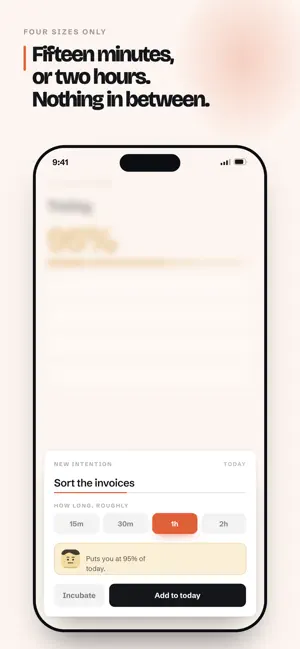
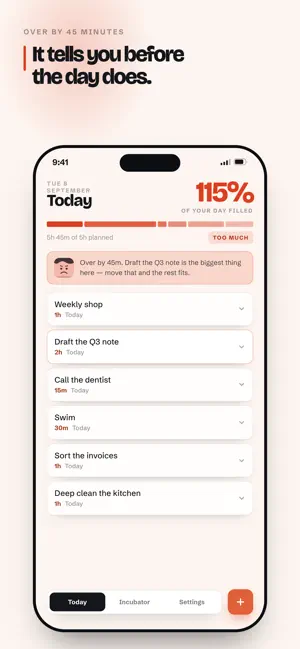
A day is a finite amount of time. Not an infinite list. Most to-do apps let you keep on adding. With no restrictions. Intentions asks how much of the day is actually yours to allocate to tasks — three hours, five, eight ‚ then shows that time filling up as you add to it. When the bar turns red, it is not a warning. It is arithmetic. HOW IT WORKS Add an intention and give it a rough length: 15 minutes, 30, an hour, or two. No sliders, no minute-by-minute entry — false precision is one of the key things that Intentions argues against. The availability bar keeps the running total so you don't have to. Swipe right when something is finished. Swipe left into the Incubator, where it waits - sorted by how long it has been waiting - until you're reading to bring it back into the day. SOMEONE TO KEEP YOU HONEST Pick a coach. Bea is warm and firm and wants you to finish. Nigel keeps score and raises an eyebrow. Ivy does not do pep talks and what simply tell you when something doesn't fit. They watch how your day is stacking up and say something about it: in the morning check-in, in the evening round-up, and when an intention has been carried for five days and needs a genuine decision rather than another chance to carry over. Rename them, swap them when you need a different personality to guide you, or hide them and go at it without guidance. WHAT ELSE DOES INTENTIONS OFFER 1. A dedicated home screen widget: what is next and how full the day is 2. Siri capture — say "Add to my Intentions" and it lands in your Incubator with the app shut 3. A morning check-in and an evening round-up, at times you choose 4. Midnight rollover — anything unfinished incubates or rolls over. Your choice 5. An options that simply refuses anything taking today past your hours 6. Backup to a single file, kept somewhere of your choosing to restore at a time that suits you NO ACCOUNT. NO CLOUD. NO WATCHING There is nothing to sign up for. Your intentions live on your device in a database only this app can read. Nothing is uploaded, nothing is analysed, and there is no server to lose it from. A backup goes where you send it and nowhere else. Terms of Use (EULA): https://www.apple.com/legal/internet-services/itunes/dev/stdeula/
What’s new
Version 1.0.3 · Updated September 24, 2026
Focus Mode one intention, one timer, nothing else on screen. Sprints run 10 to 20 minutes depending on the size of the thing, and you are never asked to finish it - only to start. Stop partway and you can leave yourself a line about where you got to, so next time doesn't start from nothing. The app icon can carry your count Turn it on and the icon shows how many intentions are still in Today, until the day is clear. Both additions are off until you ask for them, in Settings.
App privacy
The developer, Paul Morris, reported these privacy practices to Apple.
Data Not Collected
The developer does not collect any data from this app.
Alternatives to Intentions: Day & Task Planner
Looking for apps like Intentions: Day & Task Planner? Here are 6 similar apps on the App Store. The highest rated is Life AI: Organize Your Life (5.0/5), and 5 of the 6 are free to download.
-
 Toi 'n' Moi® FactCheck Pro
-
 Life AI: Organize Your Life
5.0
Life AI: Organize Your Life
5.0
-
 CalmTask
5.0
CalmTask
5.0
-
 MyScanner: Scan PDF & QR Code
5.0
MyScanner: Scan PDF & QR Code
5.0
-
 Coleva
-
 AltNotes – AI Voice Notes
| App | Rating | Price | Last updated | Compare |
|---|---|---|---|---|
| Intentions: Day & Task Planner | – | Free | September 24, 2026 | |
| Toi 'n' Moi® FactCheck Pro | – | 2.99 USD | Oct 10, 2026 | Compare |
| Life AI: Organize Your Life | 5.0 / 5 (8) | Free | Oct 14, 2026 | Compare |
| CalmTask | 5.0 / 5 (2) | Free | Oct 22, 2026 | Compare |
| MyScanner: Scan PDF & QR Code | 5.0 / 5 (6) | Free | Oct 19, 2026 | Compare |
| Coleva | – | Free | Aug 6, 2026 | Compare |
| AltNotes – AI Voice Notes | – | Free | Oct 12, 2026 | Compare |