

Xpense Budget Manager
Yigit Tamer Finance iPhoneiPadiPod touch
Xpense Budget Manager is a free Finance app for iPhone and iPad by Yigit Tamer. Requires iOS 17.0. Updated October 19, 2026.
- Price
- Free
- on the App Store
- Size
- 19 MB
- Age 4+
- Updated
- Oct 19
- 2026 · v1.0.4
Screenshots

About Xpense Budget Manager
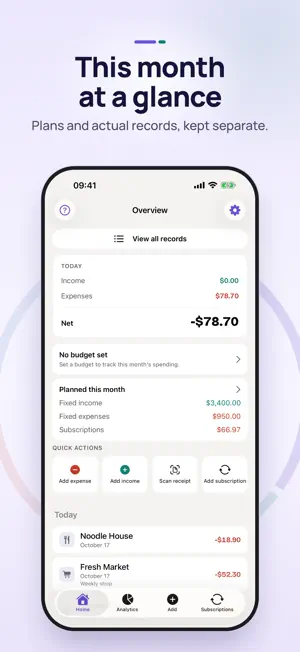
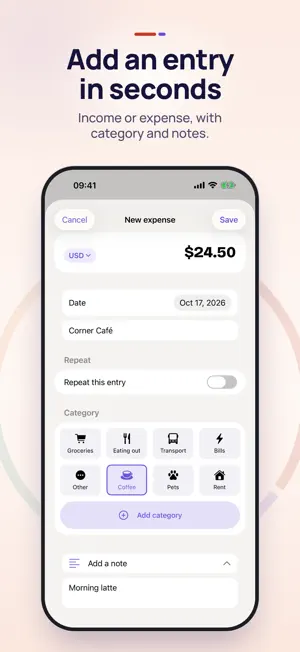
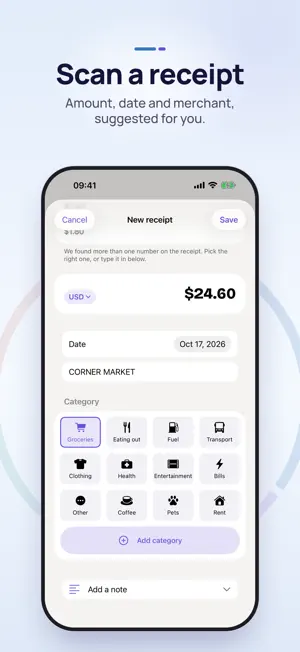
Xpense Budget Manager is an iPhone expense and income tracker for logging spending, setting a monthly budget, scanning receipts on your device, and planning recurring bills and subscriptions. It needs no account and no bank connection. You enter or scan your own records, and they are stored on your device and, if iCloud is on, in your own iCloud account. Xpense is free to download. It shows ads and has no in-app purchases. TRACK EXPENSES AND INCOME • Add an expense or income entry with an amount, date, category and optional note. • Start with ready-made categories or create your own while adding a record. • Keep separate books, each with its own records and budget. • Review any period in Analytics: income, expenses and net, with a category chart. Tap a slice to see its share. SET A MONTHLY BUDGET • Set a total monthly budget and optional limits for each category. • Only expenses count against the budget; income is never subtracted. • Optional alerts on your iPhone at 80% of a limit and when a limit is exceeded. SCAN RECEIPTS • Use the camera or choose a receipt photo from your library. • Text recognition runs on your device and suggests the merchant, date and total. • You review and confirm the amount before saving. The receipt photo is not stored. PLAN RECURRING BILLS AND SUBSCRIPTIONS • Repeat income or expenses daily, weekly, monthly or yearly, with an optional end. • See this month's planned amounts separately from your actual records. • A due payment becomes an actual record only after you confirm it. Stopping a repeat keeps past entries. • Track subscriptions with billing dates and optional payment reminders. MORE THAN ONE CURRENCY • Choose a main currency and record entries in other currencies. • Amounts convert with European Central Bank reference rates for the date of each record (the previous business day on weekends and holidays). EXPORT • Export a CSV report for a selected period after watching a short rewarded video ad, when one is available. ADS • Banner ads appear on some screens, an occasional full-screen ad appears after you save entries, and a rewarded video is used for CSV export. • On first launch you choose personalized or limited ads. You can change this at any time in Settings > Privacy and iCloud > Advertising privacy. ALSO • Light and dark appearance, 19 app languages and an in-app help guide. • Delete all of your data from Settings at any time. Xpense is a record-keeping tool. It does not give financial, tax or accounting advice.
What’s new
Version 1.0.4 · Updated October 19, 2026
Version 1.0.4 makes terms and ad choices clearer. • A Terms of Service and Privacy Policy screen now appears the first time you open the app. • The ad choice screen gives Personalized and Limited ads equal weight, with a plain explanation of each. • Settings > Privacy and iCloud > Advertising privacy shows your current choice and lets you change it at any time. • New "Report an ad" option for ads that are not appropriate. • The Privacy Policy now opens inside the app, and Settings links to the Terms of Service. • We removed one ad network from the app. • The new screens are available in all 19 app languages.
App privacy
The developer, Yigit Tamer, reported these privacy practices to Apple.
Data Used to Track You
The following data may be used to track you across apps and websites owned by other companies:
- Location: Coarse Location
- Identifiers: Device ID
- Usage Data: Advertising Data
Data Linked to You
The following data, which may be collected and linked to your identity, may be used for the following purposes:
- Location: Coarse Location
- Identifiers: Device ID, User ID
- Usage Data: Advertising Data
- Diagnostics: Performance Data
- Other Data: Other Data Types
- User Content: Customer Support
Used for: Third-Party Advertising, Analytics, App Functionality
Data Not Linked to You
The following data, which may be collected but is not linked to your identity, may be used for the following purposes:
- Usage Data: Product Interaction, Advertising Data
- Diagnostics: Other Diagnostic Data
Used for: Third-Party Advertising, Analytics, App Functionality
Alternatives to Xpense Budget Manager
Looking for apps like Xpense Budget Manager? Here are 6 similar apps on the App Store. The highest rated is ExpenseJar: Track & Budget (5.0/5), and all 6 are free to download.
-
 TNC Mikro
-
 TEG Mobil
-
 Tutar: Budget & Expenses
-
 ExpenseJar: Track & Budget
5.0
ExpenseJar: Track & Budget
5.0
-
 Central Soya FCU Mobile
-
 CuzdanApp - Budget Tracker
| App | Rating | Price | Last updated | Compare |
|---|---|---|---|---|
| Xpense Budget Manager | – | Free | October 19, 2026 | |
| TNC Mikro | – | Free | Jul 14, 2026 | Compare |
| TEG Mobil | – | Free | Oct 16, 2026 | Compare |
| Tutar: Budget & Expenses | – | Free | Oct 12, 2026 | Compare |
| ExpenseJar: Track & Budget | 5.0 / 5 (1) | Free | Mar 23, 2026 | Compare |
| Central Soya FCU Mobile | – | Free | Feb 23, 2026 | Compare |
| CuzdanApp - Budget Tracker | – | Free | Nov 14, 2025 | Compare |