

Relock: Block Apps & Focus
Yaya Mouhamad Nourouddine Productivity iPhoneiPadiPod touch
Relock: Block Apps & Focus is a free Productivity app for iPhone and iPad by Yaya Mouhamad Nourouddine. Rated 4.5/5 from 2 ratings. Requires iOS 16.0.
- Rating
- 4.5
- 2 ratings
- Price
- Free
- on the App Store
- Size
- 67 MB
- Age 4+
- Updated
- Sep 23
- 2026 · v1.0.3
Screenshots

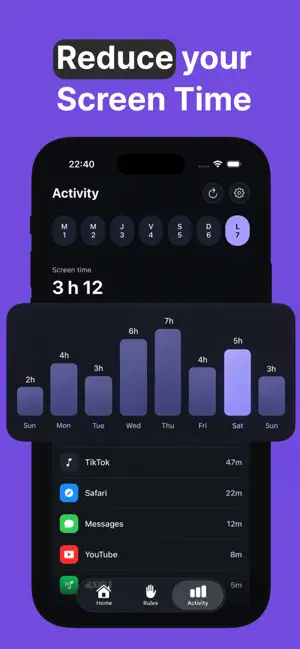

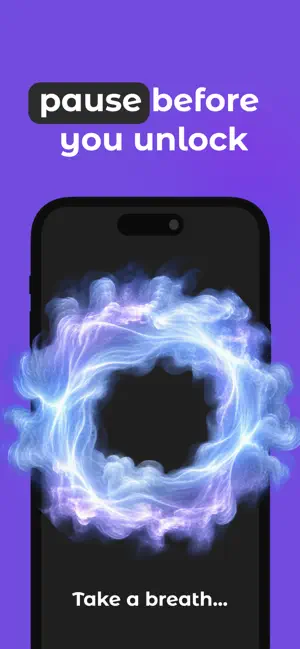
About Relock: Block Apps & Focus
Take your attention back. You open an app without thinking. Five minutes quietly become fifty. Relock puts a pause between the reflex and the scroll — just long enough to remember what you actually wanted to do. CHOOSE WHAT NEEDS PROTECTING Select apps and categories through Apple Screen Time controls. You decide what matters, not a preset list. BUILD A RULE AROUND YOUR DAY Schedules, durations, daily limits, rule modes. Shape the boundary that fits your morning, your work session, your wind down — from a light block to strict mode when you really mean it. A PAUSE WITH A PURPOSE When a protected app is restricted, Relock creates a clear interruption with the context of your rule. Not another notification. A moment to choose. CHANGE IT WHEN LIFE CHANGES Edit, suspend, resume, or reset your rules. No two days are the same, and your boundaries should not be either. PROGRESS WITHOUT PRESSURE Interventions, estimated time saved, streaks. Information, not judgment. CALM BY DESIGN A focused interface and restrained feedback. An app that helps you look at your screen less should not demand more of your attention. YOUR PRIVACY Relock does not read your messages, your photos, or the contents of restricted apps. Apple provides opaque selection tokens that stay local on your device. JSON export and account deletion are available anytime in Settings. Start with the app that steals five minutes. Build the pause that gives them back. Relock is built around Apple Screen Time controls, for iPhone. Support: [email protected] Terms of Use (EULA): https://getrelock.com/terms/ Privacy Policy: https://getrelock.com/privacy/ Apple standard EULA: https://www.apple.com/legal/internet-services/itunes/dev/stdeula/
What’s new
Version 1.0.3 · Updated September 23, 2026
Bug fix
App privacy
The developer, Yaya Mouhamad Nourouddine, reported these privacy practices to Apple.
Data Not Linked to You
The following data, which may be collected but is not linked to your identity, may be used for the following purposes:
- Contact Info: Email Address, Name
- User Content: Photos or Videos, Other User Content
- Identifiers: User ID
- Usage Data: Product Interaction
- Diagnostics: Crash Data, Other Diagnostic Data
- Other Data: Other Data Types
Used for: Analytics, Product Personalization, App Functionality
Alternatives to Relock: Block Apps & Focus
Looking for apps like Relock: Block Apps & Focus? Here are 6 similar apps on the App Store. The highest rated is Holdback: App Blocker & Steps (5.0/5), and all 6 are free to download.
-
 blok.
blok.
-
 Holdback: App Blocker & Steps
5.0
Holdback: App Blocker & Steps
5.0
-
 Retime: Screen Time
-
 Sunote: AI Voice Note Taker
5.0
Sunote: AI Voice Note Taker
5.0
-
 PawLock: Screen Time Blocker
-
 Wecker - Alarm to Wake Up
5.0
Wecker - Alarm to Wake Up
5.0
| App | Rating | Price | Last updated | Compare |
|---|---|---|---|---|
| Relock: Block Apps & Focus | 4.5 / 5 (2 ratings) | Free | September 23, 2026 | |
| blok. | – | Free | Jul 2, 2026 | Compare |
| Holdback: App Blocker & Steps | 5.0 / 5 (1) | Free | Sep 7, 2026 | Compare |
| Retime: Screen Time | – | Free | Oct 12, 2026 | Compare |
| Sunote: AI Voice Note Taker | 5.0 / 5 (1) | Free | Oct 12, 2026 | Compare |
| PawLock: Screen Time Blocker | – | Free | Oct 3, 2026 | Compare |
| Wecker - Alarm to Wake Up | 5.0 / 5 (2) | Free | Aug 1, 2026 | Compare |