

HomeStretch Countdown
ONY Services Group Korlatolt Felelossegu Tarsasag Utilities iPhoneiPadiPod touch
HomeStretch Countdown is a free Utilities app for iPhone and iPad by ONY Services Group Korlatolt Felelossegu Tarsasag. Requires iOS 26.0.
- Price
- Free
- on the App Store
- Size
- 23 MB
- Age 4+
- Updated
- Sep 12
- 2026 · v1.0.2
Screenshots


About HomeStretch Countdown
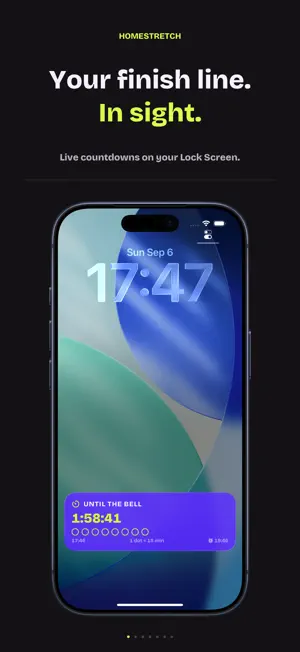
The part of the day you actually watch the clock for is the last one. HomeStretch puts that part on your Lock Screen. Make a counter for whatever you are inside of — the school day, the shift, the workday, the workout, the fast — and say when it ends. That is the whole setup. When the end gets close, a Live Activity appears on its own, counts down, and goes away when you have made it. WHAT YOU GET • Six templates to start from: School day, Shift, Workday, Workout, Fast, or your own • Repeating counters on the weekdays you pick, one-off counters, and quick countdowns • Six countdown styles: digits, dots, bar, ring, an LED clock, and a sentence you write yourself • Six palettes, all readable on a bright screen • Dynamic Island, Home Screen and Lock Screen widgets, and wherever iOS mirrors Live Activities: Apple Watch Smart Stack and StandBy • A notification when the home stretch starts, and one when it is over • Dynamic Type and VoiceOver throughout ONE HONEST LIMIT iOS ends every Live Activity after eight hours, so a home stretch is at most 7 hours 45 minutes long. If the end is days away, a widget carries the countdown until then and the Lock Screen takes over by itself when the home stretch begins. There are no background tricks here: HomeStretch does not run while you are not looking, and it does not need to. HOMESTRETCH PRO Free gives you one counter, the digits and dots styles, three palettes and one widget configuration — enough for the one thing you count down every day. HomeStretch Pro adds: • Unlimited counters • All six styles, including bar, ring, sentence and the LED clock • All six palettes • Your own sentence templates around the countdown • Siri Shortcuts and a Control Center button • Quick countdowns straight from Shortcuts • End a countdown with an alarm that rings through Silent mode and Focus Three plans: Yearly and Monthly are auto-renewing subscriptions — Yearly opens with a 7-day free trial — and Lifetime is a single purchase, not a subscription. The price in your own currency is shown before you buy, and you can restore a purchase on any of your devices. PRIVACY No account, no sign-in, no ads, no analytics beyond purchases. Your counters and your history stay on your device. Notifications are scheduled locally — there is no push and no server of ours. TERMS Terms of Use (EULA): https://www.apple.com/legal/internet-services/itunes/dev/stdeula/ Privacy Policy: https://onygroup.hu/homestretch/privacy/
What’s new
Version 1.0.2 · Updated September 12, 2026
• Share HomeStretch with a friend straight from Settings, and rate it there too. • Stability: fixes a crash on iOS 26.4 when the Today screen refreshed, and one when a counter was deleted while HomeStretch was updating in the background.
App privacy
The developer, ONY Services Group Korlatolt Felelossegu Tarsasag, reported these privacy practices to Apple.
Data Not Collected
The developer does not collect any data from this app.
Alternatives to HomeStretch Countdown
Looking for apps like HomeStretch Countdown? Here are 6 similar apps on the App Store. The highest rated is Easy Timesheet: Ore Lavoro (4.7/5), and all 6 are free to download.
-
 Salary Calculator Croatia
-
 Controlla Punti Burraco
-
 Price & Margin Calculator
-
 Quick Count: Cash Calculator
-
 DoneAt: Shift Countdown Timer
-
 Easy Timesheet: Ore Lavoro
4.7
| App | Rating | Price | Last updated | Compare |
|---|---|---|---|---|
| HomeStretch Countdown | – | Free | September 12, 2026 | |
| Salary Calculator Croatia | – | Free | Jun 20, 2026 | Compare |
| Controlla Punti Burraco | – | Free | Oct 5, 2026 | Compare |
| Price & Margin Calculator | – | Free | Jul 15, 2026 | Compare |
| Quick Count: Cash Calculator | – | Free | Oct 4, 2026 | Compare |
| DoneAt: Shift Countdown Timer | – | Free | Oct 16, 2026 | Compare |
| Easy Timesheet: Ore Lavoro | 4.7 / 5 (3) | Free | Sep 21, 2026 | Compare |