

Ortholinear Keyboard
Igor Varyvoda Utilities iPhoneiPadiPod touch
Ortholinear Keyboard is a free Utilities app for iPhone and iPad by Igor Varyvoda. Requires iOS 17.0. Updated October 27, 2026.
- Price
- Free
- on the App Store
- Size
- 27 MB
- Age 4+
- Updated
- Oct 27
- 2026 · v0.7.0
Screenshots



About Ortholinear Keyboard
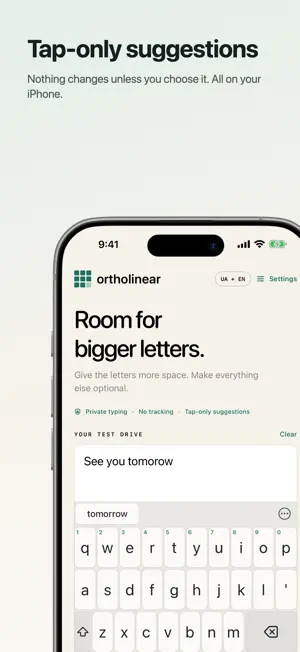
Big fingers deserve room to type. Standard keys feel cramped under your thumbs? Ortholinear is built for bigger fingers, with wider keys, larger letters, and adjustable spacing. Give your hands more generous touch targets and a layout that fits the way you type. Ortholinear is a Ukrainian and English keyboard for iPhone and iPad, with optional layouts for Polish, German, French, Spanish, Czech, Slovak, Croatian, Bosnian, Montenegrin, Serbian (Latin and Cyrillic), Swedish, Norwegian, Danish, Dutch, and Russian. Straight rows and equal-width letter cells make the most of the available space. Choose a preset or adjust the keyboard to suit your hands. MAKE THE SPACE YOURS • Start with Big letters, Balanced, or Original grid. • Adjust letter size, key height, control-row height, and spacing with a live preview. • Give Return and Delete more room, with Delete immediately after M / Ю. • Keep Ukrainian letters free of an apostrophe key. • Add a space after punctuation automatically, or turn it off. • Choose Shift placement and optional punctuation keys. • Extend touch targets into the gaps between keys. • Choose Warm Light, Soft Dark, High Contrast, Tokyo Night, Catppuccin Mocha, Nord, or Automatic themes, plus your own accent color. TYPE FASTER • Glide typing in English and Ukrainian: slide across the letters of a word and lift. • Sentences start with a capital on their own, and two Spaces end a sentence with a period. • Punctuation waits in the suggestion row between words, one tap away. • Flick a top-row key down for its digit, or turn on a number row. • Typed a Ukrainian word with the English layout on? One tap fixes it and switches language. UKRAINIAN + ENGLISH • Switch languages with one tap. • Type the full Ukrainian alphabet; hold г for ґ and Г for Ґ. • Optionally move ї to long-press і for a wider top row, with small hints to help you find held letters. • Access numbers, symbols, and punctuation alternatives. • Hold 123, slide to a symbol, and release to type it and return to letters. • Keep 123 / ABC at the far left, with clear feedback on keyboard controls. • Slide on Space to move the cursor. • Double-tap Shift for caps lock. Hold Delete to erase gradually faster. MORE LANGUAGES AND LAYOUTS • Add Polish, German, French, Spanish, Czech, Slovak, Croatian, Bosnian, Montenegrin, Serbian (Latin and Cyrillic), Swedish, Norwegian, Danish, Dutch, and Russian; the language key cycles through the ones you turn on. • Hold letters for accented forms such as ą, ß, é, ř, and ё. • Type English in QWERTY, Colemak, Colemak-DH, Dvorak, or Workman. • Message, search, email, and web address fields each reopen in the language you last used in them. MAKE IT YOURS • Layout Workshop: move letters, choose what each key holds, and try it before applying. Free. • Share a layout as a file, or open one someone else made. ORTHOLINEAR PRO: ONE PURCHASE, NO SUBSCRIPTION • Flicks on any key: swipe up, down, left or right for a symbol. One tap puts ! @ # on every letter. • Keycap colorways: eight keycap sets, or your own colors, fonts and sculpted keycaps. • Navigation keys: move by word or line, delete whole words, type ( ) with the cursor inside. • Text expansions: type ;mail and get your email address. • Layers for math, code and writing, phrase keys, and saved setups you can switch and share. Everything that was free stays free. YOUR WORDS STAY YOURS Typing works without Full Access. No analytics, ads, app accounts, or typed-text collection. Typing and settings stay on your device. Nothing is autocorrected: optional word suggestions run on your device and change a word only when you tap one. TRY IT BEFORE ENABLING Use the interactive keyboard preview inside the app, customize your layout, then follow the setup guide to enable Ortholinear in iOS Settings. Works in apps that allow third-party keyboards. iOS uses its own keyboard for password and phone-pad fields. Some apps disable third-party keyboards. Open source under the MIT license.
What’s new
Version 0.7.0 · Updated October 27, 2026
• A new install starts with the languages your iPhone or iPad already uses: on a Polish iPhone, Ortholinear starts with the Polish layout. Change them any time in Settings > Languages and layouts. • French can type on QWERTY (Canada) as well as AZERTY, and Canadian French iPhones start on QWERTY.
App privacy
The developer, Igor Varyvoda, reported these privacy practices to Apple.
Data Not Collected
The developer does not collect any data from this app.
Alternatives to Ortholinear Keyboard
Looking for apps like Ortholinear Keyboard? Here are 6 similar apps on the App Store. The highest rated is MyAIDictation - AI Keyboard (5.0/5), and all 6 are free to download.
-
 MyAIDictation - AI Keyboard
5.0
-
 SenLangEdit
-
 CountStamp: Tally Counter Log
-
 Widgo: Clock Widget
-
 Tanglish
5.0
-
 Ultrasonic Pest Shield
| App | Rating | Price | Last updated | Compare |
|---|---|---|---|---|
| Ortholinear Keyboard | – | Free | October 27, 2026 | |
| MyAIDictation - AI Keyboard | 5.0 / 5 (3) | Free | Jun 19, 2026 | Compare |
| SenLangEdit | – | Free | Sep 19, 2026 | Compare |
| CountStamp: Tally Counter Log | – | Free | Sep 5, 2026 | Compare |
| Widgo: Clock Widget | – | Free | Jan 17, 2026 | Compare |
| Tanglish | 5.0 / 5 (3) | Free | Jun 16, 2026 | Compare |
| Ultrasonic Pest Shield | – | Free | Oct 19, 2026 | Compare |