

MultiEdit: Batch Photo Editor
SK Corp. Photo & Video iPhoneiPadiPod touch
MultiEdit: Batch Photo Editor is a free Photo & Video app for iPhone and iPad by SK Corp. Requires iOS 17.0. Updated October 22, 2026.
- Price
- Free
- on the App Store
- Size
- 246 MB
- Age 4+
- Updated
- Oct 22
- 2026 · v1.1.4
Screenshots
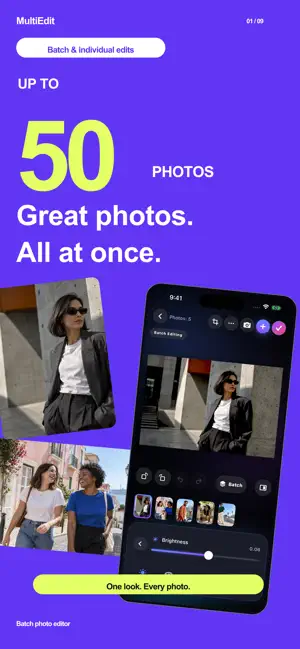


About MultiEdit: Batch Photo Editor
Edit, resize, and save up to 50 photos together. MultiEdit is a batch photo editor that applies consistent adjustments across multiple images while letting you fine-tune individual photos. Save time on travel shots, everyday memories, portraits, and product photos for your online shop. BATCH EDITING WITH INDIVIDUAL CONTROL Adjust brightness, contrast, saturation, warmth and more across multiple photos. Switch to individual editing for each photo's finishing touches, and compare your edits with the original. JPEG, PNG & RESIZING Choose JPEG or PNG when saving. Resize your exports from 10% to 200% and preview each photo's output pixel dimensions before saving. PREVIEW & SAVE Review your results on the editing completion screen. Save all photos or select several favorites to save to Photos or Files. MAGIC TOOLS • Batch Skin Retouch: adjust skin smoothness and brightness across selected photos. Tap or brush over individual blemishes, with zoom, comparison and undo support. • Batch Background Removal: remove backgrounds from selected photos together. Keep them transparent, choose a background color, or refine the cutout with an eraser. • Batch Background Blur: keep subjects clear while adjusting background blur across selected photos. • Magic Eraser: brush over unwanted objects to remove them. Zoom in for detail and undo your changes. • Batch Watermarks: add text or logos to multiple photos. Adjust fonts, colors, size, angle, opacity, repeating layouts and grids. • Batch Crop: choose an aspect ratio and frame multiple photos together. • Match With Reference: use a reference photo to guide color and light adjustments across selected photos. RETRO FILTERS & FILM LOOKS Explore 12 retro film looks, from vintage-inspired colors to textured grain. Adjust grain, motion blur and fade to make each look your own. Increase fade to soften the effect and bring back more of the original photo. Apply a look to your whole set or fine-tune one photo at a time. FILTERS, BLUR & MOSAIC Change the mood with filters, or apply blur and mosaic to entire photos. Use the blur and mosaic brushes to edit just the areas you paint over. TEXT & PAINT Add multiple text elements to each photo and adjust their fonts, colors, sizes and positions independently. Draw freely with adjustable brush size and opacity, crop and rotate. SAVE YOUR PROJECTS Keep your photos and edits together in up to five saved projects, and resume later. Interrupted-edit backups have a separate space where you can restore or delete them. CAPTURE TO EDIT Take several photos in succession and edit them together. A refreshed walkthrough and highlighted controls help you get started. Photo editing takes place on your device. MULTIEDIT PRO Free Magic: 2 uses per day, resetting at local midnight. Each batch counts as one use; free background removal supports up to 50 photos per batch. Pro removes ads and Magic usage limits. Eligible new subscribers get 3 days free, then a monthly subscription. See the purchase screen for your local price and eligibility. Renews automatically unless canceled at least 24 hours before renewal. Manage or cancel in your App Store account settings. Previous lifetime ad-removal purchases remain valid. Terms of Use: https://www.apple.com/legal/internet-services/itunes/dev/stdeula/ Privacy Policy: https://skcp.net/privacy
What’s new
Version 1.1.4 · Updated October 22, 2026
Added Spanish, Brazilian Portuguese, Traditional Chinese, and Korean, including app controls and the editing guide.
App privacy
The developer, SK Corp., reported these privacy practices to Apple.
Data Used to Track You
The following data may be used to track you across apps and websites owned by other companies:
- Location: Coarse Location
- Identifiers: Device ID
- Usage Data: Product Interaction, Advertising Data
- Diagnostics: Performance Data
Data Linked to You
The following data, which may be collected and linked to your identity, may be used for the following purposes:
- Location: Coarse Location
- Identifiers: Device ID
- Usage Data: Product Interaction, Advertising Data
- Diagnostics: Performance Data
Used for: Third-Party Advertising, Analytics
Data Not Linked to You
The following data, which may be collected but is not linked to your identity, may be used for the following purposes:
- Diagnostics: Crash Data
Used for: Analytics, App Functionality
Alternatives to MultiEdit: Batch Photo Editor
Looking for apps like MultiEdit: Batch Photo Editor? Here are 6 similar apps on the App Store.


| App | Rating | Price | Last updated | Compare |
|---|---|---|---|---|
| MultiEdit: Batch Photo Editor | – | Free | October 22, 2026 | |
| PictBatch | – | Free | Sep 18, 2026 | Compare |
| ウレル:フリマ写真文字入れ・スタンプ | – | Free | Aug 31, 2026 | Compare |
| GatherCam | – | Free | Nov 26, 2024 | Compare |
| ClipJoin | – | Free | Sep 17, 2026 | Compare |
| CutOut | – | Free | Jul 8, 2026 | Compare |
| shuffle slide | – | Free | Jul 14, 2026 | Compare |