

BatchOCR
Tomokazu Shinozaki Productivity iPhoneiPadiPod touch
BatchOCR is a free Productivity app for iPhone and iPad by Tomokazu Shinozaki. Requires iOS 17.0. Updated October 18, 2026.
- Price
- Free
- on the App Store
- Size
- 7 MB
- Age 4+
- Updated
- Oct 18
- 2026 · v1.0.1
Screenshots



About BatchOCR
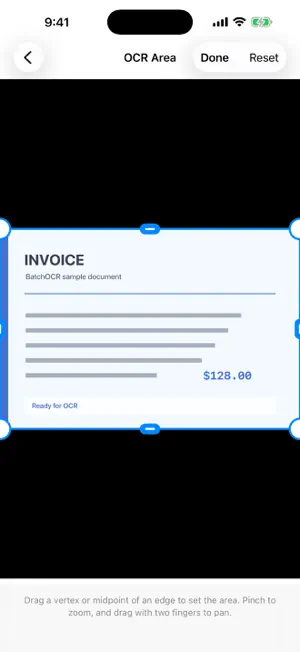
Get the text from several photos together, ready to copy into a note or share. BatchOCR turns printed Japanese and English text into editable results on your iPhone. FROM PHOTOS TO ONE TEXT RESULT 1. Choose multiple photos in the order you want to read them. 2. Adjust the recognition area for each photo when needed. 3. Extract the text and review or edit each image's result. 4. View the combined text, copy it all, or share it with another app. Each photo's text stays in selection order in the combined result, with image-number headings to help you check it against the originals. Copy an individual result when you only need one part. Useful for gathering printed instructions, reference pages, or other text spread across several photos without copying each result separately. BEFORE YOU CLOSE Results are not saved automatically. Copy or share the text you want to keep before closing OCR Results, resetting, or quitting the app. The combined-text view is for reading and copying; make corrections in each image's result before combining. RECOGNITION AND PRIVACY Recognition runs on your iPhone. Selected images and recognized text are not uploaded to a developer-operated server. No account or login is required. If a selected photo is stored in iCloud, iOS may download it according to your Apple settings. Designed for clear printed Japanese and English text. Results depend on image quality, orientation, font, layout, and language. Check the recognized text before using it. ADS AND OPTIONAL PURCHASE BatchOCR is free to download. Users without the optional Remove Ads purchase may see a Google AdMob banner on the Home and OCR Results screens. Remove Ads is a one-time, non-consumable purchase; there is no subscription. Restore Purchases is available in Settings. Google Mobile Ads and its consent component may process advertising, device, diagnostic, and consent information as described in the privacy policy. Ads and purchase services may use a network connection. Privacy policy: https://reishabu.tokyo/batchocr-privacy-policy/ Support: https://reishabu.tokyo/batchocr-support/
What’s new
Version 1.0.1 · Updated October 18, 2026
Improved English singular and plural wording for the selected-image count and OCR progress.
App privacy
The developer, Tomokazu Shinozaki, reported these privacy practices to Apple.
Data Used to Track You
The following data may be used to track you across apps and websites owned by other companies:
- Identifiers: Device ID
Data Linked to You
The following data, which may be collected and linked to your identity, may be used for the following purposes:
- Location: Coarse Location
- Identifiers: Device ID
- Usage Data: Product Interaction, Advertising Data
- Diagnostics: Performance Data
Used for: Third-Party Advertising, Analytics, App Functionality
Data Not Linked to You
The following data, which may be collected but is not linked to your identity, may be used for the following purposes:
- Diagnostics: Other Diagnostic Data, Crash Data
Used for: Third-Party Advertising, Analytics
Alternatives to BatchOCR
Looking for apps like BatchOCR? Here are 6 similar apps on the App Store. The highest rated is PDF Text Scanner [OCR] : Lens (1.0/5), and all 6 are free to download.
-
 ImViz: Image & PDF to Text OCR
-
 Scanry: PDF Scanner & OCR
-
 Papyr - Document Scanner
-
 OnlyScans: PDF & Doc Scanner
-
 Texty Copy: Fields & OCR
-
![PDF Text Scanner [OCR] : Lens](https://is1-ssl.mzstatic.com/image/thumb/Purple211/v4/b7/f8/7e/b7f87e12-fc5b-3dc9-d649-b0ae1983bdcd/AppIcon-1x_U007emarketing-0-8-0-85-220-0.png/200x200bb.webp) PDF Text Scanner [OCR] : Lens
1.0
PDF Text Scanner [OCR] : Lens
1.0
| App | Rating | Price | Last updated | Compare |
|---|---|---|---|---|
| BatchOCR | – | Free | October 18, 2026 | |
| ImViz: Image & PDF to Text OCR | – | Free | Sep 23, 2026 | Compare |
| Scanry: PDF Scanner & OCR | – | Free | Oct 7, 2026 | Compare |
| Papyr - Document Scanner | – | Free | Oct 2, 2026 | Compare |
| OnlyScans: PDF & Doc Scanner | – | Free | Oct 19, 2026 | Compare |
| Texty Copy: Fields & OCR | – | Free | Apr 23, 2026 | Compare |
| PDF Text Scanner [OCR] : Lens | 1.0 / 5 (1) | Free | Oct 6, 2025 | Compare |
Compare BatchOCR with the top alternatives: ratings, updates, ASO score and keyword gaps →