

Sign & Fill PDF - Sigvo
Mustafa Onur Kendir Productivity iPhoneiPadiPod touch
Sign & Fill PDF - Sigvo is a free Productivity app for iPhone and iPad by Mustafa Onur Kendir. Requires iOS 15.0. Updated November 25, 2026.
- Price
- Free
- on the App Store
- Size
- 32 MB
- Age 4+
- Updated
- Nov 25
- 2026 · v1.6.2
Screenshots
Save to Pinterest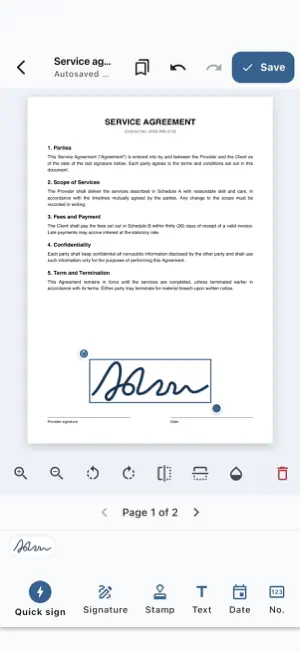


About Sign & Fill PDF - Sigvo
Sign, fill and prepare documents on your iPhone or iPad with Sigvo. Open a PDF, Word document, Excel workbook or photo, add your signature and save or share a finished PDF. Your documents are processed on your device. SIGN AND FILL Draw a signature, capture one with the camera or import a signature image. Save signatures and stamps for reuse. Add text and dates, then drag, resize and rotate each item into place. Work across multiple PDF pages and return to saved drafts. CONVERT AND SCAN Convert DOCX, XLSX and supported images to PDF without uploading the document to a conversion service. Photograph paper documents, adjust the crop and improve the scan. Review the result before sending; complex Office formatting can differ from the original. FREE EVERY DAY Opening, editing and signing are free. Save or share one completed document per day at no charge. You can save and share that same source document again on the same day. Cancelling a save or share does not use the daily allowance. There are no ads or watermarks, and no Sigvo account is required. SIGVO PRO Pro unlocks exports of additional documents each day and exports from batch document scanning. Prepare a batch and apply signatures, dates and sequential numbering across its pages before purchasing. Choose a monthly or yearly subscription for Sigvo Pro features. Monthly and yearly subscriptions renew automatically unless cancelled. Payment is charged to your Apple Account. Manage or cancel subscriptions in your Apple Account settings. The local price and billing period are shown before purchase. Purchases can be restored with the same Apple Account. YOUR DOCUMENTS, YOUR CONTROL Document processing works offline. You choose when to save or share a file with another app. Optional usage and crash reporting can be controlled in Settings. Sigvo adds a visual signature. It is not a qualified or certificate-based electronic signature service. Privacy: https://www.sigvo.app/privacy Terms of Use: https://www.apple.com/legal/internet-services/itunes/dev/stdeula/ Support: [email protected]
What’s new
Version 1.6.2 · Updated November 25, 2026
We updated the age rating information for Sigvo on the App Store.
App privacy
The developer, Mustafa Onur Kendir, reported these privacy practices to Apple.
Data Linked to You
The following data, which may be collected and linked to your identity, may be used for the following purposes:
- Purchases: Purchase History
- Location: Coarse Location
- Identifiers: Device ID
- Usage Data: Product Interaction
Used for: Analytics
Data Not Linked to You
The following data, which may be collected but is not linked to your identity, may be used for the following purposes:
- Diagnostics: Other Diagnostic Data, Crash Data
Used for: Analytics, App Functionality
Alternatives to Sign & Fill PDF - Sigvo
Looking for apps like Sign & Fill PDF - Sigvo? Here are 6 similar apps on the App Store. The highest rated is Claradrive (5.0/5), and all 6 are free to download.
-
 Signature Maker: Sign PDFs
-
 Sign PDF: Signature Maker
-
 Namma Bill
-
 Claradrive
5.0
-
 eSign Digital Signature Maker
5.0
-
 SMART FE
| App | Rating | Price | Last updated | Compare |
|---|---|---|---|---|
| Sign & Fill PDF - Sigvo | – | Free | November 25, 2026 | |
| Signature Maker: Sign PDFs | – | Free | Nov 10, 2026 | Compare |
| Sign PDF: Signature Maker | – | Free | Nov 6, 2026 | Compare |
| Namma Bill | – | Free | Sep 9, 2026 | Compare |
| Claradrive | 5.0 / 5 (15) | Free | Sep 21, 2026 | Compare |
| eSign Digital Signature Maker | 5.0 / 5 (1) | Free | Aug 1, 2026 | Compare |
| SMART FE | – | Free | Oct 7, 2026 | Compare |