

Manneung Viewer
Yongtae Kim Productivity iPhoneiPadiPod touch
Manneung Viewer is a free Productivity app for iPhone and iPad by Yongtae Kim. Requires iOS 17.0. Updated October 19, 2026.
- Price
- Free
- on the App Store
- Size
- 51 MB
- Age 4+
- Updated
- Oct 19
- 2026 · v1.3
Screenshots


About Manneung Viewer
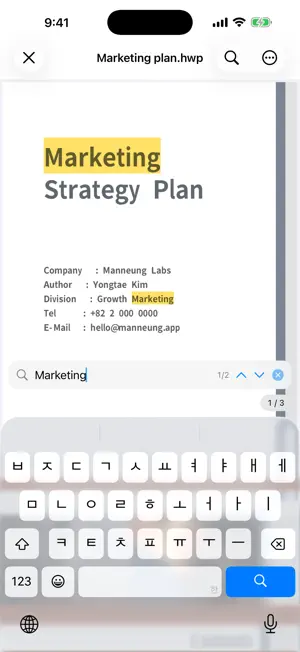
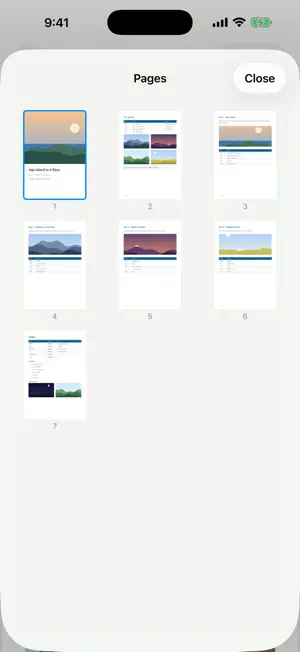
Open documents without ads or subscriptions. View PDF, Korean Hangul (HWP, HWPX, HML), Word, Excel, PowerPoint, images and text in one app. Office, images, text (RTF, TXT, CSV) and iWork (Pages, Numbers, Keynote) use the built-in iOS preview. Illustrator .ai requires a PDF-compatible file. ■ Free viewing • Search, page lists, bookmarks and favorites for PDF and Hangul; PDF outlines • Start from a renewed layout with clear document and folder open buttons, Recent, Favorites and Image Folders. • See actual PDF and image content, and HWP content when a preview is available. Continue Reading shows the last-read page preview; unavailable previews use a file-type icon. • Read image folders in single- or two-page view. Switching views keeps your position tied to the original image. • Zoom, pan and jump to a page; tap the page to hide or restore controls. Paired images keep their proportions, and a final unpaired image is centered. • Supported sharing and printing, dark mode and document color inversion • Open recent documents from Home Screen widgets and Shortcuts • iPhone and iPad ■ Pro — one-time purchase, no subscription • Save Hangul documents as PDF • PDF annotations, highlighter and pen; rotate, extract, delete and merge pages • Create PDFs from photos; add or remove PDF passwords Restore purchases with the same Apple ID. Viewing stays free. Developer tips are optional and do not unlock extra features. ■ Format limits Office-to-PDF export and Office page editing are not available. There is no OCR or scanning. DRM-protected documents cannot be opened. Hangul uses bundled fonts, so fonts may differ from the original. Document viewing and conversion happen on your device. App Store purchases, restoration and support links you choose may need a connection. Files are not sent automatically; you decide whether to attach a problem file to a support request. Use in-app support to report a problem or suggest an improvement. Files are never attached automatically. Optional developer tips are separate from support and do not unlock Pro. Developed with reference to Hancom Inc.'s publicly released HWP file format specification.
What’s new
Version 1.3 · Updated October 19, 2026
• A renewed layout and document/folder open buttons make Recent, Favorites and Image Folders easier to reach. • PDF, image and HWP content previews appear when available, with a last-read page preview for Continue Reading. A file-type icon is used when no preview is available. • Switch image folders between single- and two-page views while keeping your place in the original image sequence. • Zoom, pan, jump to a page and tap to hide or restore controls. Pairs keep their proportions; a final unpaired image is centered. • Clearer problem reports and suggestions, with no automatic file attachment. Optional developer tips are separate and add no features. • Improved preview refresh after file changes and more reliable document and folder opening. • Existing files and recent history are retained.
App privacy
The developer, Yongtae Kim, reported these privacy practices to Apple.
Data Not Collected
The developer does not collect any data from this app.
Alternatives to Manneung Viewer
Looking for apps like Manneung Viewer? Here are 6 similar apps on the App Store.


| App | Rating | Price | Last updated | Compare |
|---|---|---|---|---|
| Manneung Viewer | – | Free | October 19, 2026 | |
| Ongle: HWP·HWPX Viewer, PDF | – | Free | Sep 16, 2026 | Compare |
| 손뷰 | – | Free | Oct 13, 2026 | Compare |
| 한글·봄 | – | Free | Oct 6, 2026 | Compare |
| AllDocs - Document Viewer | – | Free | Jun 25, 2026 | Compare |
| 픽옥션:자동차경매 | – | Free | Mar 14, 2024 | Compare |
| Runn: To-Do List & Widget | – | Free | Oct 8, 2026 | Compare |
Compare Manneung Viewer with the top alternatives: ratings, updates, ASO score and keyword gaps →