

Interior Design: Decor Studio
Emir ARIKAN Graphics & Design iPhoneiPadiPod touch
Interior Design: Decor Studio is a free Graphics & Design app for iPhone and iPad by Emir ARIKAN. Requires iOS 17.0. Updated September 16, 2026.
- Price
- Free
- on the App Store
- Size
- 32 MB
- Age 4+
- Updated
- Sep 16
- 2026 · v1.0.0
Screenshots
About Interior Design: Decor Studio
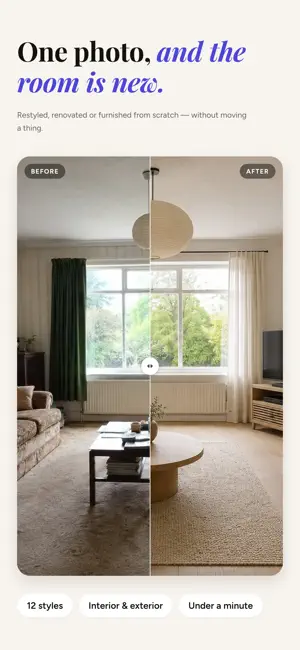
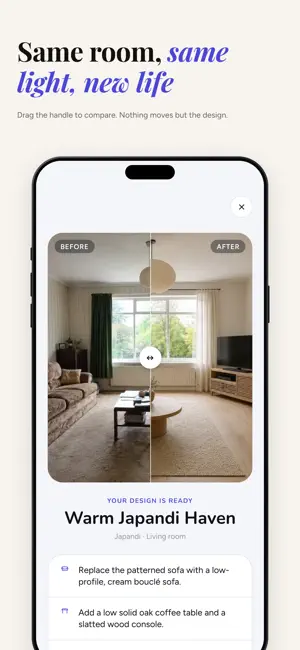
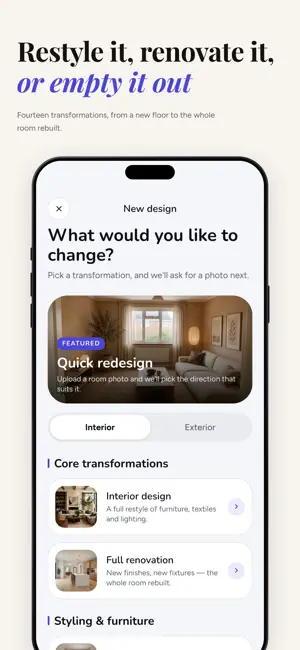
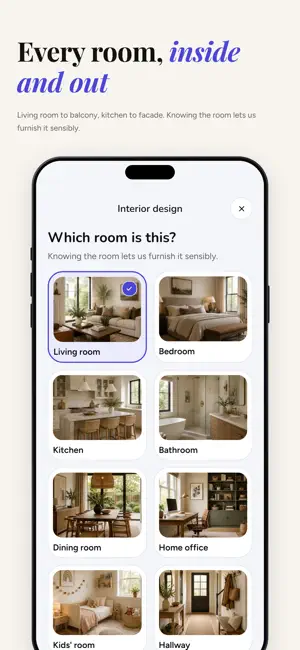
Your room, redesigned before you spend a thing. Photograph the space. Decor Studio hands back the same room — same walls, same windows, same light — restyled, refinished or refurnished the way you have been imagining it. WHY PEOPLE USE IT Paint is expensive to undo. So is a sofa. Seeing the finished room first turns a guess into a decision. THREE STEPS 1. Take a photo, or pick one from your library. 2. Choose what to change, which room it is, and a style. 3. Drag the slider to compare before and after. WHAT YOU CAN CHANGE • Interior design — furniture, textiles and lighting, completely restyled • Full renovation — new finishes, new fixtures, the whole room rebuilt • Furnish an empty room — fill a bare space at realistic scale • Remove furniture — clear it out and see the room underneath • New furniture — keep the room, swap in a whole new set • New walls — paint, plaster, panelling or wallpaper • New floors — wood, tile, concrete, marble or carpet • Exterior — facade, outdoor spaces and full exterior renovation • Your own brief — describe exactly what you want changed TWELVE STYLES Minimalist, Modern, Scandinavian, Bohemian, Mid-century, Industrial, Japandi, Coastal, Traditional, Art Deco, Modern Farmhouse and Maximalist. EVERY ROOM Living room, bedroom, kitchen, bathroom, dining room, home office, kids' room, hallway, balcony and studio. IT IS YOUR ROOM, NOT A CATALOGUE The camera angle, the proportions, the window you cannot move — all of it stays. What comes back is a picture of your own space, which is the only version worth planning against. MADE FOR Homeowners costing out a renovation. Renters working out what is possible without touching the walls. Anyone mid-move, mid-declutter, or simply tired of a room they cannot picture any other way. DECOR STUDIO PRO Your first design is free. Pro unlocks unlimited designs, full-resolution results with no blur, every transformation, and saving and sharing what you make. Subscriptions renew automatically unless cancelled at least 24 hours before the end of the current period. Manage or cancel in your Apple Account settings. No commitment — cancel anytime. Privacy Policy: https://emirarikaan.github.io/room-studio-privacy.html Terms of Use: https://emirarikaan.github.io/room-studio-terms.html
App privacy
The developer, Emir ARIKAN, reported these privacy practices to Apple.
Data Not Linked to You
The following data, which may be collected but is not linked to your identity, may be used for the following purposes:
- User Content: Photos or Videos
- Identifiers: User ID
Used for: App Functionality
Alternatives to Interior Design: Decor Studio
Looking for apps like Interior Design: Decor Studio? Here are 6 similar apps on the App Store. The highest rated is Home Makeover AI: House Design (5.0/5), and all 6 are free to download.
-
 Home Lab AI: Interior Design
-
 3dQdesign
-
 Mosaic: AI Interior Design
-
 Room: AI Home Design
-
 Room Planner: Scan & AI Fit
-
 Home Makeover AI: House Design
5.0
Home Makeover AI: House Design
5.0
| App | Rating | Price | Last updated | Compare |
|---|---|---|---|---|
| Interior Design: Decor Studio | – | Free | September 16, 2026 | |
| Home Lab AI: Interior Design | – | Free | Sep 30, 2026 | Compare |
| 3dQdesign | – | Free | Oct 20, 2026 | Compare |
| Mosaic: AI Interior Design | – | Free | Aug 13, 2026 | Compare |
| Room: AI Home Design | – | Free | Aug 23, 2026 | Compare |
| Room Planner: Scan & AI Fit | – | Free | Oct 19, 2026 | Compare |
| Home Makeover AI: House Design | 5.0 / 5 (4) | Free | Oct 13, 2026 | Compare |