

时刻时间工具箱
泽一 李 Utilities iPhoneiPadiPod touchMac
时刻时间工具箱 is a free Utilities app for iPhone and iPad by 泽一 李. Requires iOS 17.0. Updated September 9, 2026.
- Price
- Free
- on the App Store
- Size
- 2 MB
- Age 4+
- Updated
- Sep 9
- 2026 · v1.0
Screenshots
About 时刻时间工具箱
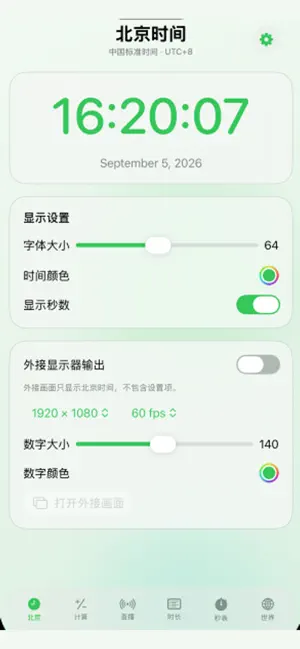
时刻时间工具箱是一款全免费、无广告的多平台时间工具集合,专为直播、演讲、活动执行、会议与日常时间管理设计。 核心功能: • 北京时间:显示精确到秒的北京时间,可自定义字体、大小、颜色、背景与布局,并支持外接显示器纯时间输出。 • 时间计算器:快速进行时、分、秒的加减与换算,适合节目编排和现场计算。 • 直播倒计时:设置开播时间,开播前以倒计时显示,开播后自动切换为正计时;标题、颜色和外接屏幕显示均可自定义。 • 时长叠加:以列表添加多个环节,自定义环节名称与时长,自动计算总时长;支持模板保存、导入导出与 XLSX 文件交换。 • 秒表:高精度计时,支持开始、暂停、复位和分段记录。 • 世界时间:查看多个城市的实时当地时间,提供卡片式、列表式和多种表盘布局,模块可拖拽排序。 支持 iPhone、iPad 与 Mac,界面可随系统在中文和英文之间切换,并提供亮色、暗色和跟随系统主题。所有核心功能永久免费使用。 App Review Information – Time Collection 1. Demonstration video A screen recording captured on a physical iPhone/iPad is provided with this submission. The recording starts by launching the app and demonstrates: - Beijing Time display - Time Calculator - Live Timer countdown and elapsed-time modes - Duration Builder with stage creation, manual time input, reordering, and deletion - Stopwatch - World Clock - External display output where supported The app does not require account registration, login, or account deletion. It does not include user-generated content, social features, or content reporting/blocking flows. 2. App purpose and target audience Time Collection is a simple time-management utility for general users, livestream hosts, presenters, teachers, event organizers, and anyone who needs accurate time displays and duration planning. It provides Beijing Time, time calculations, live countdown/elapsed timers, duration planning, stopwatch, world clocks, and external display output. 3. Setup and access instructions No account or login credentials are required. To use the main features: - Open the app and select a feature from the sidebar/tab bar. - In Live Timer, enter a title and start time to use countdown or elapsed-time mode. - In Duration Builder, add stages, enter hours/minutes/seconds manually, use “Reorder” to change the order, or swipe left on iOS/iPadOS to delete a stage. - On macOS, external display output opens a separate window that can be moved to another display. - On iOS/iPadOS, connect an external display or AirPlay device first, then enable external display output. - All data and settings are stored locally on the device. 4. External services The app does not use external services to provide its core functionality. It does not use accounts, authentication services, analytics SDKs, advertising SDKs, AI services, cloud databases, or payment processors. External display output uses the operating system’s native display APIs only. 5. Regional differences The app functions consistently across all regions. The default time display is Beijing Time (UTC+8), and users can also use the world clock feature. There is no region-specific content or functionality. 6. Regulated content and third-party material The app does not operate in a regulated industry and does not provide protected third-party content or services.
App privacy
The developer, 泽一 李, reported these privacy practices to Apple.
Data Not Collected
The developer does not collect any data from this app.
Alternatives to 时刻时间工具箱
Looking for apps like 时刻时间工具箱? Here are 6 similar apps on the App Store.


| App | Rating | Price | Last updated | Compare |
|---|---|---|---|---|
| 时刻时间工具箱 | – | Free | September 9, 2026 | |
| PinTime 灵动时钟 | – | Free | Aug 16, 2026 | Compare |
| 灰尘清理 | – | Free | Jan 8, 2026 | Compare |
| Flip Clock & Digital Widgets | – | Free | Oct 5, 2026 | Compare |
| Cool Penguin Clock | – | Free | Jul 27, 2026 | Compare |
| 普通闹钟-工作党极简使命起床闹钟 | – | Free | Mar 14, 2026 | Compare |
| 微鲤万年历-中老年关怀版 | – | Free | Dec 27, 2024 | Compare |
Compare 时刻时间工具箱 with the top alternatives: ratings, updates, ASO score and keyword gaps →