

CharangoPalette
Satoshi Nishikawa Music iPhoneiPadiPod touch
CharangoPalette is a paid Music app for iPhone and iPad by Satoshi Nishikawa. Requires iOS 16.0. Updated October 24, 2026.
- Price
- 7.99 USD
- on the App Store
- Size
- 51 MB
- Age 4+
- Updated
- Oct 24
- 2026 · v1.5.1
Screenshots


About CharangoPalette
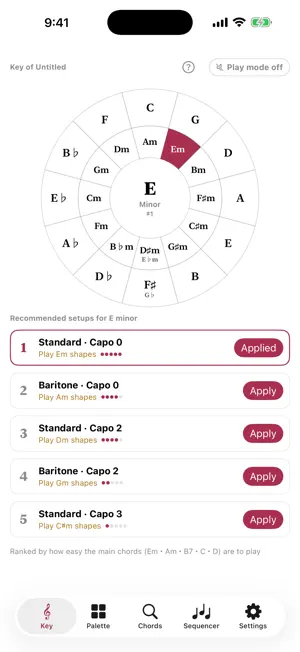
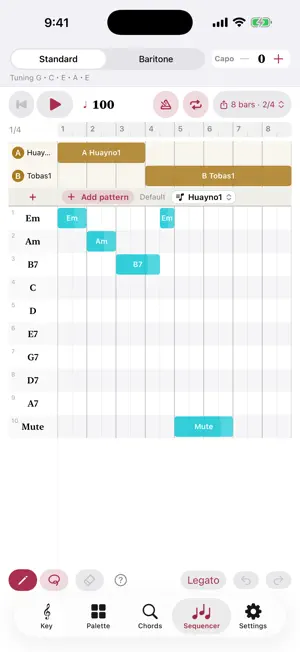
Any key, every fingering on one screen. Build a progression, hear real charango backing. Charango Palette is a chord chart and strumming simulator for the charango (and the ronroco, the baritone charango). Just pick the song's key on the circle of fifths and the palette fills with the chords and fingerings for that key, along with a suggested capo position and instrument. Press a card and it strums with the sound of a real charango recorded note by note; lay out a chord progression and rhythm patterns, and the app plays the accompaniment and exports it as audio. ■ Pick a key, get the chords for the song Tap the key on the circle of fifths and the palette fills with the diatonic chords plus the usual secondary chords. The app also suggests standard or baritone and where to put the capo. No more puzzling over how to play a song in Cm. ■ Press a card, hear the real thing Turn on play mode and every chord card strums when you press it. Press the right side of a card for a downstroke and the left side for an upstroke; the higher you press, the stronger the strum. 316 real samples, recorded note by note from a charango and a ronroco, with low latency, so playing along at tempo feels good (Bluetooth audio adds delay). ■ Play folklore rhythms as they are Turn on pattern play and the strumming pattern loops for as long as you hold a card, stopping when you let go. 64 presets across 14 genres: huayno, cueca, bailecito, carnaval, tobas, diablada, morenada, tinku, caporal, zamba, taquirari, chuntunqui, chacarera and saya. Change the tempo on the spot, and put a Mute card on the palette to play the rhythm on left-hand muted strings. ■ Build a progression, get an accompaniment Put chord changes and pattern switches on a piano roll and let the app play them back. Set the tempo, bar count, meter (2/4, 3/4, 4/4, 6/8), a count-in before playback and the loop range. Save as many songs as you like by name. Export the accompaniment as WAV (24-bit) or M4A and hand it to Files, AirDrop, Messages and more. You may use the exported audio freely in your own work (videos, streams, songs), including commercially (redistribution as a sample pack is not allowed). ■ 686 chord shapes, plus your own Search for the chord you are curious about and hear exactly that fingering. Chord diagrams can show left-hand finger numbers, and you can register your own shapes with a name and put them on the palette. When you have a shape but not its name, the app suggests the chord names that fit. ■ Focus mode: nothing but the cards Tap Focus on the palette and the chord cards fill the screen. Scrolling and editing are off, so a stray touch can't get in the way. Switch patterns with the buttons at the bottom and change the tempo at the top. ■ Build your own patterns Enter down/up and partial strokes, repique, chasquido, golpe, tapa and accents on a step grid, then loosen it up with early/late timing, swing and humanize. 8th, 16th and triplet grids; length from half a bar up. You can also duplicate a preset and adjust it. ■ Also • Tuner (A4 reference pitch adjustable) • Optional degree names, diagram size • iPhone and iPad, portrait or landscape • Japanese, English, Spanish, French, German and Portuguese • Recorded with a NEUMANN KM184 microphone No account, no network. Everything stays on your device; nothing is collected or sent.
What’s new
Version 1.5.1 · Updated October 24, 2026
• Shorter, clearer on-screen text (Key screen, chord search, and the Sequencer / pattern editor help).
App privacy
The developer, Satoshi Nishikawa, reported these privacy practices to Apple.
Data Not Collected
The developer does not collect any data from this app.
Alternatives to CharangoPalette
Looking for apps like CharangoPalette? Here are 6 similar apps on the App Store. The highest rated is JigRipper (5.0/5).
-
 JigRipper
5.0
-
 iCathedral Organ
3.7
-
 VocaLive for iPad
-
 AudioMaster Pro: Mastering DAW
4.7
-
 Aries Rotary Speaker & Amp
4.9
-
 Reverb - FDN
4.4
| App | Rating | Price | Last updated | Compare |
|---|---|---|---|---|
| CharangoPalette | – | 7.99 USD | October 24, 2026 | |
| JigRipper | 5.0 / 5 (1) | 6.99 USD | Oct 16, 2026 | Compare |
| iCathedral Organ | 3.7 / 5 (15) | 14.99 USD | Jan 19, 2026 | Compare |
| VocaLive for iPad | – | 24.99 USD | Sep 28, 2026 | Compare |
| AudioMaster Pro: Mastering DAW | 4.7 / 5 (662) | 99.99 USD | Oct 7, 2026 | Compare |
| Aries Rotary Speaker & Amp | 4.9 / 5 (10) | 14.99 USD | Nov 25, 2024 | Compare |
| Reverb - FDN | 4.4 / 5 (14) | 4.99 USD | Sep 21, 2026 | Compare |
Compare CharangoPalette with the top alternatives: ratings, updates, ASO score and keyword gaps →