

Keging: Kegel Timer
YECHAN SONG Health & Fitness iPhoneiPadiPod touchApple Watch
Keging: Kegel Timer is a free Health & Fitness app for iPhone and iPad by YECHAN SONG. Requires iOS 18.0. Updated October 14, 2026.
- Price
- Free
- on the App Store
- Size
- 7 MB
- Age 4+
- Updated
- Oct 14
- 2026 · v1.2.2
Screenshots



About Keging: Kegel Timer
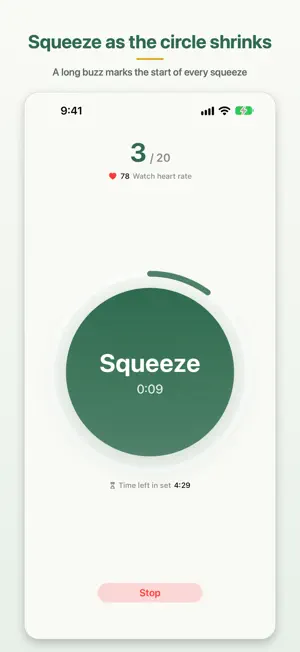
Keging — a Kegel timer that guides you by feel Squeeze. Relax. Repeat. Keging runs your squeeze-and-relax cycles for the seconds and reps you choose, and tells you each phase with a vibration. Completely free — no ads, no purchases. ■ How it works • One big Start button. A short countdown, then your first squeeze begins • Squeeze as the circle shrinks, let go as it swells • Finish every rep and the set is saved. A set you stop midway isn't recorded ■ Pick a preset • A preset is one cycle: ready time, squeeze, relax, reps, rounds. You start with "Default" (10 s squeeze, 5 s relax, 20 reps, about 5 minutes) • Swipe left or right on the main screen to switch presets, then tap Start • Ready 0–10 s, squeeze and relax 1–60 s, 1–100 reps. Make as many presets as you like • Rounds — do several sets in a row with a rest in between. Each set is recorded • Your presets are sent to Apple Watch as they are ■ Haptic cues — no need to look • Squeeze and relax start with different vibrations, so you know what to do with the phone in your pocket • Three patterns (Standard, Two Taps, Long Buzz) for squeeze and relax, with a preview • Sound cues too (chime, beep or voice), or silent for haptics only. Optional 3-second countdown • A long celebratory buzz when you finish • Timer and haptics keep going in other apps or with the screen off ■ Dynamic Island and Lock Screen • Leave the app mid-workout and a live status appears in the Dynamic Island and on the Lock Screen • The set is drawn as a timeline in squeeze (mint) and relax (amber), with a line that moves in real time and the remaining time • A Stop button on the Lock Screen and in the island — end a set without opening the app • A "Discreet Display" with the timeline only, and optional phase banners in other apps ■ Widgets and Control Center • Widgets (small, medium, large): today's sets and reps, the last 7 days, recent records and a Start button • Add a Start control to Control Center or the Lock Screen • Assign a preset to a widget or control, or tell Siri "Start (preset) in Keging" • A watch complication opens Keging ■ Apple Watch • Open the watch app and tap Start. The workout runs on your wrist, haptics included. Double Tap works too • Swipe up or down to pick a preset — the same list as on your iPhone • Start on iPhone and the watch app opens by itself to measure your heart rate. Haptics play only where you started • Haptic and Health settings live on the watch itself (swipe left) • Sets finished on the watch flow into your iPhone stats ■ Statistics • Swipe up from the main screen: daily, weekly, monthly • The day timeline shows when you worked out as dots on a 24-hour axis, with arrows and a calendar for past days • Weekly: reps by day plus a 7-day timeline. Monthly: reps by day and totals • Swipe a record left to delete it, along with its Health workout • Totals include exercise time, and every record can be exported as CSV ■ Apple Health and Shortcuts • Completed sets are saved to Apple Health as workouts (type and effort adjustable, or turn it off) • With a watch on, the watch measures heart rate and active energy whichever device you start from • The "Start Kegel Workout" action in Shortcuts starts from a Home Screen icon, Back Tap or Siri • Run a shortcut after a completed set ■ And more • Light and dark themes, in-app language choice (한국어 · English · 日本語) • No account needed ■ Works well with Haru Danim, a time and habit tracker from the same developer: workouts Keging saves to Apple Health count toward your Haru Danim exercise quests automatically. ■ Privacy Keging collects no personal data. Every record stays on your iPhone and Apple Watch and is never sent to any server. Apple Health entries are written only if you allow it. Privacy Policy: https://github.com/notalentprogrammer/Keging/blob/main/PRIVACY.md ※ Keging is an exercise timer and does not provide medical advice. If you have pain, discomfort or a medical condition, consult a professional first.
What’s new
Version 1.2.2 · Updated October 14, 2026
• Polished the English and Japanese text. Help and guide cards now use the exact button and menu names you see on screen, with consistent terms throughout • Fixed the preset name changing to something like "Preset 2" (and syncing to Apple Watch) while you were clearing the name field in Workout Setup • Fixed the previous version's What's New card appearing again after a small update
App privacy
The developer, YECHAN SONG, reported these privacy practices to Apple.
Data Not Collected
The developer does not collect any data from this app.
Alternatives to Keging: Kegel Timer
Looking for apps like Keging: Kegel Timer? Here are 6 similar apps on the App Store. The highest rated is liviti (5.0/5), and all 6 are free to download.
-
 NextSet - Rest Timer
-
 FloorFirm - Kegel Trainer
-
 FeelTimer
-
 Fjara – Let Habits Go
-
 liviti
5.0
liviti
5.0
-
 NO, DON'T DO IT - Behaviors
5.0
NO, DON'T DO IT - Behaviors
5.0
| App | Rating | Price | Last updated | Compare |
|---|---|---|---|---|
| Keging: Kegel Timer | – | Free | October 14, 2026 | |
| NextSet - Rest Timer | – | Free | Sep 25, 2026 | Compare |
| FloorFirm - Kegel Trainer | – | Free | Jul 31, 2026 | Compare |
| FeelTimer | – | Free | Aug 7, 2026 | Compare |
| Fjara – Let Habits Go | – | Free | Jul 24, 2026 | Compare |
| liviti | 5.0 / 5 (1) | Free | Feb 25, 2026 | Compare |
| NO, DON'T DO IT - Behaviors | 5.0 / 5 (10) | Free | Dec 4, 2025 | Compare |