

VidTools: Video Compressor
Didactic Initiatives LLC Photo & Video iPhoneiPadiPod touch
VidTools: Video Compressor is a free Photo & Video app for iPhone and iPad by Didactic Initiatives LLC. Rated 5.0/5 from 1 ratings. Requires iOS 18.0.
- Rating
- 5.0
- 1 ratings
- Price
- Free
- on the App Store
- Size
- 10 MB
- Age 4+
- Updated
- Oct 14
- 2026 · v1.1
Screenshots



About VidTools: Video Compressor
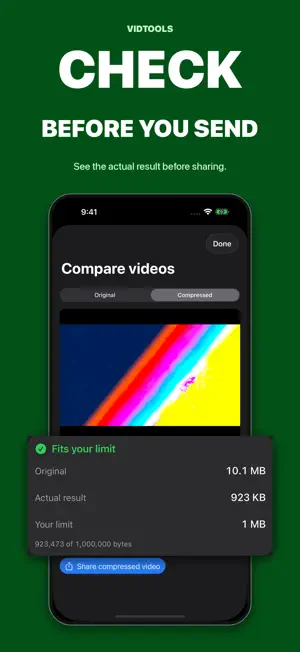
Video too large to send or upload? VidTools helps you make a smaller file and check the result before sharing. CHOOSE YOUR LIMIT Set a target file size or save a preset for an attachment or upload limit. Trim the part you need and compress it in one flow. See the actual output size and whether it fits your chosen limit. If a clip is still too large, trim it further or split it into smaller parts. PREVIEW BEFORE YOU SEND Compare the original and compressed video, then share the smaller file or save it to Photos or Files. Your original stays available. COMPRESS SEVERAL VIDEOS Select multiple clips and compress each to the same target in a queue. Import videos directly from the Photos or Files share sheet. MAKE VIDEOS READY TO SHARE Split, convert, resize, crop, trim, remove audio, fix rotation, and reframe. Convert HDR to SDR, export audio or GIFs, capture a frame, adjust playback speed, remove metadata, and inspect video details. PROCESS ON YOUR DEVICE Your videos are processed on your iPhone or iPad. No account or login is required. Every tool is available without a subscription. VidTools Pro is a one-time purchase that removes ads.
What’s new
Version 1.1 · Updated October 14, 2026
Make videos easier to send and upload. • Compare original and compressed videos before sharing. • Check the actual file size against your chosen limit, with trim and split options when needed. • Save your own size presets. • Trim and compress in one flow. • Compress multiple videos in a batch. • Import videos from the Photos and Files share sheet. • New crop, resize, playback speed, and frame capture tools.
App privacy
The developer, Didactic Initiatives LLC, reported these privacy practices to Apple.
Data Used to Track You
The following data may be used to track you across apps and websites owned by other companies:
- Identifiers: Device ID
Data Linked to You
The following data, which may be collected and linked to your identity, may be used for the following purposes:
- Usage Data: Advertising Data, Product Interaction
- Location: Coarse Location
- Identifiers: Device ID
Used for: Third-Party Advertising, Developer’s Advertising or Marketing, Analytics
Data Not Linked to You
The following data, which may be collected but is not linked to your identity, may be used for the following purposes:
- Location: Coarse Location
- Identifiers: Device ID
- Diagnostics: Performance Data, Other Diagnostic Data
Used for: Third-Party Advertising, Developer’s Advertising or Marketing, Analytics
Alternatives to VidTools: Video Compressor
Looking for apps like VidTools: Video Compressor? Here are 6 similar apps on the App Store. The highest rated is 视频剪辑器 (5.0/5), and all 6 are free to download.
-
 3D Phone Connect
-
 Watermark Stamp Camera
-
 Splitify - Cut Your Videos
-
 StoryParts: Video Splitter
-
 Video Speed: Slow & Fast
-
 视频剪辑器
5.0
视频剪辑器
5.0
| App | Rating | Price | Last updated | Compare |
|---|---|---|---|---|
| VidTools: Video Compressor | 5.0 / 5 (1 rating) | Free | October 14, 2026 | |
| 3D Phone Connect | – | Free | Sep 23, 2026 | Compare |
| Watermark Stamp Camera | – | Free | Oct 24, 2026 | Compare |
| Splitify - Cut Your Videos | – | Free | Aug 25, 2026 | Compare |
| StoryParts: Video Splitter | – | Free | Oct 9, 2026 | Compare |
| Video Speed: Slow & Fast | – | Free | Aug 17, 2026 | Compare |
| 视频剪辑器 | 5.0 / 5 (1) | Free | Apr 19, 2026 | Compare |