

ClockKeepers: Interval Timer
Joseph Ting Utilities iPhoneiPadiPod touch
ClockKeepers: Interval Timer is a free Utilities app for iPhone and iPad by Joseph Ting. Requires iOS 15.0. Updated October 21, 2026.
- Price
- Free
- on the App Store
- Size
- 8 MB
- Age 4+
- Updated
- Oct 21
- 2026 · v1.1.0
Screenshots



About ClockKeepers: Interval Timer
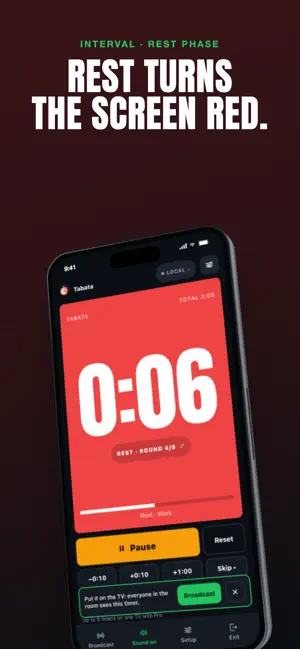
Put the workout clock on the gym TV. ClockKeepers runs your Tabata, HIIT, EMOM or boxing rounds on your phone and shows the same clock, live, on every TV, tablet and phone in the room. Start a countdown, stopwatch or interval program, tap Broadcast, and every phone, tablet or TV browser that opens your link shows the same clock, in sync, with the phase colour and round count. No mirroring, no cables, no app needed on the big screen: open clockkeepers-app.netlify.app on any TV browser and type the 5-letter code. BUILT FOR REAL ROOMS • Gyms and studios: Tabata, HIIT, EMOM, AMRAP, boxing and MMA rounds, "For time" with a cap. Work and rest flood the screen green and red so nobody has to squint. • Classrooms: 5, 10, 15 and 20-minute periods, focus sessions, a speech timer that turns amber and red as time runs out. Control it from your phone while you walk the room. • Courts and tournaments: round clocks with changeover breaks, "Round 3 of 8", one board for every court. • Home: kids' turns, cooking, board games. WHY COACHES AND TEACHERS SWITCH • Broadcast to any screen with a link, QR code or short code. Viewers never install anything. • Sound that actually plays: 3-2-1 beeps, segment tones, a spoken 10-second countdown and a finish alarm that keeps ringing until you tap, even with the silent switch on. • The screen never sleeps while a timer runs, and a notification fires if the app is in the background when time is up. • Let others control the clock (optional): pass the link to an assistant coach and either of you can pause. • Custom interval builder: up to 12 segments per round, 99 rounds, a get-ready period, labels and colours. • Presets for the programs people actually run. One tap and go. • Session log of what you ran and for how long. • On an iPad, run the timer and the controls side by side, or tap Present to fill the screen. • AirPlay or plug into a TV: the board fills the screen and the controls stay on your device. • No ads. No subscription. No account. CLOCKKEEPERS PRO (one-time purchase, no subscription, shown in your own currency) • Up to 8 timers on one board: stations, courts or groups, with Start all / Pause all, laid out automatically on the TV. • Your gym, class or event name, colours and logo on every screen. • A permanent code (like "ironworks") so the TV bookmarks one link forever. • Nine more display themes: LED, Stadium, Neon, Chalk, Minimal, Sunset, Aurora, Dot Matrix, Blueprint. • Sound packs: gym horn, ring bell, whistle, arcade. • Unlimited viewers, saved presets and session history. No watermark. From the makers of ScoreKeepers, RankKeepers, PickKeepers and QuizKeepers.
What’s new
Version 1.1.0 · Updated October 21, 2026
9 new Pro themes, each handcrafted and animated, and a new way to browse them: • LED, Stadium, Neon, Chalk, Chronograph, Sunset, Aurora, Split-flap and Blueprint, designed for iPhone and iPad in portrait and landscape • New theme gallery: swipe through every theme full screen and watch it run a whole workout, then try it on your own timer (Setup > Browse all themes) • TV short link: open sviewstudios.com/clockkeepers/tv on any TV browser and type your code • On a computer, host from a full console with keyboard controls • Better accessibility: works with screen readers, zoom and the keyboard, and the timer announces each phase • Share a workout as a link; opening it fills in the editor • Export your session log as a CSV file • New free Shrinking wedge face for the board • Bug fixes and stability improvements
App privacy
The developer, Joseph Ting, reported these privacy practices to Apple.
Data Not Collected
The developer does not collect any data from this app.
Alternatives to ClockKeepers: Interval Timer
Looking for apps like ClockKeepers: Interval Timer? Here are 6 similar apps on the App Store. The highest rated is Remote Stage Timer (5.0/5), and all 6 are free to download.
-
 Live Timekeeper|Visual Timer
-
 LiveCue Timer
4.0
-
 Remote Stage Timer
5.0
-
 Color Timer - Visual Countdown
-
 My Fidcard
-
 Fullphysio
| App | Rating | Price | Last updated | Compare |
|---|---|---|---|---|
| ClockKeepers: Interval Timer | – | Free | October 21, 2026 | |
| Live Timekeeper|Visual Timer | – | Free | Oct 24, 2026 | Compare |
| LiveCue Timer | 4.0 / 5 (1) | Free | May 19, 2026 | Compare |
| Remote Stage Timer | 5.0 / 5 (2) | Free | Aug 14, 2026 | Compare |
| Color Timer - Visual Countdown | – | Free | Oct 10, 2026 | Compare |
| My Fidcard | – | Free | Sep 3, 2026 | Compare |
| Fullphysio | – | Free | Oct 20, 2026 | Compare |