

DoWhat: Focus To-Do
思宇 关 Productivity iPhoneiPadiPod touch
DoWhat: Focus To-Do is a free Productivity app for iPhone and iPad by 思宇 关. Requires iOS 17.6. Updated October 8, 2026.
- Price
- Free
- on the App Store
- Size
- 5 MB
- Age 4+
- Updated
- Oct 8
- 2026 · v1.1
Screenshots
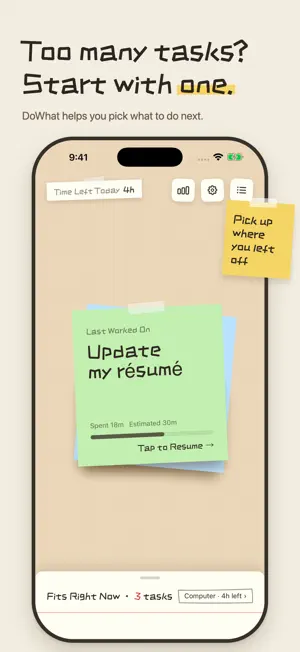

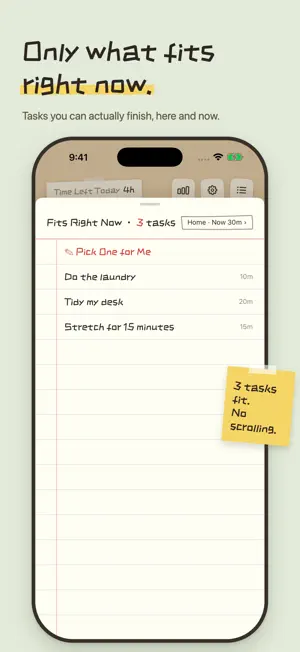

About DoWhat: Focus To-Do
Too many to-dos, no idea which one to do first? DoWhat helps you get past "what should I do first?" Tell it where you are and how much time you have, and see what you can do right now. Still can't pick? Tap "Pick one for me." Once you start, you see just that one thing. When it's done, tear off the sticky note. PICK TASKS FOR RIGHT NOW Give each task a place and an estimated time. At your computer, at home, on your phone, or out and about: switch the place. Only 15 minutes, 30 minutes, or an hour: switch the time. Your list fits the moment you're in. CAN'T DECIDE? LET IT CHOOSE DoWhat picks one task that fits your current conditions, a small nudge to get started. ONE THING AT A TIME A sticky-note focus screen. Tap to start or pause the timer, swipe up or down to switch tasks. When you finish, tear the note off and keep that feeling of "done." LOOK BACK: WHERE DID THE TIME GO See your timer and completion records for the past 7 days, free. Members can see the past 30 days and all records, plus breakdowns by place and time of day, and estimated vs. actual time. MAKE THE PAPER YOURS Handwritten style, colorful sticky notes, and paper textures. Members also get more colors, papers and desks, widgets and Live Activities, and Focus mode integration. The Dynamic Island requires a supported device; Focus mode integration requires a Shortcuts automation to be set up. WORK WITH YOUR COMPUTER ASSISTANT (MEMBERS) Connect an AI assistant on your computer over your local network. Ask it to add or edit tasks, start a timer, or review your week, right in the conversation. NO SIGN-UP, DATA STAYS ON YOUR DEVICE Tasks and timer records are stored on your device. This version has no in-app cross-device cloud sync. You don't have to plan everything. Just do this one thing first. Terms of Use: https://www.apple.com/legal/internet-services/itunes/dev/stdeula/
What’s new
Version 1.1 · Updated October 8, 2026
New: Computer Assistant (members) • Connect an AI assistant on your computer to DoWhat over your local network. • In the conversation, add and edit tasks, mark them done, start or pause the timer, and review your week. • Today's list, the timer, and your review appear right in the chat as sticky notes.
App privacy
The developer, 思宇 关, reported these privacy practices to Apple.
Data Not Collected
The developer does not collect any data from this app.
Alternatives to DoWhat: Focus To-Do
Looking for apps like DoWhat: Focus To-Do? Here are 6 similar apps on the App Store.
-
 净空-时间与心情
-
 WidgetAim: Countdown Widget
-
 osmos assistant
-
 PomoBrew: Focus Timer
-
 When - Then & Next
-
 Wish Seek · Wish & Life Goals
| App | Rating | Price | Last updated | Compare |
|---|---|---|---|---|
| DoWhat: Focus To-Do | – | Free | October 8, 2026 | |
| 净空-时间与心情 | – | Free | Oct 19, 2026 | Compare |
| WidgetAim: Countdown Widget | – | Free | Oct 15, 2026 | Compare |
| osmos assistant | – | Free | Sep 25, 2026 | Compare |
| PomoBrew: Focus Timer | – | Free | Sep 7, 2026 | Compare |
| When - Then & Next | – | Free | Oct 18, 2026 | Compare |
| Wish Seek · Wish & Life Goals | – | Free | Sep 23, 2025 | Compare |