

PDF Editor: Scan to PDF
Prabhat Pedagandham Productivity iPhoneiPadiPod touch
PDF Editor: Scan to PDF is a free Productivity app for iPhone and iPad by Prabhat Pedagandham. Rated 5.0/5 from 1 ratings. Requires iOS 26.0.
- Rating
- 5.0
- 1 ratings
- Price
- Free
- on the App Store
- Size
- 13 MB
- Age 4+
- Updated
- Sep 23
- 2026 · v2.0.2
Screenshots


About PDF Editor: Scan to PDF
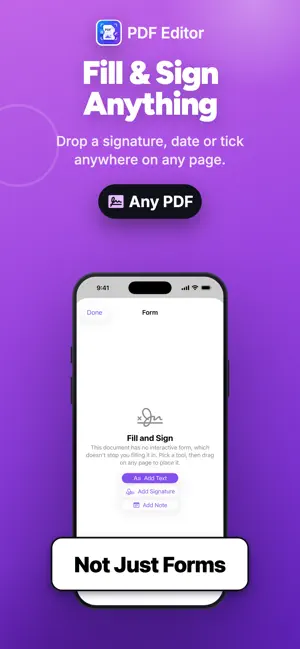
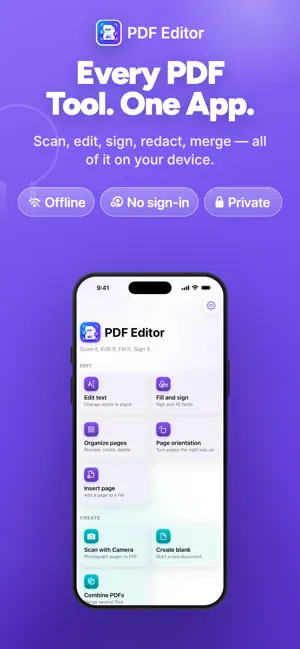
A complete PDF editor that runs entirely on your device. No account and no sign-in. The app ships without network access at all, so nothing you open can be uploaded — not by us, not by anyone. Nothing it produces is branded or stamped. EDIT WHAT IS ALREADY THERE • Change words in an existing PDF. Tap a line, retype it, and the layout stays where it was. • Fill in forms, or type anywhere on a printed form that has no fields. • Sign by drawing or typing. Your signature stays in this app's own storage on this device, is left out of backups, and never leaves it. SCAN AND READ PAPER • Photograph pages with edge detection, auto-capture, perspective correction and shadow removal. • Read the text on a photographed page, then copy it, export it, or retype a line in place. • Make a scan searchable by adding an invisible text layer — the page still looks exactly the same. PAGES AND FILES • Reorder, rotate, delete, duplicate, insert and extract pages by dragging. • Correct page orientation: one page at a time, at full size, or turn a whole document at once. • Combine several PDFs, choosing which file goes first and rearranging pages afterwards. • Split a document, export pages as images, or export the text as a Word file. • Compress by re-encoding oversized images only — text and drawings are left untouched, so the file stays sharp and searchable. MARK UP AND PROTECT • Draw, highlight, underline, strike through, add notes, shapes and text boxes. • Redact properly. The content is removed from the file, not hidden under a black box that copy-and-paste defeats. • Add your own watermark — text or an image, tiled, centred or dragged anywhere. BUILT TO BE HONEST • Your changes are written to a draft as you work, so a crash loses nothing. • Undo and redo everything, including page changes. • Saving asks before it overwrites, and validates the file before it replaces yours. • Where a tool has a limit worth knowing, the app says so in the app — not after it has cost you something. WHAT THIS APP DOES NOT DO It does not convert to Word or Excel with the original layout. Doing that faithfully needs a server, and this app has no network access. It exports the document's text instead, and says so before you use it.
App privacy
The developer, Prabhat Pedagandham, reported these privacy practices to Apple.
Data Not Collected
The developer does not collect any data from this app.
Alternatives to PDF Editor: Scan to PDF
Looking for apps like PDF Editor: Scan to PDF? Here are 6 similar apps on the App Store. The highest rated is DartPDF (5.0/5), and all 6 are free to download.
-
 Last Time: how long ago?
-
 DartPDF
5.0
DartPDF
5.0
-
 Pure PDF Editor Offline
-
 PDF Editor (Image to PDF)
-
 Countdown Timer Nano
4.2
Countdown Timer Nano
4.2
-
 Arabic OCR: Text Scanner & PDF
3.0
Arabic OCR: Text Scanner & PDF
3.0
| App | Rating | Price | Last updated | Compare |
|---|---|---|---|---|
| PDF Editor: Scan to PDF | 5.0 / 5 (1 rating) | Free | September 23, 2026 | |
| Last Time: how long ago? | – | Free | Sep 17, 2026 | Compare |
| DartPDF | 5.0 / 5 (1) | Free | Sep 29, 2026 | Compare |
| Pure PDF Editor Offline | – | Free | Sep 29, 2026 | Compare |
| PDF Editor (Image to PDF) | – | Free | Apr 13, 2024 | Compare |
| Countdown Timer Nano | 4.3 / 5 (24) | Free | Jun 12, 2026 | Compare |
| Arabic OCR: Text Scanner & PDF | 3.0 / 5 (2) | Free | Sep 19, 2026 | Compare |