
EnterTimement
kenta isomi Entertainment iPhoneiPadiPod touch
EnterTimement is a free Entertainment app for iPhone and iPad by kenta isomi. Requires iOS 17.0. Updated September 12, 2026.
- Price
- Free
- on the App Store
- Size
- 8 MB
- Age 4+
- Updated
- Sep 12
- 2026 · v1.0.5
Screenshots
About EnterTimement
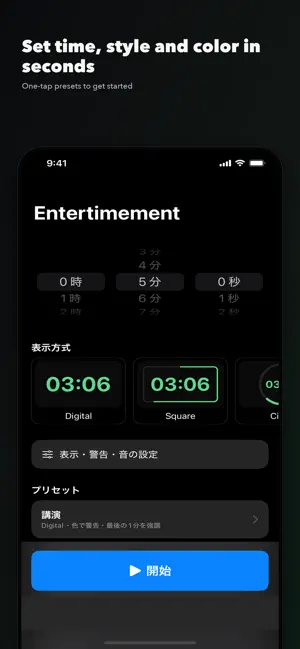
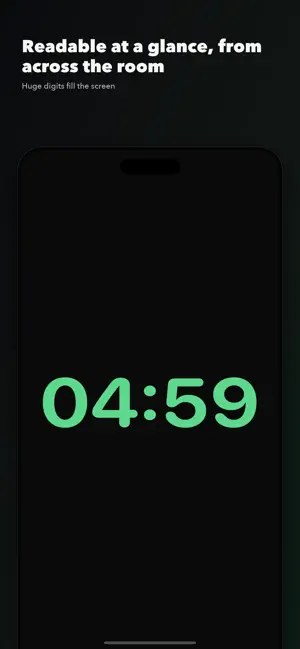
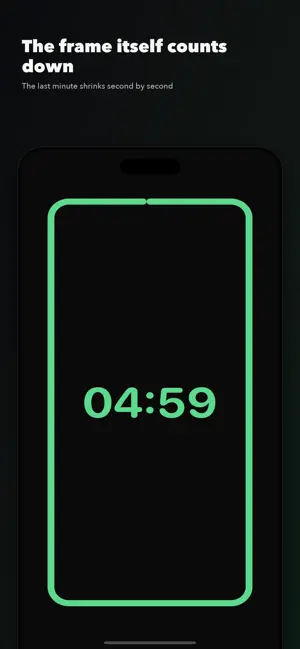
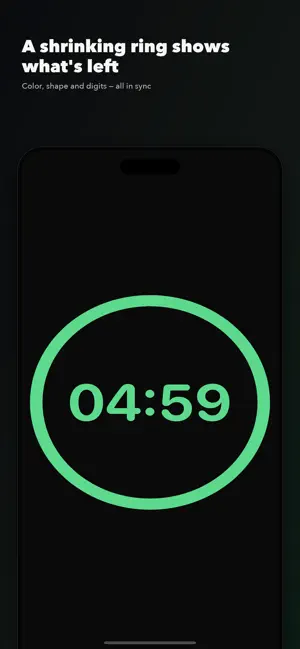
Entertimement is a countdown timer built to show the remaining time to a speaker on stage — in talks, presentations, speech contests and school reports. Most timers assume you check the time in your hand. Entertimement does the opposite: the top priority is that the remaining time is readable at a glance from across the room. Beyond just reading the digits, it combines color, shape, progress and animation to signal "plenty of time / caution / danger" intuitively. ■ Made for • Showing a speaker how much time is left during a talk or seminar • Managing time slots for presentations and lightning talks • Displaying the limit in speech contests and competitions • Timing workshops and reports at school or in training • Event staff operating a timer for the person on stage ■ Five display styles • Digital: huge digits filling the screen — built for readability at a distance • Square: the rectangular frame is the progress bar; the last minute reads second by second • Circle: the shrinking ring shows what's left at a glance • Bar: a wide bar — great for iPad in landscape • Progress: emphasizes the percentage left — good for pacing Pick a style with a live preview in Settings. ■ Set your own colors, in three zones The remaining time is split into three zones — Safe, Warning and Danger — and you choose the color for each. Tune them for the room lighting, the projector or color vision. Color is never the only cue: it works together with digits, border and animation. ■ Choose the alert style • Color change • Pulsing digits (scale and beat) • Screen-border emphasis • Blink • Sound (choose from sounds built into iOS, with a preview for the end sound) Display style and alert style combine independently. ■ Built-in presets plus your own One tap applies the presets for Lecture, Speech contest, Class presentation and Simple. Save the setups you use often with a name — up to 10. ■ Accurate countdown Rather than "subtract one second at a time," the remaining time is computed from the scheduled end time. Timekeeping is separated from the display, so it stays accurate over long durations and after pause and resume. ■ Stage-ready • Full-screen display; controls hide automatically while running and reappear on a tap • Mis-tap protection: reset needs a confirmation dialog or a long press • Time adjustments: +1 min / +10 s / −10 s • Auto-lock (sleep) is prevented while running • iPhone and iPad, portrait and landscape (iPad landscape especially) ■ Accessibility • Respects the system "Reduce Motion" setting • State is never conveyed by color alone • VoiceOver reads out the remaining time • Ample contrast * This app shows an ad (a banner at the bottom of the screen).
App privacy
The developer, kenta isomi, reported these privacy practices to Apple.
Data Not Linked to You
The following data, which may be collected but is not linked to your identity, may be used for the following purposes:
- Diagnostics: Other Diagnostic Data, Crash Data
Used for: Third-Party Advertising, Analytics
Alternatives to EnterTimement
Looking for apps like EnterTimement? Here are 6 similar apps on the App Store. The highest rated is CRUSH: AI Romance × Otome Chat (5.0/5), and all 6 are free to download.
-
 AlcarriaTV
-
 CRUSH: AI Romance × Otome Chat
5.0
CRUSH: AI Romance × Otome Chat
5.0
-
 Ginette
1.0
Ginette
1.0
-
 PlayRenfe
1.5
PlayRenfe
1.5
-
 Duochang
2.3
Duochang
2.3
-
 babyAC: AI Generate Baby Face
2.5
babyAC: AI Generate Baby Face
2.5
| App | Rating | Price | Last updated | Compare |
|---|---|---|---|---|
| EnterTimement | – | Free | September 12, 2026 | |
| AlcarriaTV | – | Free | Apr 17, 2025 | Compare |
| CRUSH: AI Romance × Otome Chat | 5.0 / 5 (1) | Free | Jul 8, 2026 | Compare |
| Ginette | 1.0 / 5 (1) | Free | Jul 6, 2026 | Compare |
| PlayRenfe | 1.5 / 5 (39) | Free | Nov 17, 2025 | Compare |
| Duochang | 2.3 / 5 (6) | Free | Mar 8, 2024 | Compare |
| babyAC: AI Generate Baby Face | 2.5 / 5 (18) | Free | Oct 30, 2023 | Compare |
Compare EnterTimement with the top alternatives: ratings, updates, ASO score and keyword gaps →