

Immersive Collage
全鹏 宋 Photo & Video iPhoneiPadiPod touch
Immersive Collage is a free Photo & Video app for iPhone and iPad by 全鹏 宋. Requires iOS 17.0. Updated October 24, 2026.
- Price
- Free
- on the App Store
- Size
- 3 MB
- Age 4+
- Updated
- Oct 24
- 2026 · v1.0.2
Screenshots
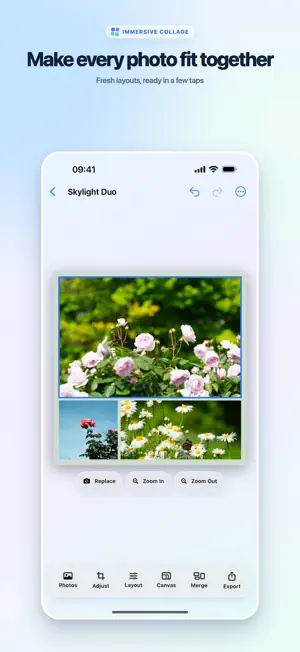

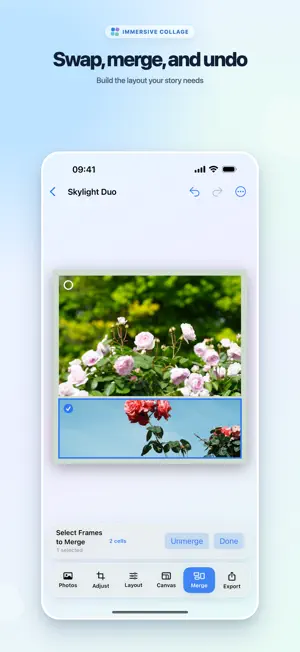

About Immersive Collage
Make a collage without stepping away from your canvas. Choose a layout and your photos, then drag, zoom, swap, and reshape until every frame feels right. SHAPE EACH PHOTO • Drag inside a frame to refine the crop. • Pinch to zoom, or use precise adjustment controls. • Press and drag to swap photos between frames. • Merge or split adjacent frames to reshape a layout. • Undo and redo without breaking your flow. START QUICKLY. MAKE IT YOURS. • Pick from simple grids and creative merged layouts. • Create custom rows and columns with Pro. • Save favorite layouts and editing settings for later. • Pin and reorder the layouts you use most. FOR SOCIAL, SCREEN, AND PRINT • Switch between portrait and landscape canvases. • Adjust spacing, outer margins, corner radius, and background. • Choose popular photo, screen, paper, and print ratios—or create your own with Pro. • Standard export creates a PNG up to 2400 pixels on the long edge. • High Quality creates lossless PNG files at 300 DPI or higher for supported print sizes with Pro. • Save to an album named after the app, or send the result through the system share sheet. PRO, YOUR WAY Custom grids, custom ratios, and High Quality export are included with Pro. Choose a monthly or annual auto-renewable subscription, or make a one-time lifetime purchase. Eligible App Store customers can try a subscription free for 7 days. PRIVATE BY DESIGN Your selected photos are processed on your device for editing and export. Immersive Collage requires no account and includes no ads, analytics SDKs, or uploads to a developer server. Terms of Use (EULA): https://www.apple.com/legal/internet-services/itunes/dev/stdeula/
What’s new
Version 1.0.2 · Updated October 24, 2026
Fixed an issue where transparent areas in PNG photos appeared gray after export. Exported collages now use your selected canvas background consistently with the preview.
App privacy
The developer, 全鹏 宋, reported these privacy practices to Apple.
Data Not Collected
The developer does not collect any data from this app.
Alternatives to Immersive Collage
Looking for apps like Immersive Collage? Here are 6 similar apps on the App Store. The highest rated is 拼图派 - 照片布局与打印 (5.0/5), and 5 of the 6 are free to download.
-
 Chroma Pocket
-
 PicBoard - 朋友圈排版工具,批量长图拼接
-
 Craftive
-
 拼图派 - 照片布局与打印
5.0
-
 MultiCam - Priceless Memories
5.0
-
 PhotoBooks by GraphicMeat
| App | Rating | Price | Last updated | Compare |
|---|---|---|---|---|
| Immersive Collage | – | Free | October 24, 2026 | |
| Chroma Pocket | – | 6.99 USD | Jul 16, 2026 | Compare |
| PicBoard - 朋友圈排版工具,批量长图拼接 | – | Free | Oct 19, 2026 | Compare |
| Craftive | – | Free | Oct 6, 2026 | Compare |
| 拼图派 - 照片布局与打印 | 5.0 / 5 (1) | Free | Apr 6, 2026 | Compare |
| MultiCam - Priceless Memories | 5.0 / 5 (1) | Free | Mar 2, 2025 | Compare |
| PhotoBooks by GraphicMeat | – | Free | Sep 8, 2026 | Compare |
Compare Immersive Collage with the top alternatives: ratings, updates, ASO score and keyword gaps →