

DESIGNER'S TABLE
Yongha Jo Shopping iPhoneiPadiPod touch
DESIGNER'S TABLE is a free Shopping app for iPhone and iPad by Yongha Jo. Requires iOS 15.1. Updated October 19, 2026.
- Price
- Free
- on the App Store
- Size
- 26 MB
- Age 4+
- Updated
- Oct 19
- 2026 · v1.0.2
Screenshots



About DESIGNER'S TABLE
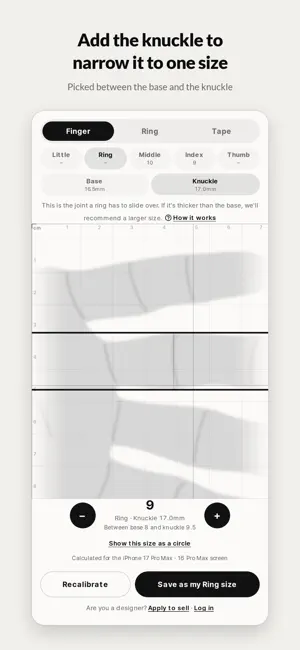
No ruler, no ring sizer. Rest your finger on your phone screen, or lay a ring you already own on it, and get your ring size. It's free, and you don't need an account. ■ Measure with your finger Rest your finger between the two lines and match them to the base of your finger — the narrowest part, where a ring sits. Fingers are soft, and their width shifts a little with pressure and viewing angle, so you get a recommended size with a range of one size either way. Measure your knuckle too and it narrows to a single size. A ring has to slide over the knuckle, so if yours is thicker than the base, the app picks the right size in between. ■ Measure a ring you own If you have a ring that fits, this is the most accurate way. Place it on the circle and match the circle to the inside of the ring. You get the size along with the US size and the inner diameter in millimeters. Buying a ring as a gift? One ring the wearer already has is all you need. ■ See your size at true scale After measuring your finger, show the result as a circle the exact size of that ring's inside. Lay a ring you own on top to double-check. ■ On-screen tape measure For anything longer than the screen, like a necklace chain or a bracelet, drag the line down and keep going — the tape keeps rolling out. ■ Half-size steps, JIS sizing Each tap of − or + moves exactly half a size. Sizes follow the JIS standard shared by Japan and Korea, and ring mode adds the US size. ■ Knows your phone, or one quick card check Most recent iPhone and Galaxy models are recognized automatically, so you can measure right away. On any other device, hold a credit or debit card to the screen and match it once — every bank card is the same size. ■ Saved for each finger Save a size for each finger, from thumb to little finger. Your sizes stay on this device. ■ Tips for an accurate reading Spread your fingers slightly and look straight down at the screen. First time? "How it works" walks you through each step. ― ■ Are you a jewelry designer? Tap "Apply to sell" at the bottom of the screen to apply. DESIGNER'S TABLE · DTS
What’s new
Version 1.0.2 · Updated October 19, 2026
The app now opens straight to the ring sizer. Measure with your finger, a ring you already own, or the on-screen tape, and save a size for each finger.
App privacy
The developer, Yongha Jo, reported these privacy practices to Apple.
Data Linked to You
The following data, which may be collected and linked to your identity, may be used for the following purposes:
- Usage Data: Product Interaction
- Diagnostics: Crash Data, Performance Data, Other Diagnostic Data
- Purchases: Purchase History
- Contact Info: Physical Address, Email Address, Name, Phone Number
- User Content: Photos or Videos, Customer Support
- Identifiers: Device ID
Used for: Analytics, App Functionality
Alternatives to DESIGNER'S TABLE
Looking for apps like DESIGNER'S TABLE? Here are 6 similar apps on the App Store. The highest rated is 럭키드로우 - 한정판 발매 정보의 모든 것 (3.4/5), and all 6 are free to download.


| App | Rating | Price | Last updated | Compare |
|---|---|---|---|---|
| DESIGNER'S TABLE | – | Free | October 19, 2026 | |
| Brijwasi Sarraf | – | Free | Aug 4, 2026 | Compare |
| 사또 – 영수증만 올려도 현금 캐시백 | – | Free | Sep 17, 2026 | Compare |
| 우주스토어 | – | Free | Jan 21, 2026 | Compare |
| 럭키드로우 - 한정판 발매 정보의 모든 것 | 3.4 / 5 (5) | Free | Oct 25, 2026 | Compare |
| 섹시수트 | – | Free | Aug 18, 2026 | Compare |
| 사이페이 | – | Free | Oct 23, 2026 | Compare |
Compare DESIGNER'S TABLE with the top alternatives: ratings, updates, ASO score and keyword gaps →