

Vera: Visual Assistant
Haresh Lakhwani Utilities iPhoneiPadiPod touch
Vera: Visual Assistant is a free Utilities app for iPhone and iPad by Haresh Lakhwani. Requires iOS 18.0. Updated September 28, 2026.
- Price
- Free
- on the App Store
- Size
- 129 MB
- Age 4+
- Updated
- Sep 28
- 2026 · v1.4
Screenshots



About Vera: Visual Assistant
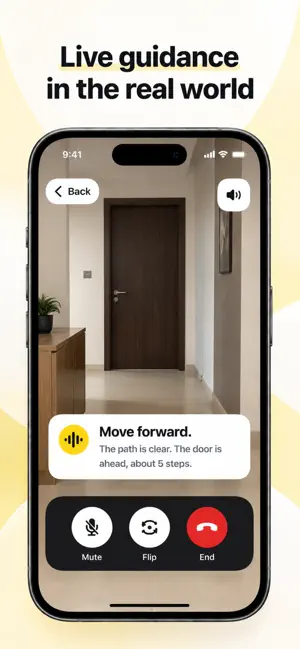
Vera is a visual assistant for blind and low-vision users on iPhone and iPad. Point your camera, ask by voice, and hear the answer. ASSIST Point the camera and ask what's there. Ask follow-up questions about the scene, a label, or an object. READ Scan books, letters, receipts, packaging, and documents. Hear the text aloud, change the speed, pause and resume, and come back to saved readings. PLACES Save places that matter and hear the way back. Vera never judges whether a path is clear or safe. MEMORIES Save people, with their permission, and objects, and check for them later. Face references stay encrypted on your device and are matched there. VOICE AND APPEARANCE Built for VoiceOver. Spoken feedback on every screen. Light, dark, or system appearance. PRIVACY AND CONTROL No sign-in. No ads. No cross-app tracking. Saved memories, readings, places, and routes are encrypted on your device. Some features process images, audio, or text online. Before any processing, Vera explains what is sent and asks for your agreement. You can withdraw that agreement and delete your data in Settings. The Privacy Policy explains handling and retention. IMPORTANT LIMITS Answers can be wrong or incomplete. Vera is not a mobility aid and does not replace a cane, guide dog, or a person. Do not rely on it to detect traffic, steps, drop-offs, or obstacles, or to decide whether a route is safe. It gives no medical or emergency advice. Online features need an internet connection. VERA PLUS Assist, Read, Places, and Memories require an auto-renewing annual Vera Plus subscription. Apple shows the current price and any eligible introductory trial before you confirm. Payment is charged to your Apple Account at confirmation, or after a free trial if one is offered. The subscription renews automatically unless canceled at least 24 hours before the current period ends. Manage or cancel in your Apple Account settings. Use Restore Purchases in Vera to recover an existing subscription. Settings, legal pages, Restore Purchases, subscription management, and data deletion stay available without an active subscription. Deleting Vera data does not cancel your Apple subscription. Terms of Use (EULA): https://www.apple.com/legal/internet-services/itunes/dev/stdeula/ Privacy Policy: https://vera-api.fly.dev/legal/privacy Terms: https://vera-api.fly.dev/legal/terms Support: https://vera-api.fly.dev/legal/support
What’s new
Version 1.4 · Updated September 28, 2026
Making reading tab experience better Assist hindi better support Minor fixes
App privacy
The developer, Haresh Lakhwani, reported these privacy practices to Apple.
Data Linked to You
The following data, which may be collected and linked to your identity, may be used for the following purposes:
- Purchases: Purchase History
- Identifiers: User ID, Device ID
- Location: Precise Location
- Contact Info: Name
- User Content: Photos or Videos, Audio Data, Other User Content
- Search History: Search History
- Usage Data: Product Interaction
- Diagnostics: Other Diagnostic Data
Used for: Analytics, App Functionality
Alternatives to Vera: Visual Assistant
Looking for apps like Vera: Visual Assistant? Here are 6 similar apps on the App Store. The highest rated is Ox Alpha - Mind Buddy (4.4/5), and all 6 are free to download.
-
 Visual AI Assistant App: Sense
-
 BatchConvert
-
 HelloNav
-
 AI Guide Dog
4.3
-
 Ox Alpha - Mind Buddy
4.4
-
 Topview: Marketing Video Agent
2.8
| App | Rating | Price | Last updated | Compare |
|---|---|---|---|---|
| Vera: Visual Assistant | – | Free | September 28, 2026 | |
| Visual AI Assistant App: Sense | – | Free | May 14, 2026 | Compare |
| BatchConvert | – | Free | Mar 17, 2026 | Compare |
| HelloNav | – | Free | Mar 31, 2026 | Compare |
| AI Guide Dog | 4.3 / 5 (7) | Free | Nov 4, 2024 | Compare |
| Ox Alpha - Mind Buddy | 4.4 / 5 (7) | Free | Sep 17, 2026 | Compare |
| Topview: Marketing Video Agent | 2.8 / 5 (11) | Free | Oct 14, 2026 | Compare |