

CharmCue: AI Dating Assistant
UMIT DURAN Lifestyle iPhoneiPadiPod touch
CharmCue: AI Dating Assistant is a free Lifestyle app for iPhone and iPad by UMIT DURAN. Requires iOS 15.0. Updated October 2, 2026.
- Price
- Free
- on the App Store
- Size
- 50 MB
- Age 17+
- Updated
- Oct 2
- 2026 · v1.0.4
Screenshots



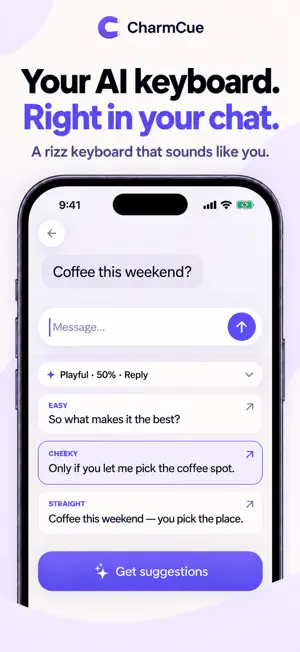
About CharmCue: AI Dating Assistant
Stuck on what to reply to a dating message? Add a chat screenshot or paste the conversation. CharmCue suggests three replies shaped by that context; choose one, edit it in your own voice, and decide what to send. Use the AI keyboard when you're writing in a supported text field, or review your dating profile for a more personal first impression. CharmCue helps with the next message, not a script to copy blindly. FROM CHAT SCREENSHOT TO YOUR NEXT REPLY Add screenshots or paste messages to give CharmCue context. Explore three suggested replies, compare different approaches and choose the one that fits the moment. Edit a draft, rewrite it or copy your favorite when it sounds right. You decide what gets sent. MAKE EVERY MESSAGE SOUND LIKE YOU Choose a relaxed, playful or direct tone. Adjust reply length, flirt level and emoji use to match your style. Keep things light, show a little more interest or make your next move clearer. CharmCue helps with the wording while you keep your personality and judgment. AN AI KEYBOARD WHERE YOU WRITE Use the CharmCue keyboard to request suggestions and insert a reply in supported text fields. A texting assistant is close at hand when you need a fresh way to phrase something. Enable the keyboard in iOS Settings; online AI features require Full Access and an internet connection. Tap a suggestion to insert it, then review before sending. START A CONVERSATION. GIVE IT SOMEWHERE TO GO. A first message, a playful follow-up or an invitation for coffee can be hard to put into words. Use conversation starters and reply ideas to move beyond a blank text box. Add the context you want considered and choose the direction that feels appropriate, without relying on the same pickup line for every person. A FRESH LOOK AT YOUR DATING PROFILE Open Profile Lab and add your profile screenshots. Get feedback on your photos, their order, your bio and written answers, plus practical ideas for improvement. Review conversation starters and suggested wording, and decide which changes reflect you. Bring more of your personality into both your profile and your messages. BRING THE CONTEXT THAT MATTERS Start with screenshots, pasted text or a supported text-only WhatsApp chat export. You choose the conversation to import; no WhatsApp account connection is needed. If chat export is unavailable, use screenshots or paste the messages instead. YOUR CONTENT. YOUR CHOICE. Choose what you share and use the available controls to hide names, photos or locations before analysis. With your permission, selected content is processed by Google Gemini to generate suggestions or profile feedback. AI can make mistakes: read each suggestion and use your own judgment. CharmCue does not send messages on your behalf. CHARMCUE PLUS AI analysis and suggestion features require an active subscription. Prices, billing periods and any eligible trial are shown before purchase. Subscriptions renew automatically unless canceled at least 24 hours before the current period ends. Manage or cancel in your Apple account settings. For adults aged 18 and over. CharmCue is an independent app, not affiliated with Tinder, Hinge, Bumble, Instagram or WhatsApp. Suggestions do not guarantee replies, matches or dates. Find your words. Keep your voice. Privacy Policy: https://charmcue-vebesto.web.app/privacy Terms of Use: https://charmcue-vebesto.web.app/terms
What’s new
Version 1.0.4 · Updated October 2, 2026
Profile Lab, refreshed. • See individual photo scores and clearer suggestions for keeping, removing, or reordering photos. • Explore scores, findings, and your fix plan together, with feedback linked to your uploads. • Preview your uploaded profile before unlocking the full AI review with CharmCue Plus. • Enjoy clearer loading steps, easier photo previews, and improved layouts. • Saved reviews now open with the same updated design.
App privacy
The developer, UMIT DURAN, reported these privacy practices to Apple.
Data Linked to You
The following data, which may be collected and linked to your identity, may be used for the following purposes:
- Purchases: Purchase History
- Identifiers: User ID, Device ID
- Diagnostics: Other Diagnostic Data
- User Content: Emails or Text Messages, Photos or Videos, Other User Content
- Contact Info: Name
- Usage Data: Product Interaction
Used for: Analytics, Product Personalization, App Functionality
Alternatives to CharmCue: AI Dating Assistant
Looking for apps like CharmCue: AI Dating Assistant? Here are 6 similar apps on the App Store. The highest rated is 100life: Habit Tracker (5.0/5), and all 6 are free to download.
-
 100life: Habit Tracker
5.0
100life: Habit Tracker
5.0
-
 Kaden: Talk Better in 30 Days
-
 Rated.
-
 Rosely
-
 QuebraGelo: AI Flirt Coach
-
 Txtor Ai
| App | Rating | Price | Last updated | Compare |
|---|---|---|---|---|
| CharmCue: AI Dating Assistant | – | Free | October 2, 2026 | |
| 100life: Habit Tracker | 5.0 / 5 (1) | Free | Aug 27, 2026 | Compare |
| Kaden: Talk Better in 30 Days | – | Free | Sep 10, 2026 | Compare |
| Rated. | – | Free | Aug 10, 2026 | Compare |
| Rosely | – | Free | Aug 9, 2025 | Compare |
| QuebraGelo: AI Flirt Coach | – | Free | Oct 13, 2026 | Compare |
| Txtor Ai | – | Free | Sep 8, 2026 | Compare |