

Photo Slim: Compress Photos
Kanana Studio Photo & Video iPhoneiPadiPod touch
Photo Slim: Compress Photos is a free Photo & Video app for iPhone and iPad by Kanana Studio. Requires iOS 17.0. Updated November 4, 2026.
- Price
- Free
- on the App Store
- Size
- 5 MB
- Age 4+
- Updated
- Nov 4
- 2026 · v1.3
Screenshots


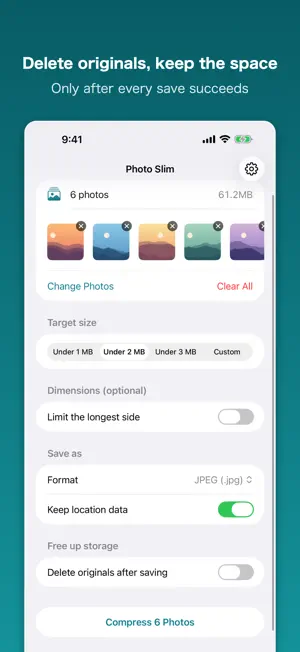
About Photo Slim: Compress Photos
Need a photo under 1 MB? Just pick the size. Fits forms, applications and email attachments, several photos at a time. Everything stays on your iPhone. Nothing is uploaded. ■ Just pick a size Choose 1 MB, 2 MB, or 3 MB, or type an exact number. The result never exceeds what you set. Useful when a form, an application, or an email attachment says "up to X MB". ■ Find the photos eating your space The Photos app only sorts by date, so you can't tell which shots are the heavy ones. This app lists every photo largest first. Tap "Select the 10 largest" and compress — that's the whole job. ■ It doesn't fall over on large batches Photos are processed one at a time and each result is written straight to disk. Memory is released after every photo, so it doesn't pile up as the count grows. Process up to 10 photos at a time. ■ Your library stays in order Capture dates are carried over, so compressed photos sit next to the originals by date instead of jumping to today. The result screen shows where they went, and you can collect them in an album. You choose whether location data is kept. ■ Free up real space There's an option to delete the originals after saving. Nothing is deleted until every save has been confirmed, and iOS keeps deleted photos in Recently Deleted for 30 days. The app also checks you have enough free space before it starts. ■ Photos never leave your device Everything runs on device. Neither the photos nor the capture dates and locations inside them are sent to us or to anyone else. Picking photos doesn't even require photo library access. ■ Long-side limit Separately from file size, you can cap the long side in pixels. The aspect ratio is preserved — nothing is cropped. ■ Formats Save as JPEG (.jpg / .jpeg), HEIC, or PNG. 【Pro — one-time purchase, not a subscription】 ・No limit on how many photos you process at once (free handles 10) ・No ads ・Keeps HDR brightness information (gain map) Without Pro you can still find large photos, compress, save, and delete the originals. Privacy Policy https://kanana-studio.com/privacy.html Contact [email protected]
What’s new
Version 1.3 · Updated November 4, 2026
• Small usability improvements.
App privacy
The developer, Kanana Studio, reported these privacy practices to Apple.
Data Not Linked to You
The following data, which may be collected but is not linked to your identity, may be used for the following purposes:
- Identifiers: Device ID
- Usage Data: Product Interaction, Advertising Data
- Diagnostics: Crash Data, Performance Data
Used for: Third-Party Advertising, App Functionality
Alternatives to Photo Slim: Compress Photos
Looking for apps like Photo Slim: Compress Photos? Here are 6 similar apps on the App Store. The highest rated is Photo Compress - SmallPic (5.0/5), and all 6 are free to download.
-
 Photo Compress - SmallPic
5.0
-
 Easy Photo Compressor: Resize
4.6
-
 Matterport
4.7
-
 Collage Photo Frame Maker
4.6
-
 GIPHY Sticker Extension
4.6
-
 ID Photo application
4.8
| App | Rating | Price | Last updated | Compare |
|---|---|---|---|---|
| Photo Slim: Compress Photos | – | Free | November 4, 2026 | |
| Photo Compress - SmallPic | 5.0 / 5 (1) | Free | May 15, 2026 | Compare |
| Easy Photo Compressor: Resize | 4.6 / 5 (265) | Free | Nov 1, 2026 | Compare |
| Matterport | 4.7 / 5 (4,199) | Free | Oct 13, 2026 | Compare |
| Collage Photo Frame Maker | 4.6 / 5 (130) | Free | Apr 7, 2025 | Compare |
| GIPHY Sticker Extension | 4.6 / 5 (326) | Free | Oct 30, 2026 | Compare |
| ID Photo application | 4.8 / 5 (1,145) | Free | Oct 20, 2026 | Compare |