

HEVM Wallet
Arca Research, Inc. Finance iPhoneiPadiPod touch
HEVM Wallet is a free Finance app for iPhone and iPad by Arca Research, Inc. Requires iOS 17.0. Updated October 23, 2026.
- Price
- Free
- on the App Store
- Size
- 134 MB
- Age 17+
- Updated
- Oct 23
- 2026 · v1.0.62
Screenshots


About HEVM Wallet
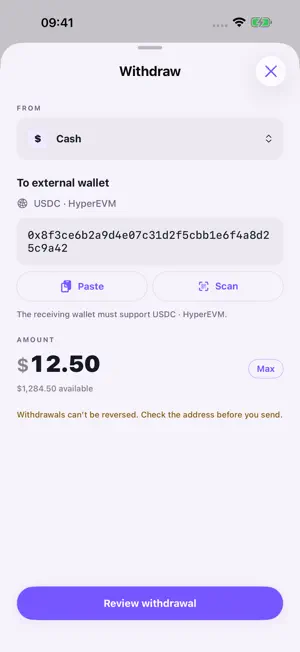
HEVM Wallet helps you manage USDC, accounts and transfers in one place. Follow balances, move funds between supported accounts, and withdraw to an external wallet. YOUR ACCOUNTS, TOGETHER Switch between Cash and named trading accounts. See the selected account's balance and available funds on Home, or open Account for an overview. Add money, move funds and start a withdrawal from the account you are using. A CLEARER WITHDRAWAL Open Withdraw from Home, Account, Cash or a trading account. Choose the source account, paste or scan the destination address, and enter an amount. Check the supported asset and network, full recipient address, and fees before approving. Transfers cannot be reversed. ADD MONEY Receive USDC at your HyperEVM receiving address, or choose an available payment or wallet option in Add money. The provider shows its methods, fees and any identity checks. After receiving is enabled, incoming USDC is added to Cash following confirmation and processing. MARKETS AND TRADING Browse supported perpetual markets on Hyperliquid. Eligible adults in supported locations can review market or limit orders and manage positions and orders. Check leverage, margin and fees before confirming. Perpetual contracts provide exposure to price movements, not ownership of the underlying asset. Leveraged trading can result in liquidation and loss of funds. FOLLOW YOUR ACTIVITY View transfers and their status in Activity. Open a receipt to check the destination, amount and available transaction details. SECURITY AND RECOVERY Privy provides your sign-in wallet. Cash is held in a smart-contract account on HyperEVM, separate from the receiving wallet. Cash withdrawals require your wallet signature. Trading authorization explains the agent permissions you grant. Security & recovery provides key export and account-deletion controls. Exporting a key does not withdraw contract-held Cash or close trading positions. AVAILABILITY Perpetual trading is unavailable in the United States, the United Kingdom and regions subject to comprehensive U.S. economic sanctions. Additional restrictions apply under applicable law and our Terms. Market browsing does not require enabling trading. See hevmwallet.com/availability for regional information. Payment methods have separate eligibility requirements. USDC is a digital token. Cash is the app's name for its USDC account, not a bank deposit.
What’s new
Version 1.0.62 · Updated October 23, 2026
Improved account switching, balance updates, and performance charts. Deposits, withdrawals, and transfers are excluded from account performance. Withdrawals are easier to find, with clearer destination, source account, and network details.
App privacy
The developer, Arca Research, Inc., reported these privacy practices to Apple.
Data Linked to You
The following data, which may be collected and linked to your identity, may be used for the following purposes:
- Location: Coarse Location
- Identifiers: User ID, Device ID
- Usage Data: Product Interaction, Advertising Data
- Financial Info: Other Financial Info
- Contact Info: Email Address, Name
- Diagnostics: Performance Data, Other Diagnostic Data
Used for: Analytics, App Functionality
Alternatives to HEVM Wallet
Looking for apps like HEVM Wallet? Here are 6 similar apps on the App Store. The highest rated is Anchr: Invest. Earn. Track. (5.0/5), and all 6 are free to download.
-
 Factor Wallet
-
 Dejabit Wallet
-
 AQON Wallet
-
 Anchr: Invest. Earn. Track.
5.0
-
 BM Wallet: Crypto & BTC Wallet
5.0
-
 Grimm App: Bitcoin Wallet
| App | Rating | Price | Last updated | Compare |
|---|---|---|---|---|
| HEVM Wallet | – | Free | October 23, 2026 | |
| Factor Wallet | – | Free | Apr 7, 2026 | Compare |
| Dejabit Wallet | – | Free | Aug 13, 2024 | Compare |
| AQON Wallet | – | Free | Oct 17, 2026 | Compare |
| Anchr: Invest. Earn. Track. | 5.0 / 5 (3) | Free | Sep 16, 2026 | Compare |
| BM Wallet: Crypto & BTC Wallet | 5.0 / 5 (2) | Free | Jul 20, 2026 | Compare |
| Grimm App: Bitcoin Wallet | – | Free | May 28, 2026 | Compare |
Compare HEVM Wallet with the top alternatives: ratings, updates, ASO score and keyword gaps →