

Aluza: Shared To-Do List
Gustavo Rosa Productivity iPhoneiPadiPod touch
Aluza: Shared To-Do List is a free Productivity app for iPhone and iPad by Gustavo Rosa. Requires iOS 15.1. Updated September 17, 2026.
- Price
- Free
- on the App Store
- Size
- 39 MB
- Age 4+
- Updated
- Sep 17
- 2026 · v1.5
Screenshots


About Aluza: Shared To-Do List
Aluza is the shared task list for people who share a life: couples, families, roommates and groups of friends. Agree on what needs doing, split it between you and follow it in one place. No "what about that thing?", no nagging and no scoreboard between you. A SPACE FOR THE LIFE YOU SHARE Groceries, bills, cleaning, the dog's medicine, a gift for your mother-in-law, the trip in December. The stuff you agree on in the hallway and forget thirty minutes later. Aluza takes all of it out of "I was sure you were going to do it" and puts it in a list both of you can see. HOW IT WORKS 1. Capture without limits. Write the way you think — "call the accountant friday 9am !high #money" — and the app reads the date, the priority and the tag on its own. One field, keyboard already open, under ten seconds. 2. Commit to three. Every day Aluza picks three of your tasks, chosen by deadline, weight and how long they have been sitting. The rest stays in the inbox, off your screen and off your back. 3. Close them and watch it add up. Finishing earns points for the size of the task, never for the count. One hard task beats crossing off five easy ones. BUILT TO DO TOGETHER • Shared lists — open a space with the people you share your routine with and everyone sees the same plan, up to date. • Invite in seconds — send a link. They tap it and they are in. No forms, no codes, no explaining how it works. • Roles that fit — who runs the list, who edits, who just follows along. • Reminders that land — for what you agreed on, for a deadline coming up and for what the other person changed. • Several spaces at once — one with the people you live with, one with your family, one with the friends on the trip. Never mixed. YOUR SCORE STAYS YOURS Points, level and streak are personal and they stay with you. The list shows what is moving; it does not compare people or turn your home into a competition. Nobody has to prove they did more. FOCUS MODE A plain timer for the task in front of you. Start, run, done — no technique to configure before you begin. WORKS FOR HOME AND FOR WORK Groceries. Monthly bills. A renovation. A move. A trip. A wedding. A baby's routine. Caring for someone who is ill. And also a launch, freelance work, a thesis and the side project you run with two friends. One app, no special mode for each subject. WHY IT IS DIFFERENT Most task apps compete on capacity: more fields, more filters, more views. None of them protect you from your own list. Forty percent of people drop a task app within two weeks, and what pushes them out is almost never a missing feature — it is opening the app and taking forty-seven overdue items to the face. Aluza does the opposite. The inbox is infinite, the day is finite. Write down everything that crosses your mind; the app will only ask you for three. WHO IT IS FOR For couples splitting bills and a home. For families losing track in a group chat. For people who live with others. For friends organizing a trip. For anyone with a full head who wants to stop carrying the list in their memory. WHAT IT IS NOT It is not a team manager, there is no corporate task board and there is no dashboard for measuring anyone's productivity. GETTING STARTED TAKES UNDER A MINUTE Sign in with Apple, Google or email, write the first task and send the link to whoever shares your routine. Done — the plan is out of both your heads. DETAILS • English and Portuguese. • Light and dark theme. • Sign in with Apple, Google or email. • Free to start. PRIVACY No ads, no ad networks and no data selling. What is on your list stays between you and the people you invited. CONTACT Questions, ideas or trouble: [email protected]
What’s new
Version 1.5 · Updated September 17, 2026
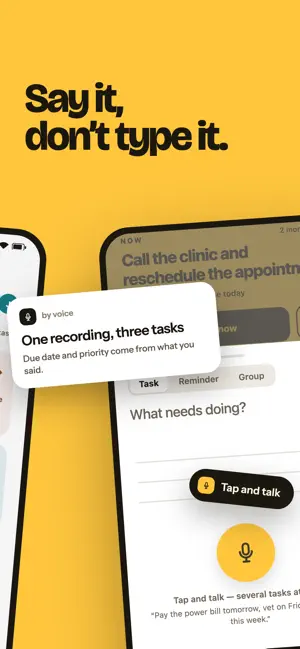
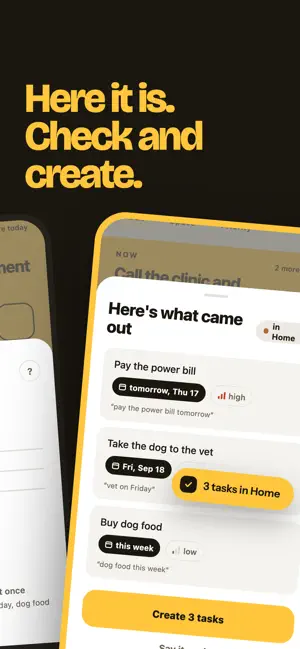
Say it, and it writes it down. • Voice capture: tap the microphone and say it all at once — "pay the power bill tomorrow, call the accountant on Friday, dog food this week". Aluza splits it into tasks, with the deadline, priority and reminder you said, and shows you the list to check. Nothing is created until you confirm. • Several at once, typed: paste or dictate a note with several tasks and it splits that the same way. In shared spaces: • Take a task into your day straight from the band at the top — whoever shares the space sees it right away. • Say who takes the task while you are still writing it. • When someone finishes a task another person had taken, the app says who finished it. Invites: • Opening an invite link now lands on the invite itself. • And if you have the link but installed from the App Store, there is a door for that: "I have an invite link". We also improved syncing in shared spaces and fixed sheets that opened floating above the bottom of the screen.
App privacy
The developer, Gustavo Rosa, reported these privacy practices to Apple.
Data Linked to You
The following data, which may be collected and linked to your identity, may be used for the following purposes:
- Contact Info: Email Address, Name
- User Content: Audio Data
- Diagnostics: Crash Data
Used for: App Functionality
Alternatives to Aluza: Shared To-Do List
Looking for apps like Aluza: Shared To-Do List? Here are 6 similar apps on the App Store. The highest rated is Jefa-D: Couple To-Do List (5.0/5), and all 6 are free to download.
-
 Jefa-D: Couple To-Do List
5.0
-
 CoupleTodo
-
 Shared To Do List — Veritask
5.0
-
 SOU+ Mais - Sancetur
-
 Sankhya Despesas
5.0
-
 Businessmap formerly Kanbanize
2.9
| App | Rating | Price | Last updated | Compare |
|---|---|---|---|---|
| Aluza: Shared To-Do List | – | Free | September 17, 2026 | |
| Jefa-D: Couple To-Do List | 5.0 / 5 (1) | Free | Jul 6, 2026 | Compare |
| CoupleTodo | – | Free | May 1, 2026 | Compare |
| Shared To Do List — Veritask | 5.0 / 5 (34) | Free | Oct 23, 2026 | Compare |
| SOU+ Mais - Sancetur | – | Free | Sep 3, 2026 | Compare |
| Sankhya Despesas | 5.0 / 5 (5) | Free | Oct 21, 2026 | Compare |
| Businessmap formerly Kanbanize | 2.9 / 5 (7) | Free | Jan 15, 2026 | Compare |