

A Good Time
Lorenzo Spinelli Productivity iPhoneiPadiPod touchApple Watch
A Good Time is a free Productivity app for iPhone and iPad by Lorenzo Spinelli. Requires iOS 18.0. Updated October 3, 2026.
- Price
- Free
- on the App Store
- Size
- 9 MB
- Age 4+
- Updated
- Oct 3
- 2026 · v1.0
Screenshots


About A Good Time
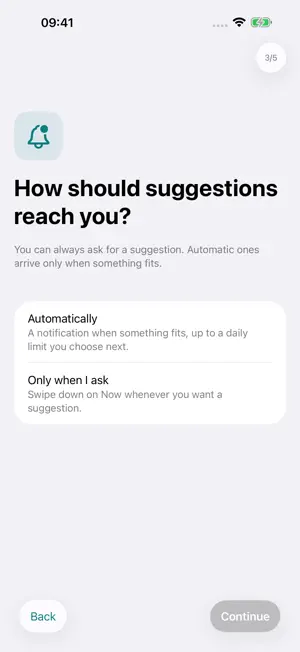
Make room for the things you keep meaning to do. A Good Time looks at your task list and suggests one that fits the time you have and where you are, with a short explanation of why. You decide whether to start, snooze it, or leave it for another day. HOW IT WORKS • Add tasks in your own words or with the form: an estimated time, where it can be done, and how much effort it needs. • On supported devices, the app can draft those details for you on the device. You review and change them before saving. • When a moment looks suitable, you get a gentle nudge with the reason. Silence is a valid answer: the app never sends a notification just to meet a quota. • Start a task and it stays on Now with a calm timer and a Live Activity. Mark it done, record progress on an ongoing activity, or stop and come back later. • No free moment to wait for? Swipe down on Now to ask for a suggestion any time, even when your calendar looks busy. YOU CHOOSE THE LIMITS • Choose automatic suggestions or ask only when you want one. • Set your welcome hours for weekdays and weekends. • Set a daily maximum from zero to five automatic suggestions. It is a limit, not a target. • Snooze, choose something else, or report that the timing was wrong, with no penalty. OPTIONAL CONNECTIONS • Calendar: uses busy and free time to avoid nudging you during events. Event titles, descriptions, attendees and locations are not saved. • Apple Reminders: activate existing reminders and keep titles, due dates, recurrence, notes and completion in sync. • Places: choose where a task can be done and, if you enable it, be considered for a task when you arrive home. • Screen Time: pick apps you associate with procrastination, and the app may suggest something more constructive after a while in them. • Apple Watch: request a suggestion, start a task, and record progress or completion from your wrist. • Weekly reflection: review your focused sessions without streaks or scores to maintain. PRIVATE BY DESIGN There is no account, no analytics and no app backend. Your tasks, calendar availability, location and Screen Time choices are processed on your device. Exporting data is always an explicit choice you make through the share sheet. FREE, WITH ONE OPTIONAL PURCHASE Free: up to 8 active tasks, automatic and on-request suggestions with reasons, Calendar, Apple Reminders, places and Screen Time, focused sessions, Live Activities and weekly reflection. One-time unlock: unlimited active tasks, automatic task details on supported devices, the full Apple Watch companion, accent colors and alternate app icons. Pay once; there is no subscription. GOOD TO KNOW • Suggestions depend on the context you allow and on iOS background delivery, so a nudge is never guaranteed. • Automatic task details require iOS 26 or later on an iPhone with Apple Intelligence enabled. The manual form works everywhere. • Available in English, Italian and Spanish.
App privacy
The developer, Lorenzo Spinelli, reported these privacy practices to Apple.
Data Not Collected
The developer does not collect any data from this app.
Alternatives to A Good Time
Looking for apps like A Good Time? Here are 4 similar apps on the App Store. The highest rated is iWifi - AR speed & signal test (4.6/5), and all 4 are free to download.
-
 planflow: Plan Together
-
 MTG Delver TCG Scanner
-
 Aruba Firma Digitale
2.3
-
 iWifi - AR speed & signal test
4.6
| App | Rating | Price | Last updated | Compare |
|---|---|---|---|---|
| A Good Time | – | Free | October 3, 2026 | |
| planflow: Plan Together | – | Free | Aug 31, 2026 | Compare |
| MTG Delver TCG Scanner | – | Free | Oct 16, 2026 | Compare |
| Aruba Firma Digitale | 2.3 / 5 (3) | Free | Sep 30, 2026 | Compare |
| iWifi - AR speed & signal test | 4.6 / 5 (17,963) | Free | Aug 25, 2026 | Compare |
Compare A Good Time with the top alternatives: ratings, updates, ASO score and keyword gaps →