

GradeViews
Saraz A.I. Inc. Education iPhoneiPadiPod touch
GradeViews is a free Education app for iPhone and iPad by Saraz A.I. Inc. Requires iOS 17.0. Updated November 24, 2026.
- Price
- Free
- on the App Store
- Size
- 14 MB
- Age 17+
- Updated
- Nov 24
- 2026 · v1.0.3
Screenshots
Save to Pinterest

About GradeViews
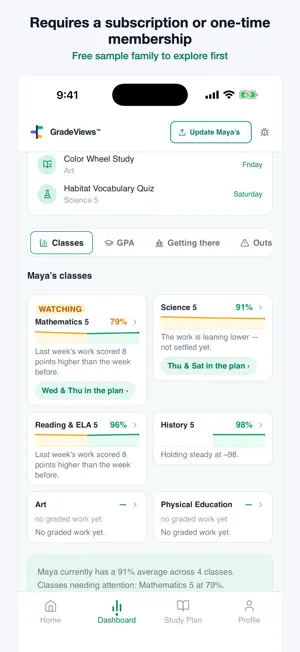
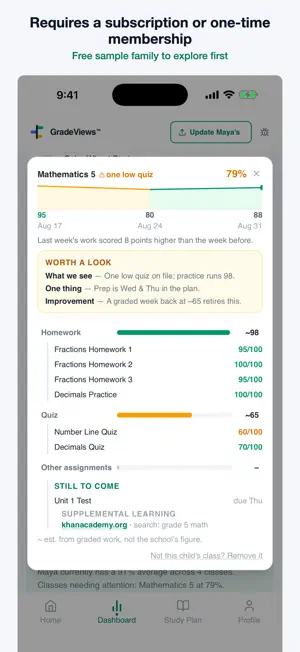
SUBSCRIPTION OR MEMBERSHIP REQUIRED. Using GradeViews with your own family requires a GradeViews subscription (Monthly or School Year) or a one-time Founding Membership, bought in the app. You can explore a free sample family first, with no account and no purchase. Your child's grades already live somewhere — a school portal, a report card, a progress report. GradeViews turns them into something a parent can act on. HOW IT WORKS (with a subscription or membership) 1. Take a photo or screenshot of the portal, report card, or progress report, or upload the PDF. No school login, no password to hand over. 2. GradeViews reads the classes, the grades, the missing work, and what's coming up — for every child in the house. 3. You get one screen per child that says how the week looks and what to do about it, plus a study plan built around your child's real assignments. WHAT A SUBSCRIPTION OR MEMBERSHIP INCLUDES • Home: every child at a glance — who is on track, who needs a hand, what is due this week. • Dashboard: each class with its current grade, the week-by-week trend, missing or ungraded work the school has flagged, and what each upcoming quiz or test could mean. • Study Plan: a week of short, specific sessions built from your child's own work, with vetted practice resources. Sunday opens the week, Saturday catches up. • Tonight's pack: a one-page printable or shareable sheet for tonight's work. • Tonight's briefing (optional): one note at 7 pm the evening before a quiz, test, or due assignment, written on your phone. Never a grade. BUILT FOR FAMILIES (with a subscription or membership) • Two parents, one picture: invite the other parent and you both see the same children on your own phones. Each parent's account needs its own subscription or membership. • Works from a screenshot of your school's grade portal, or a paper report card. • Texas, California, and New York state standards, in the language each state actually uses. • Estimates are labeled as estimates. The school's record is always the record; GradeViews shows what it read and hedges what it predicts. PRIVATE BY DESIGN • No ads, no tracking, no selling of data, and nothing is used to train AI models. • Face ID lock, sessions kept in the device Keychain, grades hidden in the app switcher. • Download everything or delete your account from inside the app, any time. No purchase needed. For parents and guardians of children in kindergarten through 12th grade. Children never sign in. SUBSCRIPTION You can explore a sample family without an account. Adding your own children, uploading documents and weekly study plans need a GradeViews subscription, Monthly or School Year (yearly), or a one-time Founding Membership, bought in the app with your Apple Account. Eligible new subscribers get 2 weeks free; then the plan renews automatically at its price until you cancel in Settings › your name › Subscriptions. Terms of Use: https://www.gradeviews.com/terms.html Apple Standard EULA: https://www.apple.com/legal/internet-services/itunes/dev/stdeula/ Privacy Policy: https://www.gradeviews.com/privacy.html Questions: [email protected]
What’s new
Version 1.0.3 · Updated November 24, 2026
Fixes to how grades are read: • A category's weight is no longer read as its grade. • A date printed without a year is placed in the current school year. • If part of a document comes back unreadable, the app says so instead of leaving it out. • "Since your last upload" no longer counts an assignment as new when its title prints differently. Also: the child you were viewing stays selected when the app opens, and the subscription plans' details no longer get cut off at larger text sizes.
App privacy
The developer, Saraz A.I. Inc., reported these privacy practices to Apple.
Data Linked to You
The following data, which may be collected and linked to your identity, may be used for the following purposes:
- Purchases: Purchase History
- Contact Info: Email Address, Name
- User Content: Other User Content
- Identifiers: User ID
Used for: Analytics, App Functionality
Alternatives to GradeViews
Looking for apps like GradeViews? Here are 6 similar apps on the App Store. The highest rated is PodsCool (5.0/5), and all 6 are free to download.
-
 Homework Generator
-
 Gradenook: Teacher Gradebook
-
 PodsCool
5.0
-
 Gradebook App
-
 Grade Evaluator
5.0
-
 Office Discipline Referral
4.5
| App | Rating | Price | Last updated | Compare |
|---|---|---|---|---|
| GradeViews | – | Free | November 24, 2026 | |
| Homework Generator | – | Free | Oct 26, 2026 | Compare |
| Gradenook: Teacher Gradebook | – | Free | Nov 20, 2026 | Compare |
| PodsCool | 5.0 / 5 (4) | Free | Nov 25, 2026 | Compare |
| Gradebook App | – | Free | Oct 14, 2026 | Compare |
| Grade Evaluator | 5.0 / 5 (1) | Free | Jun 23, 2026 | Compare |
| Office Discipline Referral | 4.5 / 5 (10) | Free | Dec 11, 2025 | Compare |
Compare GradeViews with the top alternatives: ratings, updates, ASO score and keyword gaps →