

ZugZwang - Chess Screen Time
DaDaMa Ug (haftungsbeschränkt) Productivity iPhoneiPadiPod touch
ZugZwang - Chess Screen Time is a free Productivity app for iPhone and iPad by DaDaMa Ug (haftungsbeschränkt). Requires iOS 17.0. Updated October 19, 2026.
- Price
- Free
- on the App Store
- Size
- 39 MB
- Age 4+
- Updated
- Oct 19
- 2026 · v1.0.4
Screenshots

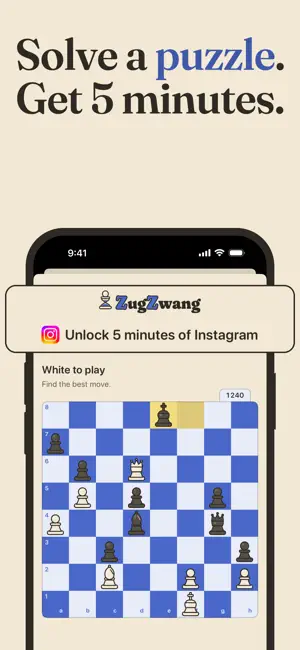


About ZugZwang - Chess Screen Time
Your apps stay blocked. A solved chess puzzle opens one of them for five minutes. ZugZwang turns the reflex of opening an app into a move you have to think about. Choose the apps, categories and websites that eat your day. They are blocked at once and stay blocked. When you open one, the block screen offers one way through: solve a chess puzzle. HOW IT WORKS • Pick what to block with Apple's Screen Time picker: apps, whole categories, websites. • Opening a blocked app shows the block screen. Tap "Solve chess puzzle". • Solve it and collect five minutes of that app, or of your whole list if you prefer. When the time is up, the block comes back on its own. • The first wrong move fails the puzzle. The solution then plays out on the board, and a failed puzzle never unlocks anything. A RATING THAT IS YOURS • Three puzzles during setup find your starting rating, from beginner to strong club player. • Every puzzle after that moves it, like an Elo puzzle rating. Puzzles are served around your level, so they stay hard enough to make you stop and think. • 20,000 rated puzzles: mates, tactics, endgames, promotions. • Endless puzzles on the Puzzles tab, with filters for kind and length. STRICT MODE With strict mode on, removing an app from the list or turning strict mode off needs a harder puzzle or a 24-hour wait. Adding to the list is always allowed. YOUR PHONE STAYS YOURS • You can always turn blocking off. • Your rating and progress are saved to your account (Sign in with Apple or Google), so they move with you to a new phone. • Which apps you block stays on your device. ZugZwang never learns their names. • No ads. SUBSCRIPTION ZugZwang Pro unlocks the whole app. Choose a monthly or a yearly subscription. The yearly plan starts with a 7-day free trial, and if you allow notifications you get a reminder two days before it ends. Payment is charged to your Apple Account when you confirm the purchase, or when the free trial ends. The subscription renews automatically unless it is cancelled at least 24 hours before the end of the current period, and your account is charged for the renewal within the 24 hours before the period ends. You can manage or cancel it at any time in your App Store account settings. Any unused part of a free trial is forfeited when you buy a subscription. Terms of Use: https://use-less.app/zugzwang/terms Privacy Policy: https://use-less.app/zugzwang/privacy Puzzles come from the Lichess open puzzle database (CC0).
What’s new
Version 1.0.4 · Updated October 19, 2026
Stop halfway through setup and pick it up right where you left off. Your apps stay open until your plan starts, so an unfinished setup never locks your phone. You can turn on reminders right after you pick your piece. Offers now show how long they last. Small bug fixes and improvements.
App privacy
The developer, DaDaMa Ug (haftungsbeschränkt), reported these privacy practices to Apple.
Data Linked to You
The following data, which may be collected and linked to your identity, may be used for the following purposes:
- Contact Info: Email Address, Name
- Identifiers: User ID
- Usage Data: Product Interaction
Used for: App Functionality
Alternatives to ZugZwang - Chess Screen Time
Looking for apps like ZugZwang - Chess Screen Time? Here are 6 similar apps on the App Store. The highest rated is ChessLock: Screen Time Control (4.8/5), and all 6 are free to download.
-
 ChessScroll: Earn Your Scroll
3.0
ChessScroll: Earn Your Scroll
3.0
-
 ChessLock: Screen Time Control
4.8
ChessLock: Screen Time Control
4.8
-
 CHESS/BLOCK: Screen Time
-
 Sediment – Memorize Quietly
-
 Todo Fox – Aufgabenliste
-
 HawkTrack
| App | Rating | Price | Last updated | Compare |
|---|---|---|---|---|
| ZugZwang - Chess Screen Time | – | Free | October 19, 2026 | |
| ChessScroll: Earn Your Scroll | 3.0 / 5 (2) | Free | Oct 6, 2026 | Compare |
| ChessLock: Screen Time Control | 4.8 / 5 (4) | Free | Oct 16, 2026 | Compare |
| CHESS/BLOCK: Screen Time | – | Free | Sep 24, 2026 | Compare |
| Sediment – Memorize Quietly | – | Free | May 15, 2026 | Compare |
| Todo Fox – Aufgabenliste | – | Free | Aug 1, 2026 | Compare |
| HawkTrack | – | Free | Oct 4, 2026 | Compare |