

My First Notes
Lustaud Vincent Education iPhoneiPadiPod touch
My First Notes is a free Education app for iPhone and iPad by Lustaud Vincent. Rated 5.0/5 from 1 ratings. Requires iOS 15.0. Updated November 9, 2026.
- Rating
- 5.0
- 1 ratings
- Price
- Free
- on the App Store
- Size
- 27 MB
- Age 4+
- Updated
- Nov 9
- 2026 · v1.2
Screenshots
Save to Pinterest


About My First Notes
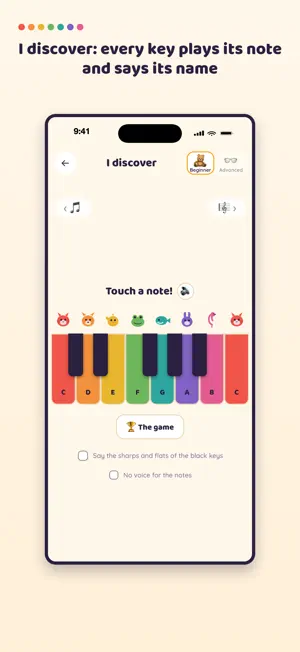
My First Notes teaches you to read music through play — children and adults alike. No lessons, no lectures: you listen, you search, you find. Two modes, chosen right at launch. In Beginner, the keys are coloured, the notes carry their names, each one says itself out loud and the instructions are read aloud. In Advanced, the piano turns black and white and no longer says the names: you truly read. SIX GAMES I DISCOVER — free A one-octave piano. Tap the keys: each plays its note and says its name. Then the guided climb calls out a note to find, and you work your way up the fifteen steps of the scale. THE STAFF — free The notes take their place on the five lines. Tap them to hear them, and each stage adds new ones until the scale is complete. No wrong answers here: you explore. THE FOUR GAMES TO UNLOCK I RECOGNIZE Real ear training. A note plays and you have to name it. Two choices at first, then three, then all seven — the app raises the level as the answers come. And for the bold, a "by ear only" mode with no visual clue at all. I PLACE NOTES No longer reading, but writing. Drag a note to its line, pick out its name: the gesture anchors what the eye has just learned. I READ NOTES Sight reading. A note appears, you play it on the piano — and the next one comes. This is the exercise that separates working it out from actually reading. THE BLACK KEYS Where music reading gets serious. Sharps and flats, heard in pairs with their white neighbour, so you finally hear what sets them apart. I Recognize, I Place Notes and I read notes also offer a scored round: ten questions, one attempt each, a score to beat. BOTH CLEFS The games that show a staff can be played in treble or bass clef — the pianist's right hand and left hand. One button switches between them. And in I read notes, the two-clef game mixes them from one question to the next. Two games are free. The other four unlock with a single purchase, no subscription. AVAILABLE IN 13 LANGUAGES Each language uses its own convention for sharps and flats. No ads. No account.
What’s new
Version 1.2 · Updated November 9, 2026
The Parents corner has been reorganised: each setting sits on its own line, and the new "About" section gathers Support, Privacy policy and All our apps. The Parents corner is still protected by the same check.
App privacy
The developer, Lustaud Vincent, reported these privacy practices to Apple.
Data Not Linked to You
The following data, which may be collected but is not linked to your identity, may be used for the following purposes:
- Purchases: Purchase History
- Identifiers: User ID, Device ID
Used for: App Functionality
Alternatives to My First Notes
Looking for apps like My First Notes? Here are 6 similar apps on the App Store. The highest rated is Treble Trouble: Read Music (5.0/5), and all 6 are free to download.
-
 Note Navi
-
 Solfito – Music & Piano
-
 Dedilhado Vivo
-
 Treble Trouble: Read Music
5.0
-
 Clefkid: Learn Music Notes
5.0
-
 Maestra: AI Piano Note Reading
| App | Rating | Price | Last updated | Compare |
|---|---|---|---|---|
| My First Notes | 5.0 / 5 (1 rating) | Free | November 9, 2026 | |
| Note Navi | – | Free | Nov 14, 2026 | Compare |
| Solfito – Music & Piano | – | Free | Nov 26, 2026 | Compare |
| Dedilhado Vivo | – | Free | Nov 7, 2026 | Compare |
| Treble Trouble: Read Music | 5.0 / 5 (2) | Free | Nov 18, 2026 | Compare |
| Clefkid: Learn Music Notes | 5.0 / 5 (1) | Free | Nov 24, 2026 | Compare |
| Maestra: AI Piano Note Reading | – | Free | Oct 31, 2026 | Compare |
Compare My First Notes with the top alternatives: ratings, updates, ASO score and keyword gaps →